Function object with c code
The function object class is defined by a $ClassDef object under the 'Class' object. Name
the object and activate 'Configure-CCodeFo' from the popupmenu of the object. Now are
created
- a RtBody object.
- a DevBody object with a PlcNode object that defines a buffer for graphic information in
the instances.
- a GraphPlcNode object that contains information for graphic and code generation for the
class.
Next step is to define the attributes of the class. The attributes are divided into inputs,
internal attributes and outputs.
Inputs
The input attributes define the input pins of the function object, i.e. values that are fetched
from output pins of other function objects. The inputs are defined by $Input objects that are
placed below the RtBody object.
In TypeRef the datatype of the input is stated. Valid datatypes for an input are
pwrs:Type-Float32, pwrs:Type-Int32 and pwrs:Type-String80.
In GraphName the text at the input pin in the function object is stated. Normally you use
2 - 4 characters, block letters for analog signals, lower-case for digital, and first
character upper-case for other signal types.
An input attribute in an instance object, contains both a pointer to the output it is
connected to, and a value that can be stated. You choose whether to use the input pin and
connect an output, or to set a value, with a check box (Used). If you choose not to mark Used,
the input pin is not displayed in the function object. In the Template object, you can set
default values for the input, that will be used when the input is not connected.
Intern attributes
Intern attributes are attributes that are not inputs or outputs. They can be used for
calculated values that need to be stored in the object, or values that are used to configure
the object.
All common datatypes are valid for intern attributes.
Outputs
The output attributes define the output pins of the function object, i.e. values that are stored
in the object, and can be fetched by inputs of other function objects. The outputs are defined
by $Output objects that are placed below the RtBody object.
The datatype for the output is stated in TypeRef. As for $Input, Boolean, Float32, Int32 and
String80 can be stated, and in GraphName the text for the output pin in the function object is
stated.
Note !
$Input, $Intern and $Output have to be placed in this order below RtBody: $Input first, then
$Intern and then $Output.
Default values
Defaultvalues of attributes can be set in the Template object.
If you want to state which inputs and outputs should be viewed as default, there is a mask in
the GraphPlcNode object that controls this, default_mask. Bits in default_mask[0] correspond
to input attributes, and bits in default_mask[1] to output attributes. If the bit that
corresponds to a specific input or output is set, this will be viewed as default.
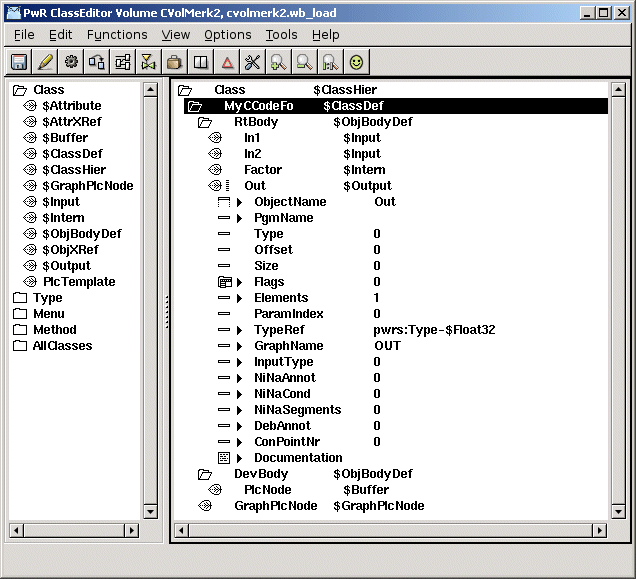
Function object with two inputs, one intern attribute, and one output
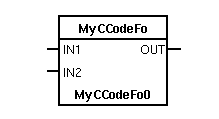
The function object for the class
Code
When the classvolume is built, an h-file with a c struct for the class is generated. The name
of the struct is
pwr_sClass_'StructName'
where StructName is fetched from the StructName attribute in RtBody. As default, it is the
same as the class name, but, for example if the classname contains national characters,
another name can be specified.
Below an example of the struct for the class MyFo is viewed. MyFo contains two inputs In1 and
In2, one intern attribute Factor, and an output Out, all of type Float32.
typedef struct {
pwr_tFloat32 *In1P;
pwr_tFloat32 In1;
pwr_tFloat32 *In2P;
pwr_tFloat32 In2;
pwr_tFloat32 Factor;
pwr_tFloat32 Out;
} pwr_sClass_MyFo;
Note that each input consist of two elements, a pointer with the suffix 'P', and an element
that can be given a value if the input is not connected. If the input is connected, the
pointer element will point to the output it is connected to, otherwise it will point to the
value element. Therefore, in the c-code, you should use the pointer element to fetch the
value of the input.
The code for the class is a function with this appearance
void 'StructName'_exec( plc_sThread *tp,
pwr_sClass_'StructName' *o) {
}
In the code, data is fetched from the inputs, and calculated values are put on the outputs.
Also intern attributes can be used to store information to the next scan, or to fetch
configuration data.
In the code example below In1 and In2 are inputs, Factor is an intern attribute and Out an
output.
o->Out = o->Factor * (*o->In1P + *o->In2P);
Note that the pointer element for the inputs In1 and In2 are used in the code.
You should also add prototype declaration of the exec function in ra_plc_user.h
void 'StructName'_exec( plc_sThread *tp,
pwr_sClass_'StructName' *o);
The module of the c-code is compiled and linked with the plc program. This requires a link
file to be placed on the directory $pwrp_exe. The file is named
plc_'nodename'_'busnumber'_'plcname'.opt, e.g. plc_mynode_0999_plc.opt. The content of the
file is input to the linker, ld, and here you add the modules of the plc-code. In the example
below these modules are placed in the archive $pwrp_lib/libpwrp.a
$pwr_obj/rt_io_user.o -lpwrp -lpwr_rt -lpwr_usbio_dummy -lpwr_usb_dummy -lpwr_pnak_dummy
-lpwr_cifx_dummy -lpwr_nodave_dummy -lpwr_epl_dummy