Functionobject
The functionobject is the interface of the component in the plc program. It defines inputs and
outputs that can be connected to other functionobjects in the plc editor. Unlike an ordinary
functionobject the code is also working with data in the main object.
The code can be written in plc-code or c-code.
plc-code
If you want to keep the code of the function object visible, and there is need of running
PlcTrace in the code, it is suitable to use a functionobject with plc-code.
Create a $ClassDef object and name the object. Preferably use the same name as for the main
object followed by the suffix 'Fo', e.g. MyComponentFo. Then activate Configure-ConnectedFo in
the popupmenu.
Under RtBody a PlcConnect attribute of type AttrRef is created, that will contain a link to
the main object, when an instance is connected in the plc-editor.
Configure inputs and outputs with $Input and $Output objects below the RtBody object. You
can also create $Intern objects, but this type of data is usually stored in the main object.
Note that the order of attribute objects should be $Input, $Intern, $Output.
The code is created by opening the plc editor for the Code object. In the code, you fetch
values from an input, by selecting the input attribute in the template object for the
functionobject in the navigator, and activate the connect function. Output is stored in a
similar way. When data should be fetched or stored in the main object, you select the attribute
in the template object of the main object. References to the function object are viewed in the
plc-code with the symbol $PlcFo, and references to the main object with the symbol $PlcMain.
If the object contains components, the function object of these components are put in the
plc-code.
If you have DisableAttr on signals or other attributes, this has to be handled with conditional
execution in the code. A signal that is disabled must not be read or written to in the code.
You use the object Disabled under the map Other, to evaluate if an attribute is disabled or not.
This can then be connected to a CArea object that handles the conditional execution.
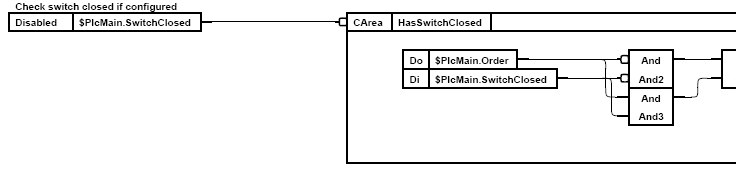
Condition execution with Disabled and CArea
c-code
A function object with c-code is configured with a $ClassDef object. Name the object and then
activate Configure-ConnectedCCodeFo in the popupmenu.
Below RtBody, two attributes are created, PlcConnect of type AttrRef and PlcConnectP that is a
pointer. In PlcConnect, the reference to the main object is stored, when an instance is
connected in the plc editor. When the plc program is initialized in runtime, you fetch, with
help of the reference, a pointer to the main object. The pointer is stored in PlcConnectP.
This is done in the c code, that is separated in an init function that is executed at initialization
of the plc program, and an exec function that is executed at every scan. For the function object
MyComponentFo with the input In1 and In2, and the output Out2, the code is
void MyComponentFo_init( pwr_sClass_MyComponentFo *o)
{
pwr_tDlid dlid;
pwr_tStatus sts;
sts = gdh_DLRefObjectInfoAttrref( &o->PlcConnect, (void **)&o->PlcConnectP, &dlid);
if ( EVEN(sts))
o->PlcConnectP = 0;
}
void MyComponentFo_exec( plc_sThread *tp,
pwr_sClass_MyComponentFo *o)
{
pwr_sClass_MyComponent *co = (pwr_sClass_MyComponent *) o->PlcConnectP;
if ( !co)
return;
o->Out = co->Value = co->Factor * (*o->In1P + *o->In2P);
}