Main object
The main object contains all data needed to configure and make calculations. The object is
placed in the plant hierarchy, as an individual object or as a part of an aggregate.
Often the class BaseComponent:Component is used as super class to a component class. It
contains a number of attributes as Description, Specification, DataSheet etc.
All the input and output signals that are attached to the component should be placed in the
main object. Di, Ii, Ai, Do, Io, Ao or Co object are inserted as attribute objects. When
creating instances of the component, the signals have to be connected to channel objects. For
profibus, for example, you can create a module object, that contains the channels, and
preconnect the signals in the main object to these channels. For each instance, you then
don't have to connect every channel individually, but can make a single connection between
main object and module object.
Special attributes
PlcConnect
If there is any code that is to be created by the plc program, you create a function object
for the class. This has to be connected to the main object, and this connection is stored in
an attribute with name 'PlcConnect' of type pwrs:Type-$AttrRef.
SimConnect
If there is a simulation object, this is connected to the main object by a 'SimConnect'
attribute of type pwrs:Type-AttrRef.
IoConnect
If there is a I/O module object, this is connected with an 'IoConnect' attribute of type
pwrs:Type-AttrRef. The attribute is handled by the IoConnect method.
IoStatus
If you want to fetch the status from the I/O-module object, you create the attribute
'IoStatus' of type pwrs:Type-$Status, and set the Pointer bit in Flags. You also have
to set 4 in Size (for relative pointers the size of what the pointer is pointing at, has
to specified in Size).
The attribute will be assigned a pointer to the Status attribute of the I/O-module in runtime
when the I/O handling is initialized. The Status attribute is of type Status and can for example
be displayed in an object graph with the dynamic type StatusColor. If you want to use IoStatus
in the plc code for the object, you have to consider that the attribute is a pointer and
fetch the value with GetIpPtr.
SequenceReset
It is possible to use Grafcet sequences in a component. One difference from an ordinary
sequence are that the reset object should be defined as an attribute of class Dv in the
main object, with the name 'SequenceReset'. SubSteps can not be used in the sequence.
GraphConfiguration
GraphConfiguration is of type Enum and used to decide which object graph is to be opened
for the current instance. It is used by the 'ConfigureComponent' method (see below).
DisableAttr
The DisableAttr function makes it possible to disable an attribute in an instance. If an
attribute is disabled, it will not be viewed in the navigator or object editor. If the
disabled attribute is a signal, it will be ignored by the I/O handling.
The disable function is used for components that can exist in different configurations.
A solenoid valve for example, can have one switch indicating that the valve is open, and one
indicating that the valve is closed. Totally there are four configurations for the solenoid
valve:
- no switches
- switch open
- switch closed
- both switch open and switch closed
You could create four different solenoid valve classes, but a problem will come up when
building aggregates of the valve objects. An aggregate, containing a valve object also has
to exist in four variations, and if the aggregate contains two valve objects, there has to be
16 variations. By using the DisableAttr function on the switch attributes we can create a
solenoid valve class that covers all four configurations, and also can be used in aggregate
classes.
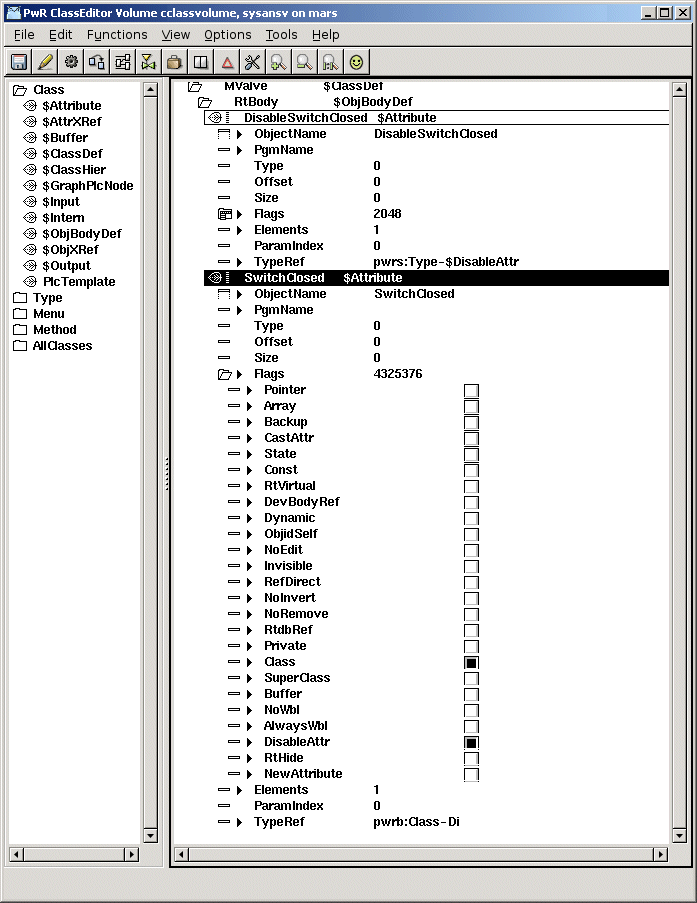
DisableAttr for an attribute is configured in the following way.
- the DisableAttr bit in Flags is set for the attribute.
- before the attribute, an attribute of type pwrs:Type-$DisableAttr is placed, with the same
name as the attribute, but with the prefix 'Disable'. The Invisible bit in Flags should be
set for the DisableAttr attribute.
Example
In the solenoid valve class above, the switch closed is represented by the attribute
SwitchClosed that is a digital signal of type pwrb:Class-Di. Immediately above the attribute
an attribute with name 'DisableSwitchClosed' of type pwrs:Type-$DisableAttr is placed. For
this attribute the Invisible bit in Flags is set, and for the SwitchClosed attribute the
DisableAttr bit in Flags is set.
Attribute with disable function
Cast
Component classes are often built in a relatively flexible way to minimize the number of
variants. Often you create a baseclass that makes use of the DisableAttr function to be able
to cover a number of different configurations. In the example above a solenoid valve class
can cover four different configurations by setting DisableAttr on the switch signals. You also
create subclasses that are adapted to specific valves. For example, a Durholt 100.103 doesn't
contain any switches, and an subclass is created where both switches are disabled in the
Template object. You also set other adaptations in the Template object as a link to a datasheet.
The result is a subclass that can be used for Durholt valves without any configurations for
each instance.
If we now build a general aggregate, containing a solenoid valve, and want to be able to use
the subclasses that exist for the solenoid valve, we use the Cast function. With the Cast
function, an attribute object can be casted as a subclass of the original class, given that
the subclass has the same size. When an attribute object is casted, default values, and thus
configurations, are fetched from the subclass. Also classname and methods are fetched from the
subclass.
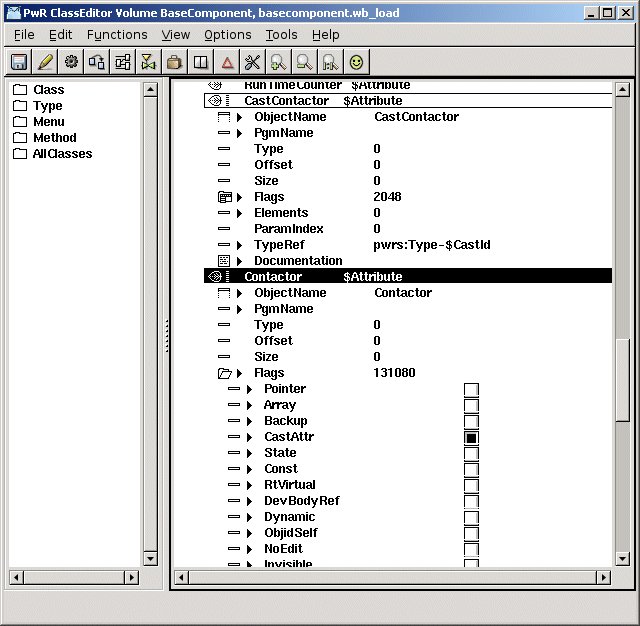
The cast function for an attribute is entered in the following way:
- The CastAttr bit in Flags is set for the attribute.
- Before the attribute, an attribute of type pwrs:Type-$CastId is placed with the same name
as the attribute, but with the prefix 'Cast'. The Invisible bit in Flags should be set for
the cast attribute.
Contactor with cast attribute
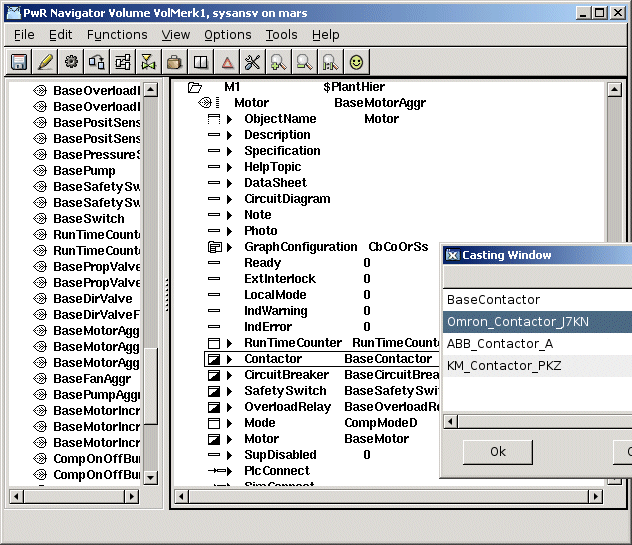
Casting of an instance is executed by activating the 'Cast' method in the popupmenu for the
attribute. A list with the baseclass and all subclasses are displayed, where a suitable
cast class can be selected.
If an attribute has both cast and disable attributes, the cast attribute should be placed
before the disable attribute.
Casting of an instance
Methods
Method ConfigureComponent
Often there are several variants of a component. In the example with the solenoid valve above,
four different variants were found dependent on the configuration of switches. To simplify
the users configuration of the component, you can define the method 'ConfigureComponent'.
The ConfigureComponent method makes it possible to set Disable to one or a number of attributes
from a menu alternative in the popupmenu, and to select an object graph that is adapted
to the current configuration.
Meny
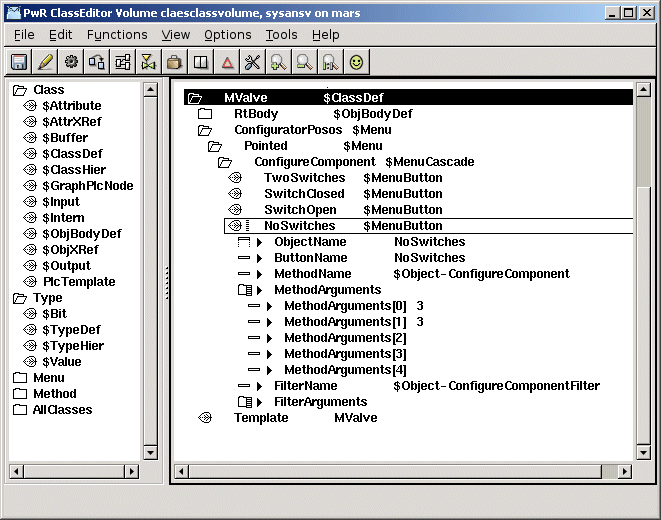
The menu alternatives for ConfigureComponent are defined by menu objects. Under the $ClassDef
object, a $Menu object with name 'ConfiguratorPosos' is placed, which makes the menu visible
in edit mode when the object is pointed at and selected. Below this, yet another $Menu object
is placed with the name 'Pointed', and below this a $MenuCascade object with the name
'ConfigureComponent'. The attribute ButtonName is set to ConfigureComponent for this object.
Below this, finally one $MenuButton object is placed for each configuration alternative.
The name is preferably set to the name of the configuration alternative, and is also put into
the attribute ButtonName. In the attribute MethodName '$Object-ConfigureComponent' is inserted
and in the attribute FilterName '$Object-ConfigureComponentFilter'. You should also fill in
arguments to the method in MethodArguments. MethodArguments[0] contains a bitmask, that decide
which attributes that will be disabled in the current menu alternative. Each attribute, that is
possible to disable is represented by a bit, and bit order corresponds to the attribute order
in the object. MethodArguments[1] contains the graphic representation, see below.
If we look at the solenoid valve, we have two attributes that can be disabled, SwitchClosed
and SwitchOpen. In the bitmask in MethodArguments[0] SwitchClosed corresponds to the first
bit and SwitchOpen to the second, i.e. if the first bit is set, SwitchClosed will be disabled,
and if the second bit is set, SwitchOpen is disabled. The four configuration alternatives
TwoSwitches, SwitchClosed, SwitchOpen and NoSwitches correspond to the following masks
TwoSwitches 0 (both SwitchOpen and SwitchClosed are present)
SwitchClosed 2 (SwitchOpen is disabled)
SwitchOpen 1 (SwitchClosed is disabled)
NoSwitches 3 (both SwitchOpen and SwitchClosed are disabled)
Configuration of component attributes
If you disable an attribute that is a component that contains signals, the signals in the
component also have to be disabled. The I/O handling only looks at if the individual signal is
disabled, and is not looking upwards on higher levels. To disable a signal in a component
attribute, you add a comma and the name of the component followed by the disable mask that
is valid for the component to MethodArguments[0]. For example in an object where the
components Contactor and CircuitBreaker are disabled MethodArguments[0] can contain
3, Contactor 1, CircuitBreaker 1
where '3' is the Disable mask of the object (that disables the attributes Contactor and
CircuitBreaker), and 'Contactor 1' results in disabling a signal attribute in Contactor, and
'CircuitBreaker 1' disables a signal in CircuitBreaker.
There is also another syntax with paranthesis that allows more than two levels. In this example
the object above, Motor, is a part of a larger aggregate.
(5 (Motor 3 (Contactor 1, CircuitBreaker 1), Temp 1))
Component attributes with individual configuration
When the ConfigureComponent method is activated, Disable is removed from all component
attributes, to reset any previous configuration. Sometimes there are component attributes
that are not a part of the object configuration, but have to be configured individually. These
components should not be reset by the ConfigureComponent method, and have to be stated in
MethodArguments[2] with comma as delimiter. In the following example, the component attributes
Motor and Contactor should be configured by their own ConfigureComponent methods, and not
affected by the ConfigureComponent method of the object. In MethodArguments[2] is stated
Motor, Contactor
Object graph
When drawing the object graph for the component, you have to consider the different
configurations. If the differences between the configurations are small, you can use the
Invisible dynamic. If the differences are greater, it might be more convenient to draw
separate graphs for the configurations. Then you insert an attribute in the main object with
the name GraphConfiguration of type Enum. It is common to create a specific enumeration type
with the configuration alternatives. If GraphConfiguration is 0 the standard graph is used,
else the value in GraphConfiguration is set as suffix to the graphname.
In the example with the solenoid valve, MValve, we create an enum type, MValveGCEnum, and
define the values
TwoSwitches 0
SwitchClosed 1
SwitchOpen 2
NoSwitches 3
For the TwoSwitches configuration, with value 0, we draw an object graph with name mvalve.pwg.
For SwitchClosed, with value 1, we name the graph mvalve1.pwg, for SwichOpen mvalve2.pwg and
for NoSwitches mvalve3.pwg.
We also state the enumeration value in MethodArguments[1] in the $MenuButton object for the
current configuration. This will imply that GraphConfiguration will be set to this value
when the current menu alternative is activated.
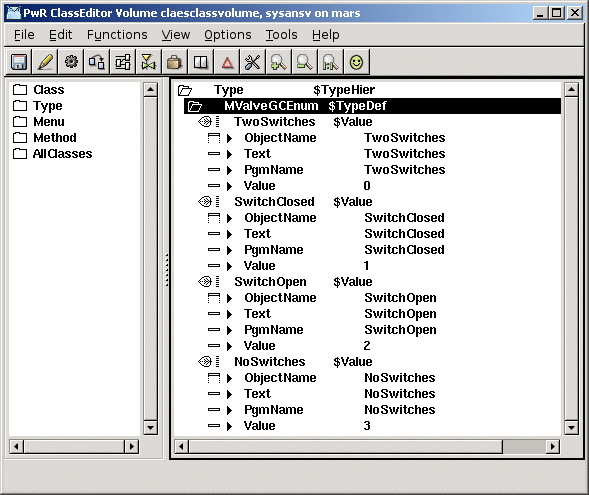
Enumeration type for GraphConfiguration