Object graph
Object graph has the same name as the component, but with lower case. For classes in the ProviewR
base system you add the prefix 'pwr_c_'. The graphs are edited as normal in Ge. In the dynamic
you exchange the object name with '$object'. Object graph for objects in the base system are
drawn with the following guidelines.
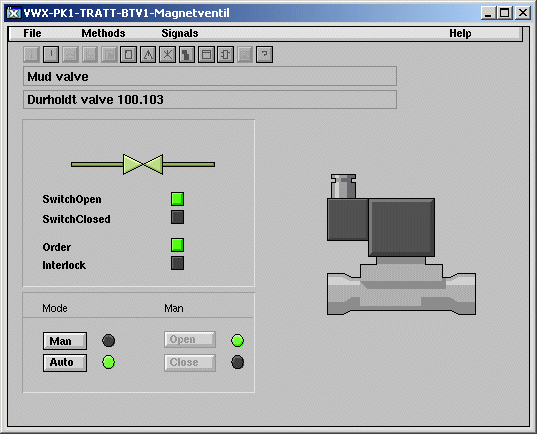
Menu
There should be a menu with the pulldown menus File, Methods, Signals and Help.
File should have the entries
Print Command print graph/class/inst=$object
Close CloseGraph
Methods should have the entries
Help Invisible $cmd(check method/method="Help"/object=$object)
Command call method/method="Help"/object=$object
Note Invisible $cmd(check method/method="Note"/object=$object)
Command call method/method="Note"/object=$object
Trend Invisible $cmd(check method/method="Trend"/object=$object)
Command call method/method="Trend"/object=$object
Fast Invisible $cmd(check method/method="Fast"/object=$object)
Command call method/method="Fast"/object=$object
Help Invisible $cmd(check method/method="Photo"/object=$object)
Command call method/method="Photo"/object=$object
DataSheet Invisible $cmd(check method/method="DataSheet"/object=$object)
Command call method/method="DataSheet"/object=$object
Hist Event... Invisible $cmd(check method/method="Hist Event..."/object=$object)
Command call method/method="Hist Event..."/object=$object
Block Events... Invisible $cmd(check method/method="Block Events..."/object=$object)
Command call method/method="Block Events..."/object=$object
RtNavigator Invisible $cmd(check method/method="RtNavigator"/object=$object)
Command call method/method="RtNavigator"/object=$object
Open Object Invisible $cmd(check method/method="Open Object"/object=$object)
Command call method/method="Open Object"/object=$object
Open Plc Invisible $cmd(check method/method="Open Plc"/object=$object)
Command call method/method="Open Plc"/object=$object
Circuit Diagram Invisible $cmd(check method/method="Circuit Diagram"/object=$object)
Command call method/method="Circuit Diagram"/object=$object
HelpClass Invisible $cmd(check method/method="HelpClass"/object=$object)
Command call method/method="HelpClass"/object=$object
Signals should contain all signals in the component and open the object graph for each signal.
Example
SwitchOpen Di Command open graph/class /inst=$object.SwitchOpen
SwitchClosed Di Command open graph/class /inst=$object.SwitchClosed
Order Do Command open graph/class /inst=$object.Order
The Help menu should contain Help and HelpClass
Help Command call method/method="Help"/object=$object
HelpClass Command call method/method="HelpClass"/object=$object
Toolbar
The toolbar contains buttons for the methods. The dynamics are the same as in the methods menu
above. To the right, there is also a button for the object graph of the simulate object. This
has the dynamic
Invisible $cmd(check method/method="Simulate"/object=$object)
Command call method/method="Simulate"/object=$object
Below the method buttons there are two textfields that display the Description and Specification
attributes in the component with the dynamic
Description Value.Attribute $object.Description##String80
Value.Format %s
Specification Value.Attribute $object.Specification##String80
Value.Format %s
On the lowest row in the graph, any Notes message are viewed, with a button to change or remove
the message.
Notes button Invisible $object.Note##String80
Command call method/method="Note"/object=$object
Notes text Value.Attribute $object.Note##String80
Value.Format %s
Object graph