Create a class volume
The classdefinition objects reside in a classvolume, and first the classvolume has to be
registered and created.
The registration is made in the global volume list which is opened from
File/Open/GlobalVolumeList in the navigator menu. Here you create a VolumeReg object with
suitable volume name and volume identity. The volume identity for user classvolumes should
be in the intervall 0.0.2-249.1-254. Use preferably the prefix CVol in the name to indicate
that it is a class volume. Also state the current project.
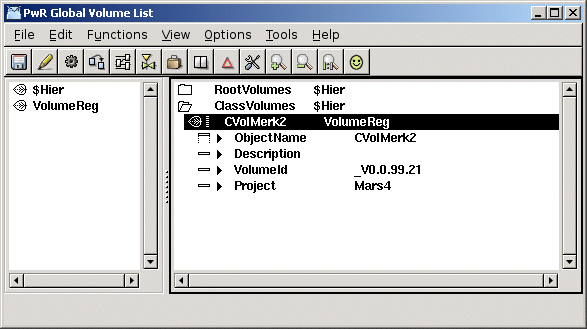
Registration of the class volume in GlobalVolumeList
Next step is to configure the classvolume in the directory volume of the project, with a
ClassVolumeConfig object. Open the Directory volume with
$ pwrs
and create a ClassVolumeConfig object in the left window. The object should have the same
name as the classvolume. After saving and leaving edit mode, the classvolume can be opened
by rightclicking on the ClassVolumeConfig object and activating 'Open ClassEditor...'.
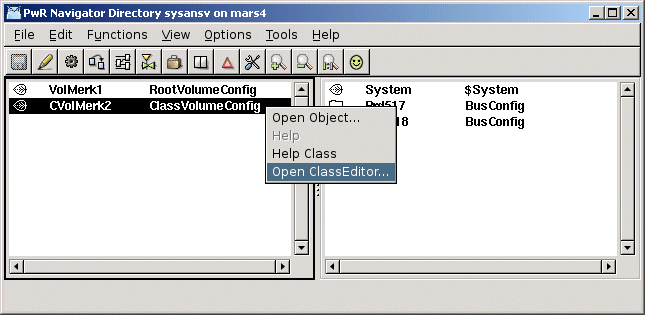
Configuration of th classvolume in the Directory volume
Now the Class Editor is opened, where you can create classdefinition objects. By entering
edit mode, a palette is viewed, with the class and type description classes that are used to
define a class or type.
Begin by creating an object of type $ClassHier on the top level. This will automatically get
the name 'Class'. Below the $ClassHier objects, $ClassDef objects are created for each class
that is to be defined.