Console log
Log on the console log
Console log
The console log contains log messages from system processes. If there is something wrong
with the system, you should look in the console log to examine if any process logs error
messages. The error log is a text file on $pwrp_log, pwr_'nodename'.log, which can also
be opened in rt_xtt from System/SystemMessages. The loggings have five severity levels,
fatal, error, warning, info and success. Fatal and error are colored red, warning colored
yellow, info and success colored green.
Also applications can write on the console log. First you attach to the console log with
errh_Init(), then you kan write messages with different severity with errh_Fatal(),
errh_Error(), errh_Warning(), errh_Info() and errh_Success(),
errh_Init() is called before gdh_Init() and has as arguments a name of the application and
an application index supplied as errh_eAnix_Appl1, errh_eAnix_Appl2 etc. Every application
should have a unique application index within the node.
#include "rt_errh.h"
sts = errh_Init( "ra_myappl", errh_eAnix_Appl1);
To the log functions you send the string that is to be written in the log, e.g.
errh_Error( "Something went wrong");
The string can also work as a format statement containing %s to format strings, %f for
float and %d for integer, see printf for more info.
errh_Error( "Number is to high: %d", n);
The format %m translates a status code to corresponding text
catch ( co_error e) {
errh_Error( "Error status: %m", e.sts());
}
Application status
Every application has a status word in the $Node object. It is found in the attribute
ProcStatus[] in element applicationindex + 20. The status should reflect the condition
of the application and is set by the application itself by the function errh_SetStatus().
errh_SetStatus( PWR__ARUN);
PWR__ARUN is defined in rt_pwr_msg.h and linked to the text "Application running".
Other useful status codes are
PWR__APPLSTARTUP "Application starting up" (info)
PWR__APPLRESTART "Application restaring" (info)
PWR__APPLTERM "Application terminated" (fatal)
In the node object there is also a SystemStatus that is a kind of sum of all the status
of the server and application processes. The most severe server or application status
is placed in the systemstatus.
Watchdog
An application that has called errt_Init() is supervised by the system. It should call
aproc_TimeStamp cyclic, or the application status is set to "Process timeout" (fatal).
The timeout for applications is 5 s.
Application object
An application object can be created for the applications. It is placed in the node
hierarchy under the $Node object and is of class Application.
The application object is registered by the function aproc_RegisterObject() that has
the object identity for the object as argument.
pwr_tObjid aoid;
pwr_tOName name = "Nodes-MyNode-ra_myappl";
sts = gdh_NameToObjid( name, &aoid);
if (EVEN(sts)) throw co_error(sts);
sts = aproc_RegisterObject( aoid);
if (EVEN(sts)) throw co_error(sts);
Status graph
The application is viewed in the status graph for the node if the application has attached
errh and registered the application object. It will be shown under 'Application' on the row
corresponding to the application index. In the graph the status of the application and the
last/most severe log message are displayed.
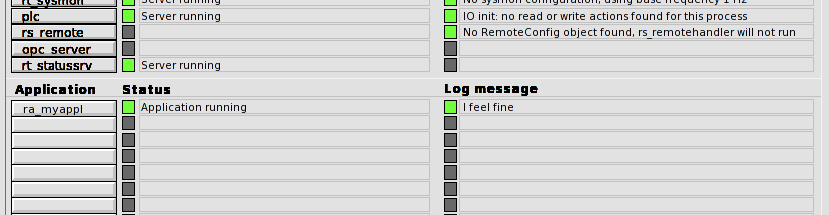
Fig Detail for the status graph displaying status and log message for the application.
If the process is halted, status is set to timeout. This will also affect the system status.
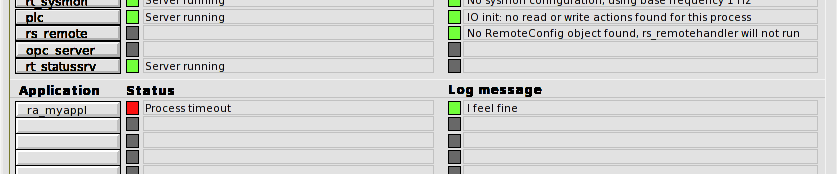
Fig The application is halted.
Example
In the example we have extended the program with the xy-curve above, and inserted
calls to set application status, log on the console log and register the application
object.
#include
#include
#include "pwr.h"
#include "pwr_baseclasses.hpp"
#include "rt_gdh.h"
#include "rt_errh.h"
#include "rt_aproc.h"
#include "rt_pwr_msg.h"
#include "co_error.h"
class ra_myappl {
pwr_Class_XyCurve *curve_ptr;
pwr_tRefId dlid;
public:
ra_myappl() {}
void init();
void scan();
void close();
};
void ra_myappl::init()
{
pwr_tStatus sts;
pwr_tOName name = "H1-H2-Curve";
pwr_tObjid aoid;
// Init errh with anix 1
sts = errh_Init( "ra_myappl", errh_eAnix_appl1);
if ( EVEN(sts)) throw co_error(sts);
// Write message to consolelog and set application status
errh_Info( "I feel fine");
errh_SetStatus( PWR__APPLSTARTUP);
// Connect to database
sts = gdh_Init( "ra_myappl");
if ( EVEN(sts)) throw co_error(sts);
// Register application object
sts = gdh_NameToObjid( "Nodes-Saturnus7-ra_myappl", &aoid);
if ( EVEN(sts)) throw co_error(sts);
aproc_RegisterObject( aoid);
// Directlink to curve object
sts = gdh_RefObjectInfo( name, (void **)&curve_ptr, &dlid, sizeof(*curve_ptr));
if ( EVEN(sts)) throw co_error(sts);
errh_SetStatus( PWR__ARUN);
}
void ra_myappl::scan()
{
for ( unsigned int i = 0;;i++) {
// Notify that we are still alive
aproc_TimeStamp();
if ( i % 5 == 0) {
for ( int j = 0; j < 100; j++) {
curve_ptr->XValue[j] = j;
curve_ptr->YValue[j] = 50 + 50 * sin( 2.0 * M_PI * (j + i) / 100);
}
curve_ptr->Update = 1;
}
else if ( i % 5 == 2)
curve_ptr->Update = 0;
sleep(1);
if ( i > 360)
i = 0;
}
}
void ra_myappl::close()
{
gdh_UnrefObjectInfo( dlid);
}
int main()
{
ra_myappl myappl;
try {
myappl.init();
}
catch ( co_error e) {
errh_Fatal( "ra_myappl terminated, %m", e.sts());
errh_SetStatus( PWR__APPLTERM);
exit(0);
}
myappl.scan();
myappl.close();
}