Attach to the database and handle object and data
We start by writing a simple c++ program that attaches to the realtime database and links
to some objects.
The cpp file should be created on the $pwrp_src directory, or subdirectory to this. We create
the directory $pwrp-src/myappl and edit the file ra_myappl.cpp.
Datatypes
In the includefile pwr.h the basic datatypes in ProviewR are defined. The most common is
pwr_tBoolean for digital signals and pwr_tFloat32 for analogous signals, but there are also
c types for all the other ProviewR types, e.g. pwr_tInt32, pwr_tUInt32, pwr_tString80 etc.
Gdh initialization
The database is attached with a call to gdh_Init() which takes an identifier string for the
application as an argument. First we include pwr.h that contains the basic types in ProviewR
and rt_gdh.h that contains the API to the database.
#include "pwr.h"
#include "rt_gdh.h"
int main() {
pwr_tStatus sts;
sts = gdh_Init( "ra_myappl");
if ( EVEN(sts)) {
cout << "gdh_Init failure " << sts << endl;
exit(0);
}
}
The function returns a status variable of type pwr_tStatus. An even status implies that
something is wrong, an odd that the call was a success. The status can be translated to
a string that gives more information about what is wrong. This is achieved with the
errh interface which is described later.
Read and write attribute values
If we want to read or write an object attribute we can use the functions
gdh_SetObjectInfo() and gdh_GetObjectInfo().
A read and write of the Dv H1-H2-Start can look like this. Note that the value of the Dv
is fetched from the attribute ActualValue.
pwr_tBoolean value;
sts = gdh_GetObjectInfo( "H1-H2-Start.ActualValue", &value, sizeof(value));
if (ODD(sts)) {
value = !value;
sts = gdh_SetObjectInfo( "H1-H2-Start.ActualValue", &value, sizeof(value));
}
Direct link to attributes
Application programs are often put into an infinite loop, supervising attributes in the
database and reacting to certain changes. In this case you preferably direct link to the
attribute, i.e. get a pointer. This is done by gdh_RefObjectInfo(). In the example below
the program is split in an init() function direct linking to attributes, a scan()
function containing the supervision and control functions, and a close() function removing
the direct links.
class ra_myappl {
pwr_tBoolean *start_ptr;
pwr_tRefId dlid;
public:
ra_myappl() {}
void init();
void scan();
void close();
};
void ra_myappl::init()
{
sts = gdh_RefObectInfo( "H1-H2-Start.ActualValue", &start_ptr, &dlid,
sizeof(*start_ptr));
if ( EVEN(sts)) exit(0);
}
void ra_myappl::scan()
{
for (;;) {
if ( *start_ptr) {
// Do something...
cout << "Starting" << endl;
*start_ptr = 0;
}
sleep(1);
}
}
void ra_myappl::close()
{
gdh_UnrefObjectInfo( &dlid);
}
In the init() function the pointer start_ptr is set to point to the value of the Dv
H1-H2-Start in the database.
Warning
Note that pointers in c requires caution. If you use pointer arithmetics or array indexes
it is easy to point at the wrong position in the database, and to write in the wrong position.
This can cause errors which are very hard to find the source for.
Direct link to objects
gdh_RefObjectInfo() can, besides direct link to individual attributes, also direct link to
objects and attribute objects.
Suppose that we will set points in a curve and display the curve in a graph. We direct link
to the object H1-H2-Curve of class XyCurve. The includefile pwr_baseclasses.hpp contains a
c++ class, pwr_Class_XyCurve, for the object.
#include
#include "pwr.h"
#include "pwr_baseclasses.hpp"
#include "rt_gdh.h"
class ra_myappl {
pwr_Class_XyCurve *curve_ptr;
pwr_tRefId dlid;
public:
ra_myappl() {}
void init();
void scan();
void close();
};
void ra_myappl::init()
{
pwr_tStatus sts;
pwr_tOName name = "H1-H2-Curve";
// Connect to database
sts = gdh_Init( "ra_myappl");
if ( EVEN(sts)) exit(0);
// Direct link to curve object
sts = gdh_RefObjectInfo( name, (void **)&curve_ptr, &dlid, sizeof(*curve_ptr));
if ( EVEN(sts)) exit(0);
}
void ra_myappl::scan()
{
for ( unsigned int i = 0;;i++) {
if ( i % 5 == 0) {
// Calculate x and y coordinates for a sine curve every fifth second
for ( int j = 0; j < 100; j++) {
curve_ptr->XValue[j] = j;
curve_ptr->YValue[j] = 50 + 50 * sin( 2.0 * M_PI * (j + i) / 100);
}
// Indicate new curve to graph
curve_ptr->Update = 1;
}
else if ( i % 5 == 2)
curve_ptr->Update = 0;
sleep(1);
if ( i > 360)
i = 0;
}
}
void ra_myappl::close()
{
gdh_UnrefObjectInfo( dlid);
}
int main()
{
ra_myappl myappl;
myappl.init();
myappl.scan();
myappl.close();
}
The program is compiled and linked with
> g++ -g -c ra_myappl.cpp -o $pwrp_obj/ra_myappl.o -I$pwr_inc -DOS_LINUX=1
-DOS=linux -DHW_X86=1 -DHW=x86
> g++ -g -o $pwrp_exe/ra_myappl $pwrp_obj/ra_myappl.o $pwr_obj/pwr_msg_rt.o
-L$pwr_lib -lpwr_rt -lpwr_co -lpwr_msg_dummy -lrt
Later we will see how to use make for compiling and linking.
When opening the object graph for the H1-H2-Curve object, we can study the result.
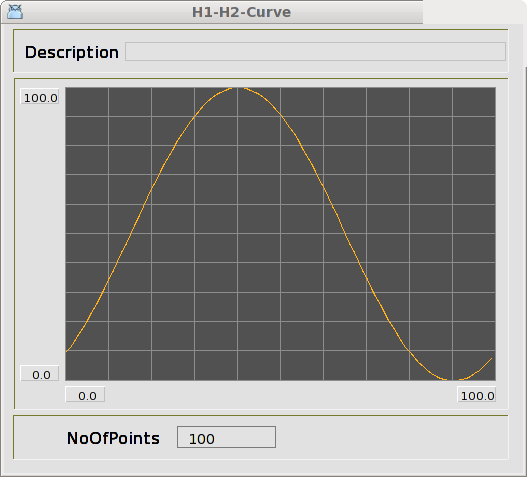
Fig Object graph for the curve object.