Distribute
Distribute, means collecting the files that are created when the node is built, and that
is needed to execute the runtime environment, into a package. The package is copied to the
process or operator station and unpacked there.
Which files are going to be a part of the package, is configured in the directory volume with
a Distribute object beneath the NodeConfig object of the node. The Distribute object contains
the attribute Components where you specify what types of components or files that are selected.
If there are components specified that are not generated, a warning message will comply with the
distribution.
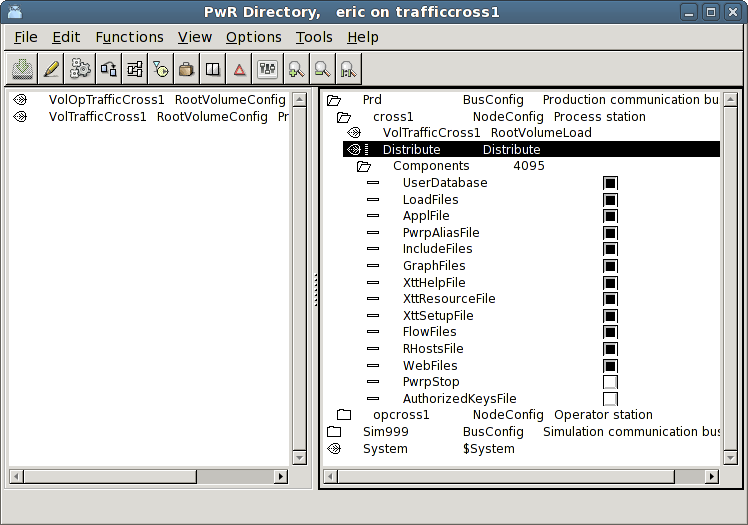
Fig The Distribute object
If there are other files, e.g. application programs, that are to be a part of the package, you
add an object of type ApplDistribute below the Distribute object. In the ApplDistribute object
you can state which files are to be added (specification with wildcard is allowed) and where
they are to be copied.
All files needed at runtime should be a part of the package. It is important that a package
represents a complete version of the system, making it possible to restore the runtime
environment if you for example want to go back to a previous version. If a disk crash occurs,
it is also important to be able to restore the system on a new disk without any manual
copying and modifications of files.
The distribution is performed from the Distributor that is opened from 'Functions/Distribute'
in the Configurator menu. Select the node you want to distribute to, and select
'Functions/Distribute' in the Distributor menu.
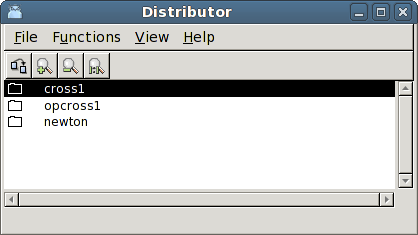
Fig The distributor
The distributor will now collect the specified files into a package and copy the package to
the user 'pwrp' on the process node with ssh. ssh requires password, and this has to be
typed two times in the terminal window from which the configurator is started. At installation
the user 'pwrp' is given the password 'pwrp', but this may have been changed for security
reasons.
If you don't have network contact with the process station, you can create a package and move
it to the process station for example with an USB stick. Select the node in the Distributor
and activate 'Functions/Create Package'. The package is stored on $pwrp_load with the name
pwrp_pkg_'nodename'_'version'.tgz, e.g. pwrp_pkg_cross1_0002.tgz. On the process station you
unpack the package with the script pwr_pkg.sh -i which takes the name of the package as argument.
> pwr_pkg.sh -i pwrp_pkg_cross1_0002.tgz
Restore a previous version
Sometimes a modification of the system doesn't work as planned, and you want to restore a
previous version. This is easily done with pwr_pkg.sh. The packages are stored in the home
directory of user pwrp, /home/pwrp. By finding the package for the previous version and start
pwr_pkg.sh -i with this package, you restore the version.
> pwr_pkg.sh -i pwrp_pkg_cross1_0001.tgz