Call functions from the plc program
The functionobject programming in the plc editor has its limitations, and some tasks can
be done much easier and nicer in c-code. c programming can be achieved in CArithm and
DataArihm where you can put an amount of c-code, but the number of characters are limited
to 1023 (8191 for the DataArithmL), and occasionally this is not enough. Then you have two
possibilities; to write a detached application, or to call a c-function from a CArithm or
DataArithm. The advantage with calling a c-function is that all initialization and linking
to objects and attributes are handled by the plc program. The execution of the function is
also synchronous with the execution of the plc thread calling the function.
Write the code
The code is put into a c file, created somewhere under $pwrp_src. We create the file
$pwrp_src/ra_myfunction.c and insert the function MyFunction() that performs some simple
calculation.
#include "pwr.h"
#include "ra_plc_user.h"
void MyFunction( pwr_tBoolean cond, pwr_tFloat32 in1, pwr_tFloat32 in2,
pwr_tFloat32 *out)
{
if ( cond)
*out = in1 * in2;
else
*out = in1 + in2;
}
Prototype declaration
In the include file ra_plc_user.h a prototype declaration is inserted.
void MyFunction( pwr_tBoolean cond, pwr_tFloat32 in1, pwr_tFloat32 in2,
pwr_tFloat32 *out);
ra_plc_user.h is included by the plc program, and the function can be called from a CArithm
or DataArithm object. You should also include ra_plc_user.h in the function code to ensure
that the prototype is correct.
ra_plc_user should be placed on $pwrp_src and copied to $pwrp_inc, from where it is included
by the plc program and the function code.
Compile the code
The c file is compiled, for example with make. Below a makefile is shown, that compiles
ra_myfunction.cpp and puts the result, ra_myfunction.o on $pwrp_obj. Note that there is also
a dependency on ra_plc_user.h, which causes this file to be copied from $pwrp_src to $pwrp_inc.
ra_myfunction_top : ra_myfunction
include $(pwr_exe)/pwrp_rules.mk
ra_myfunction_modules : \
$(pwrp_inc)/ra_plc_user.h \
$(pwrp_obj)/ra_myfunction.o
ra_myfunction : ra_myfunction_modules
@ echo "ra_myfunction built"
#
# Modules
#
$(pwrp_inc)/ra_plc_user.h : $(pwrp_src)/ra_plc_user.h
$(pwrp_obj)/ra_myfunction.o : $(pwrp_src)/ra_myfunction.c \
$(pwrp_inc)/ra_plc_user.h
Call in the plc program
The function is called from a CArithm or DataArithm.
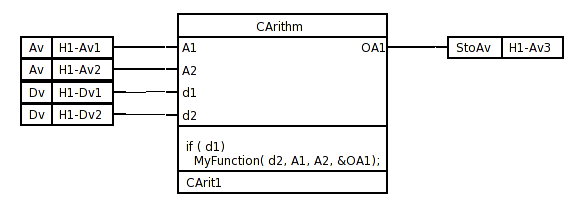
Fig Function call from the plc code
Link the plc program
When the source code of the function was compiled, the object module
$pwrp_obj/ra_myfunction.o was created. This has to be added to the link command when the
plc program is built, which is achieved by creating a BuildOptions object in the
directory volume under the NodeConfig object. Insert the name of the object module in
the ObjectModules array. When the directory volume is saved, an opt-file is created on
$pwrp_exe that will be included by the linker when the node is built.
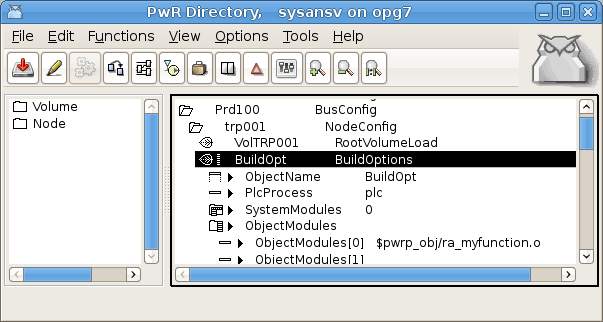
Fig The object module inserted in BuildOptions
We can now build the node and startup ProviewR runtime.
Debug
One disadvantage when you leave the graphic programming and call c-functions is that you
can't use trace any more for debugging. If you suspect some error in the function code,
you occasionally have to start the plc program in debug, set a breakpoint in the function
and step forward in the code.
First you have to build the plc program with debug, by opening Options/Setting from the
configurator and activate Build/Debug, and then build the node.
After that you start ProviewR runtime and attach the debugger, gdb, to the plc process by
starting gdb with the pid for the process. pid is viewed by 'ps x'
> ps x
...
5473 pts/0 Sl 0:18 plc_mynode_0999_plc
where 5473 is pid for the plc process, and we start the debugger, set a breakpoint in the
function and let the program continue to execute
> gdb -p 5473 plc_mynode_0999_plc
(gdb) b MyFunction
(gdb) c
When the program enters the function it stops in the debugger, and we can step (s) and
examine the content in variables (x) etc.
If the plc program is terminated immediately after start, you can restart in debug.
> gdb plc_mynode_0999_plc
You can also kill the current plc process and start a new one in debug.
> killall plc_mynode_0999_plc
> gdb plc_mynode_0999_plc