Plant Configuration

Once the configuring of the project is done, next step is to configure the plant. The
configuration is done in the Configuration Editor. The plant is a logical description of the
reality, which is to be controlled and supervised.

The Process Station

The major part of the configuration is done in the volume of the process station, VolTrafficCross1.
This because all physical hardware is configured here (the I/O), all the signals and the
PLC-programs that work with the signals.

The plant is structured hierarchically. Examples of levels in the plant can be plant, process,
process part, component, and signal. These are the logical signals represented by signal objects
which will be connected to physical channels.

Sometimes it can be difficult to configure each signal in an initial stage, but it must at any
rate be decided how possible signals shall be grouped.

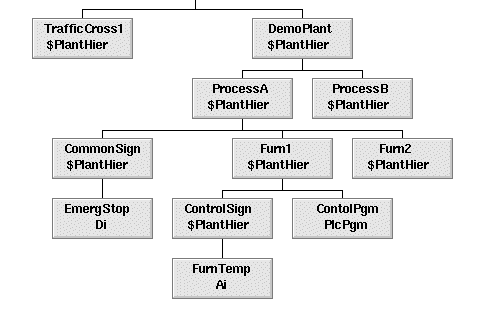
The figure below illustrates how a plant has been configured. We see how signals have been
configured on different levels, and also how the PLC programs are configured in the plant.


Fig An Example of a Plant Configuration

We choose to call our plant TrafficCross1 and we decide on the following structure:

- Two traffic lights, each one consisting of a green, a yellow, and a red lamp. Since the
streets run north-south and west-east respectively, we call them TrafficLightNS and
TrafficLightWE. Each lamp requires a signal. These are digital output signals and are
called RedNS, RedWE, etc.

- A PLC program to control the traffic lights.

- A number of control signals to select operating mode and function. We choose to put them in
one folder, ControlSignals. The table below shows the signals required.

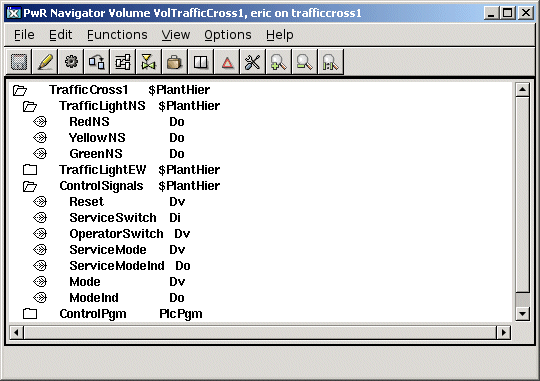
Figure shows the resulting Plant Configuration.

We choose to call our plant TrafficCross1 and decide the following structure:

Signal Name         Signal Type         Function

ServiceSwitch      Di                  A switch which the maintenance technician can influence to
                       change the operating mode.
OperatorSwitch      Di                  A value which the operator can influence to change the operating
                       mode.
ServiceMode      Di                  A value which the operator can influence to change the function
                       to service mode.
ServiceModeInd      Do                  A signal which shows the maintenance technician that the program
                       is in service mode.
Mode      Dv                  Indicates whether the program is in normal or flashing mode.
ModeInd      Do                  Indicates whether the program is in normal or flashing mode.
Reset      Dv                  A value which is used to reset the program to initial mode.


Fig The Plant Configuration of the Intersection

As you can see we have a plant object at the topmost level, TrafficCross1 of the class
$PlantHier. We use other objects of class $PlantHier to group our objects. We also create an
object, which defines a PLC program, the ControlPgm object of the class PlcPgm .

The Operator Station

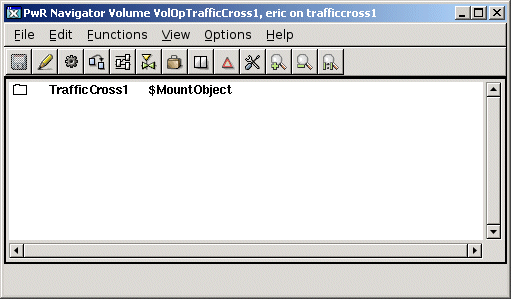
The configuration of the operator station is performed in the volume VolOpTrafficCross1. In the
Plant side there is only a mount object, that makes the plant hierarchy of the process node
available in the operator station. We have mounted the topmost $PlantHier object,
'TrafficCross1' with a MountObject with the same name.


Fig The Plant Configuration in the operator volume.