Runtime Monitor
Often you want to start the runtime environment on the development node, for example
if you have made a change in the system that you want to test, before sending it
down to the production system.
The Runtime Monitor is used to start and stop the runtime environment on the
development station.
To start the runtime environment on the development station, the following requirements
have to be fulfilled
- the node should be configured with a NodeConfig object in the project volume.
- the correct comunication buss should be set. To do this you set the bash environment variable
PWR_BUS_ID to the buss stated in the BusConfig object in the project volume, for example
export PWR_BUS_ID=999
The runtime monitor also requires a StatusServerConfig object to be configured below
the $Node object in the volume to start.
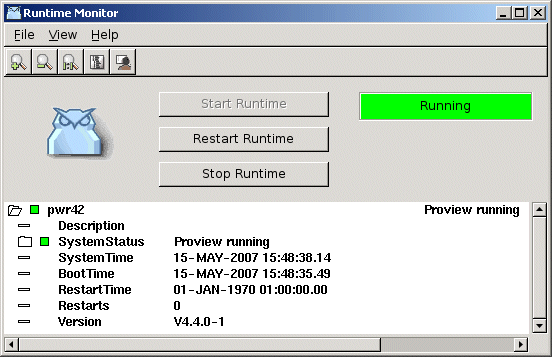
The Runtime Monitor is started from Tools/Runtime Monitor in the menu. There are buttons
to start and stop the runtime environment ('Start Runtime' and 'Stop Runtime'). In the
colored square, the status of the runtime environment is displayed ('Running' or 'Down').
The color indicates the status of the system, red for error status, yellow for warning,
and green for OK.
The button 'Restart Runtime' performs a soft restart, and can be used if the runtime
is started already.