DigBackgroundColor


The DigBackgroundColor dynamics makes it possible to set dynamics on the background color.
DigBackgroundColor works analogous with DigColor, but will changes the background color
instead of the fill color. The DigBackgroundColor has several instances and thus can be
connected to several digital signals, and change between several colors.
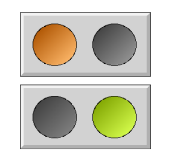
DigBackground color makes it possible to modify the color of two parts of a subgraph or
group independently of each other. In the example below, the gray rectangle is drawn with
fixed gray color, the left circle has the fill color, and the right background color.
Drawing a circle with background color is achieved by setting the fill_eq_background
property of the circle.


Fig Background color dynamics

When setting dynamic DigColor and DigBackgroundColor to the group, the DigColor dynamic
will affect the left circle drawn with fill color, and the DigBackgroundColor dynamics
will affect the right circle drawn with background color.

Attribute                               Description
DigBackgroundColor.Attribute                       Signal in the database of type Boolean the should influence
                      the component.
DigBackgroundColor.Color                       Background color of the component when the signal is 1.
DigBackgroundColor.Instances                       Instance mask where instances can be added or removed.