Open a graph
To open a graph by clicking on an object, you normally use the action OpenGraph. You can also
use the Command action with the command 'open graph'.
Open a graph with a mouse click
We create a pushbutton to open a graph, with a rectangle and a text that is grouped.
Fig Pushbutton to open a graph
Action OpenGraph
In the first example we set action to OpenGraph. OpenGraph requires that you have configured
an XttGraph object in the database. The XttGraph object is inserted into
OpenGraph.GraphObject.
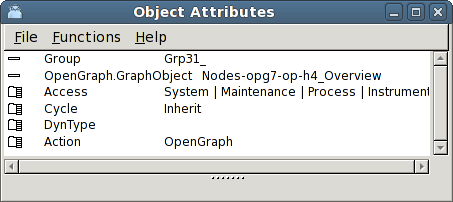
Fig Action OpenGraph
If the graph should be able to be opened on different nodes, and you prefer to use local
XttGraph object, you can replace the name of the node object by '$node'.
$node-op-h4_Overview
$node will be replaced by the name of the node object for the current node. You also have to
see to that XttGraph object with the corresponding name exist on all the nodes in question.
Action Command
It is also possible to open a graph with the action Command and the command
open graph 'graphname' [/width=] [/height=]
The command to open an object graph is
open graph /class /instance=
In this example we have set Command in Action and inserted a command to open the object
graph for the Av object H4-Av1.
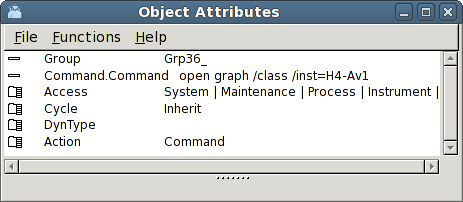
Fig Open an object graph
If the action PopupMenu is present and you in addition want to open the object graph when
you click on the object, it is sufficient to add OpenGraph to action. You don't have to
fill in an object, as this will be fetched from PopupMenu.ReferenceObject by default.
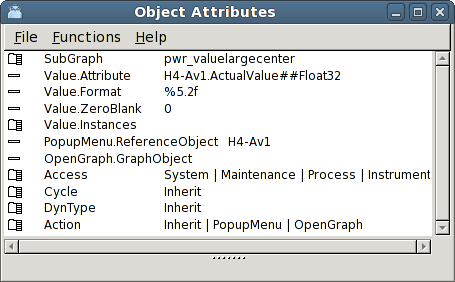
Fig Open the object graph when PopupMenu is configured
If you you want to set input focus to a specific input field in the graph when the graph is
opened, you use the command 'open graph /focus'. You also have to specify the name of the
input object that should receive input focus. The name can be set from Edit/Change name in the
menu.
open graph /object=*-Graphs-SomeXttGraph /focus="TempSetValue"
Close a graph
To close a graph the action CloseGraph is used.
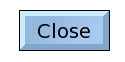
Fig Pushbutton to close a graph
We create a pushbutton with the text 'Close' and set Action to CloseGraph.
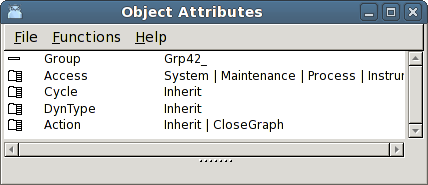
Fig Action CloseGraph