Axis and AxisArc
An axis object draws a scale with a specified range. Axis objects don't have any dynamics
and the scale is fix. There are two variants, a straight axis and a circular or elliptic axis.
Straight axis
A straight axis is an Axis object fetched from the Analog map and scaled to desired size.
The size of the digits are adjusted from the TextSize menu in the tool panel. The range of
the axis is determined by MinValue and MaxValue that in the example below are set to 0 and 50.
If the scale should be in the opposite direction you shift the values in MinValue and
MaxValue. It is not required that MaxValue should be greater than MinValue.

Fig Straight axis
The number of perpendicular lines are stated in the Lines attribute, that is set to 101. As
every tenth line should be a little longer, LongQuotient is set to 10. Every twentieth line
should be marked with a value, thus ValueQuotient is set to 20.
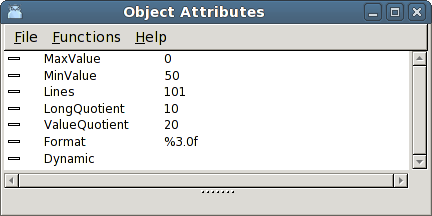
Fig Attributes of an axis object
It is also possible to affect the format of the values with the Format attribute, and if no
values should be drawn, Format can be cleared. The format should be of type %5.1f where
5 is the total number of characters, decimal point included, and 1 number of decimals.
Elliptic axis
An AxisArc object is a circular or elliptic axis. The object is scaled to suitable size,
and the text size is adjusted with TextSize in the tool panel.
The axis consists of an arc, and from the object editor Angle1 and Angle2 can be specified
to control the size and position of the arc. Angle1 is the angle from the horizontal axis
to the start of the arc, and Angle2 is the angle for the extention of the arc.
You can also affect the length of the lines in LineLength. The length is specified in
relation to the radius, so a LineLength of 0.1 will give a length on the longest lines of
10 % of the radius.
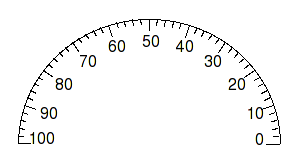
Fig Elliptic axis
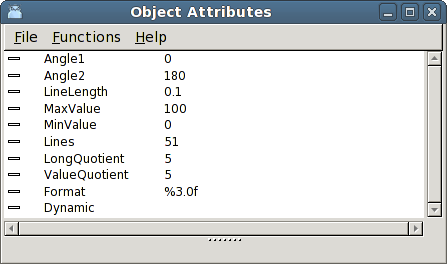
Fig Attribute of an axisarc object