Slider
A slider is a movable object connected to an analog signal in the database. The position
of the slider states the value of the signal. The slider can be moved either horizontal
or vertical between two endpoints. The position of the endpoints can be specified by two
different methods. Either by placing a special background object of type SliderBackground,
or by specifying the coordinates for the endpoints in the object editor.
Slider with background object
Under the Slider map in the subgraph palette you will find slider and slider background
objects. We select a SliderBackground1 and place a Slider1 on top of it. To get a
horizontal slider we rotate both object 270 degrees.

Fig Slider with background object
The next step is to connect the slider to an analog signal in the database. We select the
Av object H1-Av in the plant hierarchy and click with Ctrl+Doubleclick MB1 on the slider
object. We also have to state the range in signal units that the slider movement corresponds
to. The signal range is 0 - 1000 and we set Slider.MaxValue to 1000 in the object editor.
Note that we don't have to set the min and max position as they are fetched from the slider
background object.
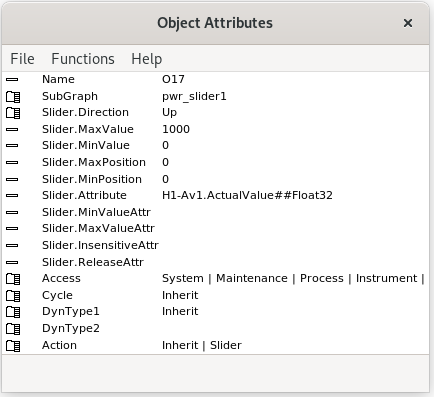
Fig The range for the signal is stated in Slider.MinValue and Slider.MaxValue
Slider without background object
For a slider without background object you have to state the direction of the slider movement
and the min and max position of the movement.
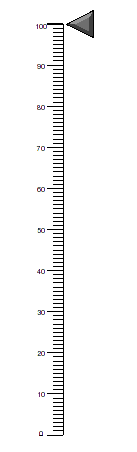
Fig Slider without background object
We create a slider of type Arrow2 that is to be moved along an axis with a scale of range
0 - 100. 100 is positioned on the y-coordinate 0, and 0 is positioned on the y-coordinate 30.
The slider should be placed on the position with the lowest y-coordinate, which is at the
value 100 on the scale. Then we should state the movement range of the slider and measure
the coordinate at the top of the slider object. This gives the y coordinates -1 in the upper
position of the slider, and 29 in the lower position. We insert these coordinates in
Slider.MinPosition (-1) and Slider.MaxPosition (29). We also set Slider.Direction to Up as
a motion upwards in the graph will give increasing signal value.
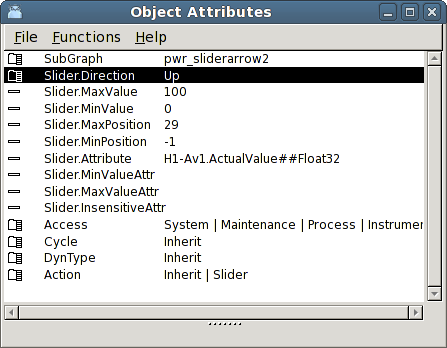
Fig The object editor of the slider
A horizontal slider is placed on the lowest x-coordinate, that is in the rightmost position
in the graph. In the example below Slider.Direction is set to Left.

Fig Horizontal slider