Windows


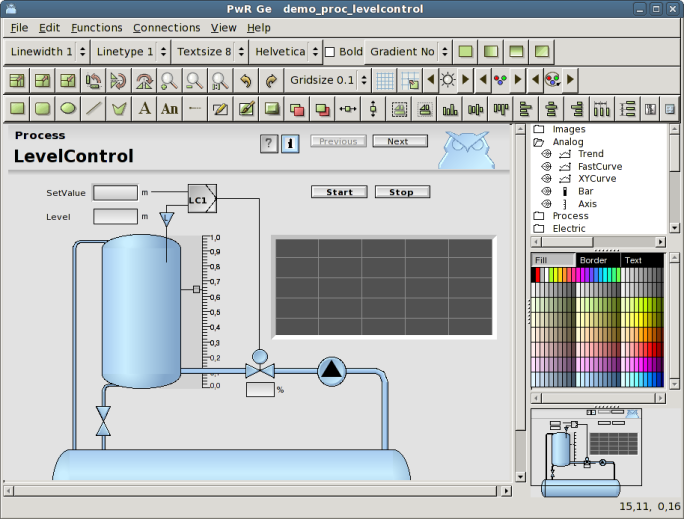
In ge, there are a number of palettes and other windows to choose objects, subgraphs, colors etc.

Working area

In the working area the graph is edited by clicking and dragging the mouse.

Mouse click                         Function
Click MB1                         Select an object, or create a base object.
Shift/Click MB1                         Add an object to the select list.
Press MB1                         Select objects in an area, or move objects.
Chift/Press MB1                         Add objects in an area to the select list.
DoubleClick MB1                         Open the object editor for the object.
Ctrl/DoubleClick MB1                       Connect the first attribute in a subgraph object to a rtdb-object.
Shift/Ctrl/DoubleClick MB1                       Connect the second attribute in a subgraph object to a
                       database object.
Shift/DoubleClick MB1                       Set selected fill color in LowColor in a subgraph object.
Click MB2                        Create a subgraph object.
Press MB2                        Create a connection.

Navigation window


Down to the left there is a navigation window that contains a copy of the working area in
reduced scale. From the navigation window you can scroll (MB1) or zoom (MB2) the graph in the
working area.

The subgraph palette


The subgraph palette consists of a number of folders with subgraphs. Under the Local/Subgraphs
folder there are subgraphs that is created within the project. Other folder contain subgraphs
that comes with ProviewR.

The color palette

The color palette contains 300 colors in 10 rows with 30 colors in each row. In the first
row there are back, white and intense signal colors, and a collection of gray tones. Then
follows a row with the gray scale and after that 8 rows with different color tones: yellowgreen,
yellow, orange, violet, blue, seablue and green. Within each color group the 10 first has low
saturation, the 10 middle medium saturation and the 10 last high saturation.

The three buttons above the palette displays the current fill, border and text colors. New
objects will be created with these colors. To set a new current fill color, set the palette in
fill color mode by pressing the Fill button and select a color in the palette. To set a fill
color on an existing object, select the object, make sure the palette is in fill color mode,
and select the desired color. In the same way the palette can be set in border or text mode by
pressing the Border and Text buttons, and the border and text colors of object can be handled.

Object also have a background color, and this is handled differently from the other colors. To
set the background color of an object, select the object and click with Ctrl+Shift MB1 on the
desired color in the palette.

To set the background color of the graph, set the desired color as current fill color, and
activate 'Functions/Set background color' in the menu.

Custom colors

In addition to the predefined colors there are space for 90 custom defined colors below the
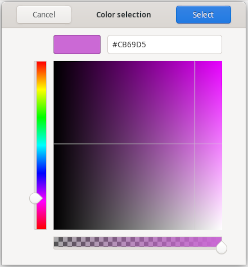
predefined colors. To set a custom color, enter the color selector by double clicking on an
entry in the custom color palette. Press the '+' button to specify a more specific color than
the predefined ones. Select the color hue with the slider to the left, and click in color area
to select brightness and saturation. The bottom slider for transparency is not implemented yet.
Press the Select button to insert the color into the custom color palette. The color can now
be used as fill, border or text color.


Fig Color selection

To use a custom color palette in another graph, save the palette from 'File/CustomColors/Save'
in the menu. The palette is stored in a pwgc file in $pwrp_pop. Load the file into another graph
by activating 'File/CustomColor/Load' and select the file.

It's also possible to use a common color file for several graphs in a project. If a color file
is specified in ColorTheme in Graph attributes, this file will be loaded automatically when the
graph is opened. When a color is adjusted and stored, it will affect all object drawn with this
color in all graphs with this color file. In this way the colors in the graphs can easily be
adjusted.

For graphs drawn with color themes, the custom color palette is used for the theme colors and
can not be used for custom colors.

Color tones

Beneath the color palette there is also a color tone palette in which you can select a color
ton for subgraph objects.

Here is also a reset button to return to the original color of an object.

Tool panel


The tool panel consists of a number of pushbuttons to create rectangles, circles, lines etc.
There are also functions to rotate and scale, to set line width, font size, to modify color of
subgraphs etc.

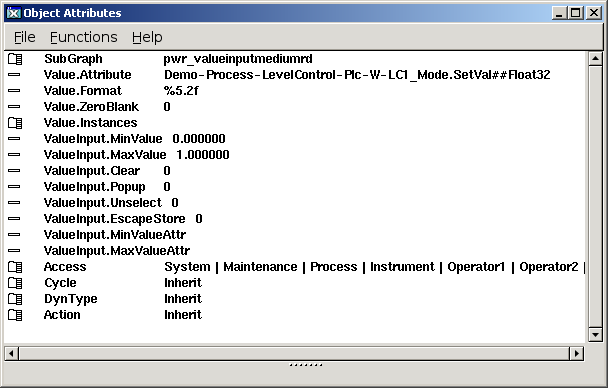
The object and attribute editor


The object and attribute editor makes it possible to enter properties to objects, graphs and
subgraphs.

For an object, this is opend by doubleclicking on the object, for graph or subgraphs, it is
opened from the menu 'File/Graph attributes'.

Values in the object editor are changed by selecting the attribute and press ArrowRight, or from
the menu with 'Functions/Change value'.

Bitmasks, enum attributes and arrays are opened with ArrowRight or DoubleClick MB1. Checkboxes
are changed with ArrowRight or by clicking in the checkbox.

The fastest way is to select an attributes with ArrowUp and ArrowDown, and use ArrowRight to
open and change the attribute, and ArrowLeft to close the attribute.

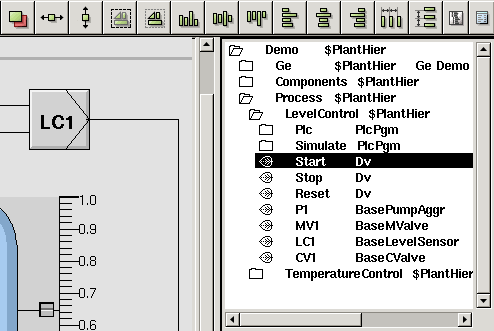
Plant hierarchy


If Ge is started from the navigator, the plant hierarchy is displayed in a window below the
color palette. It is used to connect dynamic objects to signals in the database. You connect a
subgraph object to a signal by selecting the object (or an attribute in the object) in the plant
hierarchy, and then click with Ctrl/Doubleclick MB1 on the subgraph object (or on an attribute
in the object editor). If there is a second attribute that is to be connected to a signal, you
can connect this in the same way with Shift/Ctrl/Doubleclick MB1.