Alarmlist
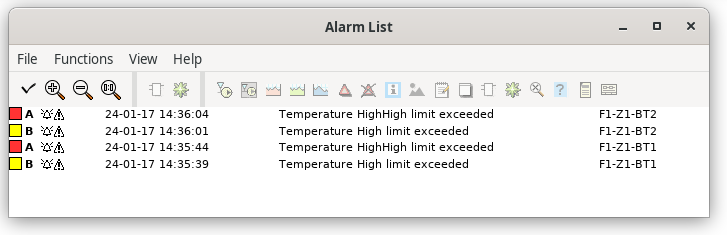
Fig Alarmlist
The alarmlist is opened by activating the "Alarmlist" button in the operator window. You can
also open the alarmlist from the menu in the navigator, 'Alarm/Alarm List', or by the xtt
command 'show alarmlist'.
In the alarmlist prevailing and unacknowledged alarms are viewed. Unacknowledged alarms are
marked with a bell and prevailing alarms with a warning triangle. Only alarms from the
plant parts stated in the selectlist are viewed.
The moretext of an alarm is displayed when the cursor is placed on the alarmtext.
Alarms can be acknowledged by activating Functions/Acknowledge (Ctrl+K) in the menu.
If you rightclick on an alarmtext, the methods of the alarm objects are displayed. Thus
making it easy to open the object graph or find where in the plc code the alarm is
generated.
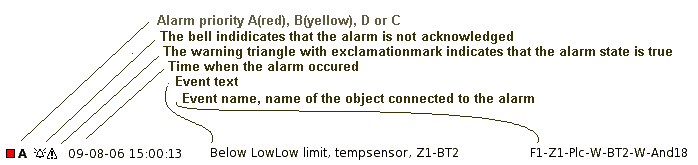
Fig Alarmtext