Eventlist
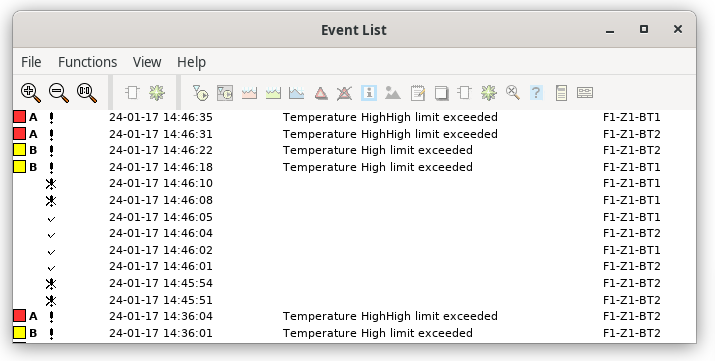
Fig Eventlist
The eventlist is opened from the "Eventlist" button in the operator window. It can also be
opened from the navigator menu or by the command 'show eventlist'.
The events from the plant parts stated in the selectlist are displayed in the eventlist.
The maximum number of events are configured in the User object. When the maximum number
of events is reached, old events are removed when new ones arrives.
Each event indicates
- Color indication for alarm priority.
- Event type.
- Time of event.
- Event text.
- Event name (object/signal name).
The moretext for an event is viewed when the cursor is placed on the event text. If you
rightclick on the eventtext, the methods of the objects are displayed. Thus making it easy
to open the object graph or find where in the plc code the alarm is generated.