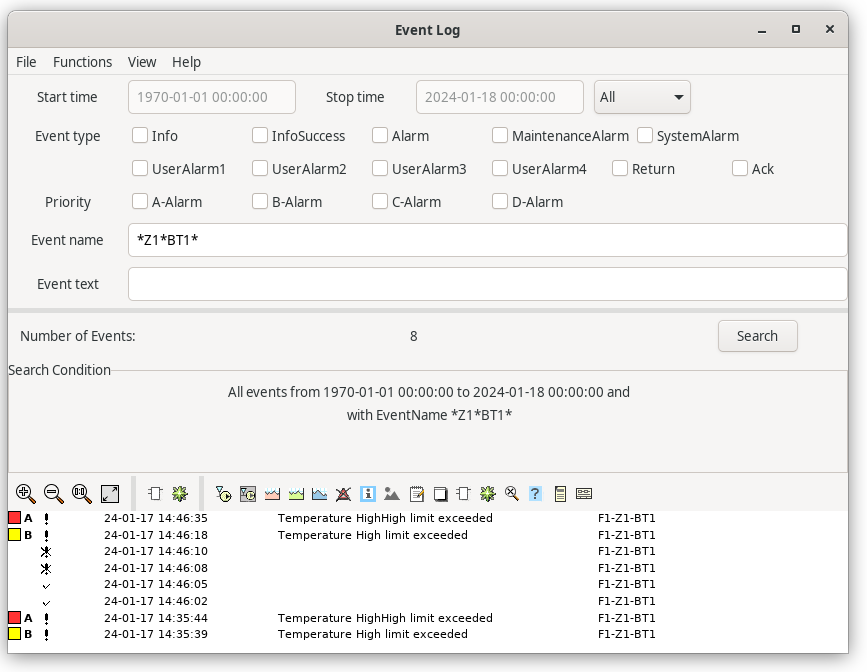
Eventlog


The eventlist has a limited length and displays only the latest event. All events though are
stored in a database, the eventlog. From this it is possible to look at events for a longer
period of time.

As the number of stored events often are several thousands, you search for the events you
are interested in with different search criteria. The events matching the search critiera are
diplayed in a list.

Search criteria

The event log dialog is viewed in figure 'Eventlog' below.

Time

On the upper row you can specify a time interval of the search. State requested interval
with the optionsmenu to the right. If you select 'Time' the time interval is inserted into
the input fields.

Eventtype

An eventtype is specified. If no type is selected, all types are present in the search.

- Active            An alarm is activated.
- Message           An info message.
- Return            An alarm returns from active state.
- Ack               En alarm is acknowledged.

Priority

Search for alarms with a specific priority. If no priority is selected, the search is made
for all priorities.

Eventname

Name of the object the event is connected to. Wildcard (*) is allowed, for example F1-Z1*
will search for all events in the hierarchy F1-Z1. If no object name is supplied, all
objects are searched for.

Eventtext

Search for an event text. Wildcard (*) is allowed. If no text is specified, all texts are
searched for.

When the search criteria are stated, the 'Search' pushbutton is pressed. The search is
performed and the result is presented in a list in the lower part of the window.


Fig Eventlog

In the list of events an event is displayed with

- Priority          The priority is marked with color and a letter.
- Eventtype         Active is marked with an exclamation mark, Return with an crossed-out
                  exclamation mark and Ack with a tick.
- Eventtext
- Eventname

If you rightclick on a row the methods of the eventname object are displayed.