Process history


Process history is opened from the 'History' method in for example the popup menu. It can
also be opened by the Xtt command 'open history'. The history is configured by SevHist
objects.

Process history means that the value of a signal, for example of type temperature, pressure
or flow, is stored in a database with a specific frequency during a period of time.
The history can extend over several years and the number of values for one signal can
reach several millions.


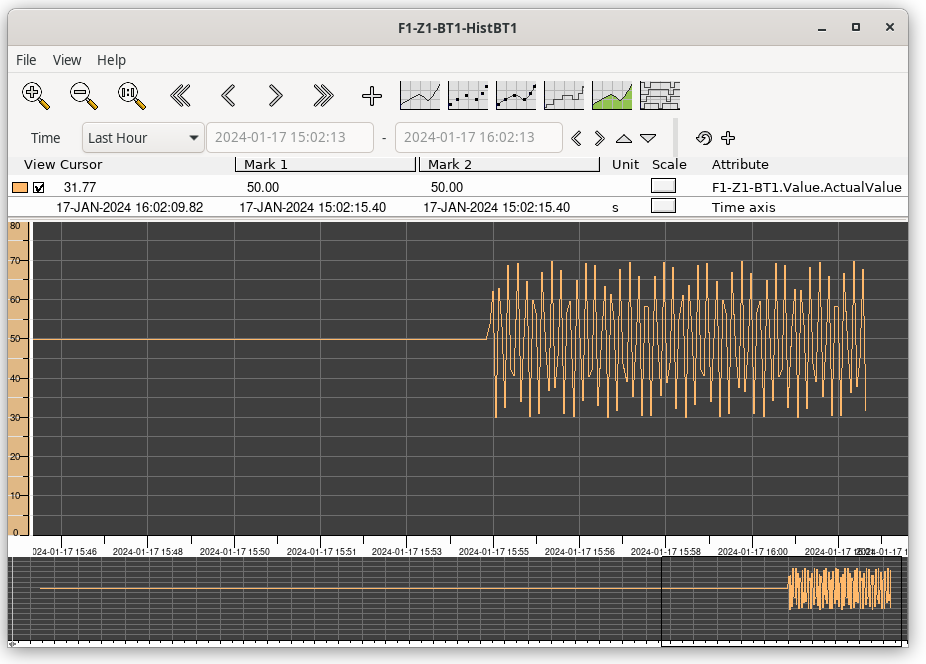
Fig Process history

In the upper part of the curve window views a table over the curves. The first column is
a color indication to identify the corresponding curve.

Description of columns in the table

View                A checkbox from which you can choose to view or hide the curve.
Cursor              Shows the curve value where the cursor is placed.
Mark                Shows the curve value where the marker i placed.
Unit                Displays the unit of the curve.
Scale               From 'Scale' you can change the scale i y direction (Scale on
              the Time axis row changes i x direction).
Attribute           States the attribute of the trend curve.

Navigation

The tool panel contains buttons to zoom and move the view to the left or to the right.

You can also navigate with the navigation window in the lower part of the window. The part
of the curve that is displayed, is marked with a black square. With drag MB1 you can move
the view in x direction, and by dragging the middle button you can zoom in and out.

Navigation from the keyboard is accomplished with the arrow keys. With arrow up and down
the zoom factor is changed, and arrow left and right moves the view to the left and to the
right.

Resolution

As the number of values for an attribute can reach several millions, only a fraction of the
values are viewed in the curve. When first opening the curve, the whole time range is
viewed with a couple of hundred points. To gain higher resolution you use the arrow up
and arrow down buttons in the tool panel. Arrow up will zoom in and increase the resolution,
i.e. new values are fetched in a smaller time interval. Arrow down will zoom out and
decrease the resolution.