Class BaseActuatorIncrDecrFo
|
| Version |
1.0 |
|
| Modified |
24-OCT-2008 13:55:07.01 |
|
| Code |
PlcTemplate |
|
Plc function object to BaseActuatorIncrDecr.
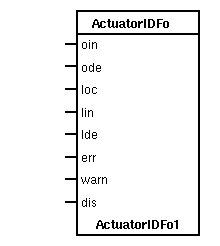
 Connect the function object to an object of class or subclass of
 BaseActuatorIncrDecr.
See also
|
RtBody attributes pwr_sClass_BaseActuatorIncrDecrFo |
| Boolean |
ExtOrderIncr |
oin |
 Input to control the increment order, OrderIncr, when auto mode is
 selected from the object graph, or when the mode is controlled via
ExtControl. |
| Boolean |
ExtOrderDecr |
ode |
 Input to control the decrement order, OrderDecr, when auto mode is
 selected from the object graph, or when the mode is controlled via
ExtControl. |
| Boolean |
LocalMode |
loc |
 Input to set Local mode.
Normally connected to a switch on a local panel. |
| Boolean |
LocalIncr |
lin |
 Input to control the increment order, OrderIncr, in local mode.
Normally connected to a button on a local panel. |
| Boolean |
LocalDecr |
lde |
 Input to control the decrement order, OrderDecr, in local mode.
Normally connected to a button on a local panel. |
| Boolean |
Error |
err |
 Input that affects the color of the graphic symbol.
The color will be flashing red when the input is set. |
| Boolean |
Warning |
warn |
 Input that affects the color of the graphic symbol.
The color will be yellow when the input is set. |
| Boolean |
DisableSup |
dis |
Disable supervision. Alarm messages are supressed. |
| Boolean |
ExtControl |
eco |
 Controls the mode when extern mode control is selected, i.e.
 Mode.OpExtAndIntMan is set to 1. The Auto/Man buttons are then removed
 from the object graph, and the auto/man selection i performed by this
 input instead.

If ExtControl is 1, mode is auto, and if ExtControl is 0 mode is manual. |
| AttrRef |
PlcConnect |
|
The main object connected to this function object.
|
| GraphPlcNode |
| object_type |
11 |
| parameters[0] |
9 |
| parameters[1] |
1 |
| parameters[2] |
0 |
| parameters[3] |
0 |
| subwindows |
1 |
| subwindow_class[0] |
pwrb:Class-WindowPlc |
| graphmethod |
0 (standard, individual attributes) |
| graphindex |
0 |
| default_mask[0] |
3 |
| default_mask[1] |
0 |
| segname_annotation |
1 |
| compmethod |
58 |
| compindex |
0 |
| tracemethod |
0 |
| traceindex |
0 |
| connectmethod |
10 |
| executeordermethod |
2 |
| objname |
ActuatorIDFo |
| graphname |
ActuatorIDFo |
Attributes detail
Input to control the increment order, OrderIncr, when auto mode is
selected from the object graph, or when the mode is controlled via
ExtControl.
Input to control the decrement order, OrderDecr, when auto mode is
selected from the object graph, or when the mode is controlled via
ExtControl.
Input to set Local mode.
Normally connected to a switch on a local panel.
Input to control the increment order, OrderIncr, in local mode.
Normally connected to a button on a local panel.
Input to control the decrement order, OrderDecr, in local mode.
Normally connected to a button on a local panel.
Input that affects the color of the graphic symbol.
The color will be flashing red when the input is set.
Input that affects the color of the graphic symbol.
The color will be yellow when the input is set.
Disable supervision. Alarm messages are supressed.
Controls the mode when extern mode control is selected, i.e.
Mode.OpExtAndIntMan is set to 1. The Auto/Man buttons are then removed
from the object graph, and the auto/man selection i performed by this
input instead.
If ExtControl is 1, mode is auto, and if ExtControl is 0 mode is manual.
 The main object connected to this object.
 This attribute is set when the function object is connected from
 the plc editor by the connect function.