 Positional sensor with highhigh, high, low and lowlow limits and
 calibration.

 One point or two point calibration is possible. In one point calibration,
 the offset of the measurement range is adjusted. In two point calibration
 also the scale of the measurement can be adjusted.

 the object supervises four alarm limits, HighHigh, High, Low and LowLow.
 The limits can be disabled and the limit values can be modified from
 the object graph.

 The object contains a trend.

 The object is a Subclass of BaseSensor.
Graphical Symbol

 Default dynamics:
 - colored yellow when the High or Low limit is activated.
 - colored red when the HighHigh or LowLow limit is activated.

 The type of sensor can be viewed with a letter in the symbol.

 The popup menu is not configured as default, but it is advisable to
 configure the menu.

 The graphical symbol is BaseComponent/Sensor
Object Graph
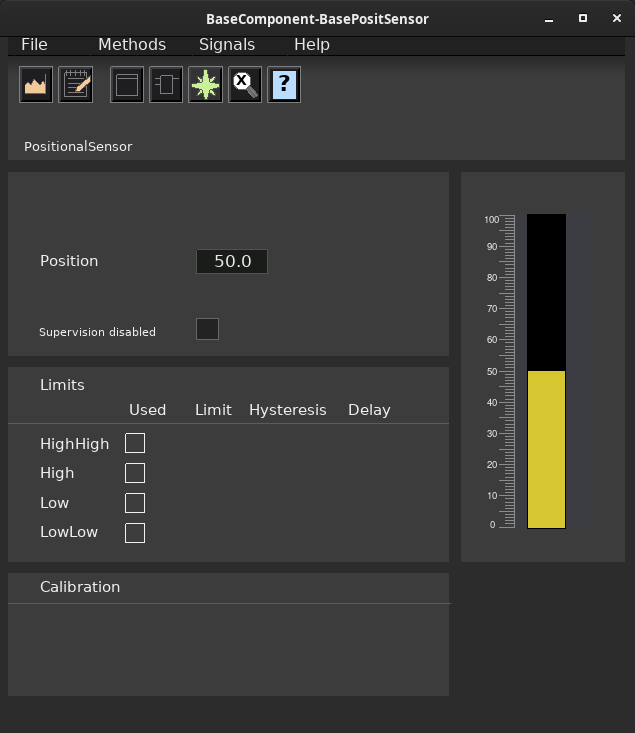
Configuration
Signals
 The object contains the Ai signal 'Value' that should be connected to an
 Ai-channel.
Supervision
 BaseSensor has four limit, each represented by a CompLimit object. For
 each CompLimit object, specify in the Used-attribute if the limit is
 active of not. If the limit is active, specify also the limit value, and
 possible hysteresis and delay.

 The alarms and alarm outputs can be disabled with the input DisableSup
 in the function object.
Plc coding
For plc coding the function object BasePositSensorFo is used.
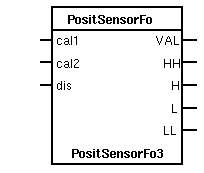
 Create a function object in the plc editor and connect it to the current
 object with the connect function.
Simulate
For simulation of the sensor value, use the plc object BaseSensorSim.
See also
|
RtBody attributes pwr_sClass_BasePositSensor |
| BaseSensor |
Super |
|
Super class. |
| Float32 |
Position |
|
The calibrated position value. |
| Float32 |
OpCalPos1 |
|
 Supplied position for calibration point 1.
This value can be entered from the object graph. |
| Float32 |
OpCalPos2 |
|
 Supplied position for calibration point 2.
This value can be entered from the object graph. |
| Float32 |
CalPos1 |
|
 Stored value of OpCalPos1 when calibration of point 1
was performed. |
| Float32 |
CalValue1 |
|
 Stored value of the raw position value when calibration of
point 1 was performed. |
| Float32 |
CalValue2 |
|
 Stored value of the raw position value when calibration of
point 2 was performed. |
| Float32 |
Gain |
|
 Calculated scale factor when two calibration points are used.
Should be 1 if only one calibration point is used. |
| Boolean |
OpCalOrder1 |
|
 Request to calculate calibration values for points 1.
Set from the calibrate point 1 button in the object graph. |
| Boolean |
OpCalOrder2 |
|
 Request to calculate calibration values for points 2.
Set from the calibrate point 2 button in the object graph. |
| Boolean |
Cal1Enable |
|
Configuration attribute to enable point 1 calibration. |
| Boolean |
Cal2Enable |
|
 Configuration attribute to enable point 2 calibration.
 Calibration point 1 has to be enabled to enable
point 2. |
| Boolean |
OpCalAccess |
|
 Gives the operator access to calibrate from the object graph.
If OpCalAccess in not set, the Calibrate buttons are dimmed. |
| Boolean |
OpCalPosAccess |
|
 Gives the operator access to the input fields for OpCalPos1 and OpCalPos2 in
 the object graph.
If OpCalPosAccess in not set, these input fields are invisible. |
| Boolean |
P1Calibrated |
|
Indicates that a calibration for point 1 is performed. |
| Boolean |
P2Calibrated |
|
Indicates that a calibration for point 2 is performed. |
| Template Object |
| Super.Super.Specification |
PositionalSensor |
| Super.Value.PresMaxLimit |
1.000000e+02 |
| Super.LimitHH.Alarm.DetectOn |
1 |
| Super.LimitHH.Alarm.DetectText |
HighHigh limit exceeded |
| Super.LimitHH.Alarm.EventType |
64 |
| Super.LimitHH.Alarm.EventPriority |
67 |
| Super.LimitHH.Alarm.EventFlags |
7 |
| Super.LimitHH.Alarm.MoreText |
|
| Super.LimitHH.Alarm.Attribute |
BaseComponent:Class-BasePositSensor-Template |
| Super.LimitHH.Alarm.CtrlPosition |
1 |
| Super.LimitHH.Alarm.LockAttribute |
1 |
| Super.LimitHH.Limit |
9.500000e+01 |
| Super.LimitH.Alarm.DetectOn |
1 |
| Super.LimitH.Alarm.DetectText |
High limit exceeded |
| Super.LimitH.Alarm.EventType |
64 |
| Super.LimitH.Alarm.EventPriority |
66 |
| Super.LimitH.Alarm.EventFlags |
7 |
| Super.LimitH.Alarm.MoreText |
|
| Super.LimitH.Alarm.Attribute |
BaseComponent:Class-BasePositSensor-Template |
| Super.LimitH.Alarm.CtrlPosition |
1 |
| Super.LimitH.Alarm.LockAttribute |
1 |
| Super.LimitH.Limit |
9.000000e+01 |
| Super.LimitL.Alarm.DetectOn |
1 |
| Super.LimitL.Alarm.DetectText |
Below Low limit |
| Super.LimitL.Alarm.EventType |
64 |
| Super.LimitL.Alarm.EventPriority |
66 |
| Super.LimitL.Alarm.EventFlags |
7 |
| Super.LimitL.Alarm.MoreText |
|
| Super.LimitL.Alarm.Attribute |
BaseComponent:Class-BasePositSensor-Template |
| Super.LimitL.Alarm.CtrlPosition |
1 |
| Super.LimitL.Alarm.LockAttribute |
1 |
| Super.LimitL.Limit |
1.000000e+01 |
| Super.LimitLL.Alarm.DetectOn |
1 |
| Super.LimitLL.Alarm.DetectText |
Below LowLow limit |
| Super.LimitLL.Alarm.EventType |
64 |
| Super.LimitLL.Alarm.EventPriority |
67 |
| Super.LimitLL.Alarm.EventFlags |
7 |
| Super.LimitLL.Alarm.MoreText |
|
| Super.LimitLL.Alarm.Attribute |
BaseComponent:Class-BasePositSensor-Template |
| Super.LimitLL.Alarm.CtrlPosition |
1 |
| Super.LimitLL.Alarm.LockAttribute |
1 |
| Super.LimitLL.Limit |
5.000000e+00 |
| Super.Trend.Multiple |
1 |
| Super.Trend.DataName |
BaseComponent:Class-BasePositSensor-Template.Super.Value.ActualValue |
| Super.Trend.StorageTime |
239 |
| Super.Trend.BufferStatus[0] |
1 |
| Super.Trend.BufferStatus[1] |
1 |
| Super.Trend.NoOfBuffers |
2 |
| Super.Trend.NoOfBufElement |
239 |
| Super.DefTrend |
BaseComponent:Class-BasePositSensor-Template.Super.Trend |
| Gain |
1.000000e+00 |
