Class CompModeD2
|
| Version |
1.0 |
|
| Modified |
05-DEC-2005 11:35:12.15 |
|
 Mode for components with digital increment and decrement orders.
 The CompModeD2 object handles two digital order outputs and and object
 graph with Auto/Man and Incr/Decr/Stop buttons. It also handles optional
 limit switches.

 The mode object handles several modes and configurations. The controlled
 unit can be handled locally or remotely.

 - Local mode    The unit is controlled from a local panel close to the drive.

 - Remote mode   The unit is controlled from the control system, either by
                 the operator from the object graph, or by PLC program.

 The local mode has higher priority than the remote.

 The mode handling also contains an extern and intern mode.

 - Intern mode   The unit is handled by the built-in Auto/Man function,
                 basically from the Auto/Man buttons in the object graph.

 - Extern mode   The built-in Auto/Man function is not used. Auto/Man is
                 handled from the plc program and other graphs.

 Which of these modes that are present depends on the configuration.

 Modes that can be configured

 - Intern          Auto/Manual mode is controlled from buttons in the
                   object graph. This is the default configuration.
 - Extern          Auto/Manual mode is controlled from the PLC program.
                   The Auto/Man buttons are removed from the object graph
                   but the Incr/Decr/Stop buttons are still present.
                   Set attribute OpIntOnly to 1.
 - Extern only     Auto/Manual mode is controlled from the PLC program.
                   No Auto/Man or IncrDecr/Stop  buttons are present in the
                   object graph. Set attribute OpExtOnly to 1.
 - Intern only     Only manual mode is present, and the Auto/Man buttons
                   are removed. Set OpIntOnly to 1.
 - Local           When the local panel is activated, and the Incr/Decr
                   buttons of the local panel is used. To disable this
                   mode, set OpNoLocal to 1.

 The Incr/Decr buttons can also be configured to show Up/Down, Forw/Back or
 Open/Close instead.
Object Graph
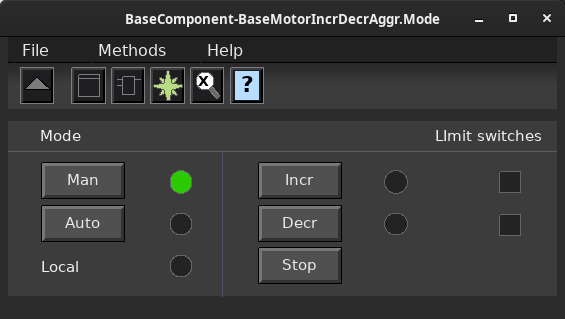
 The Auto/Man buttons changes mode in remote control, and the Incr/Decr/Stop
 buttons are used to manually control the drive at remote control.

 - The Incr/Decr buttons have toggle function, i.e. if the button is already
   activated it will stop the unit.

 - The Auto/Man buttons are used to mode in remote control.

 - In local mode, the local indicator is yellow, and the Incr/Decr/Stop buttons
   are dimmed. Control via Auto/Man is disabled.

 - The Extern indicator (not present in the graph above) displays when
   Auto/Man is controlled externally and the Auto/Man buttons are hidden.

 - When the mode is Auto, the Incr/Decr/Stop buttons are dimmed.

 - If mode extern only is configured, both the Auto/Man and the Start/Stop
   buttons are hidden, and the Extern indicator is always green. Auto/Man
   should be displayed in some other way.

 - The Incr/Decr indicators display status of the feedback, usually the contactor
   feedback.

 - The Limit Switches indicators display status of extern feedback, normally
   limit switches.
Configuration
 The Mode object CompModeD2 handles two digital order output that can be
 configured in many different ways. It contains the functions

 - Increase and decrease order.
 - Error handling for position feedback and maneuvering, 5 alarm.
 - Buttons are dimmed and made insensitive to avoid incorrect handling.

 The order outputs are controlled in three different ways

 - by the ExtStart input pin of the function object, when the object
   is in Auto mode.
 - from the Incr/Decr/Stop buttons in the object graph, when the object
   is in Manual mode.
 - by the LocalStart input pin of the function object, when the object
   is in local mode.

 Note that only one of the configuration attributes, OpExtAndIntMan, OpIntOnly
 and OpExtOnly should be set.
Component Configuration
 -IncrDecr      Text of Incr/Decr buttons in object graph is Incr/Decr.
 -UpDown        Text of Incr/Decr buttons is On/Off.
 -ForwBack      Text of Incr/Decr buttons is Forw/Back.
 -OpenClose     Text of Incr/Decr buttons is Open/Close.

 Possible end limit switches are connected to inputs in the function object.
 If no limit switches are present, OpNoLimitSwitch set set to 1, and the limit
 switch indicators are removed from the object graph.

 The stop button can be removed. The output order is then set, as long as the
 Incr/Decr buttons are pressed. To get this function, set OpNoStopButton to 1.
Mode control from object graph
 The figure displays a configuration (the default), where all the functions
 are activated. The operator selects auto or manual mode with the buttons
 Auto/Man. In auto the order outputs are controlled by the ExtIncr and
 ExtDecr inputs of the function object. The ExtControl input is not used
 in this configuration.
Mode control from the plc via inputs of the function object
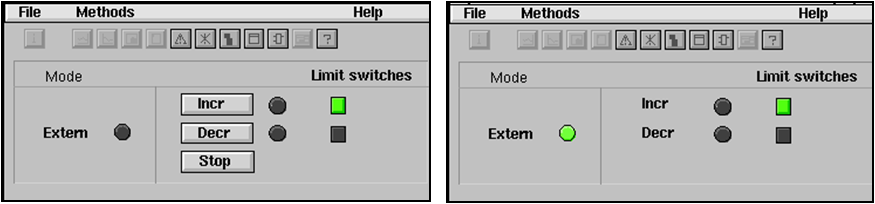
 The left figure shows when Auto/Man mode is controlled by the ExtControl input
 of the function object. Auto is activated by setting ExtControl to 1. The order
 outputs are now controlled by the ExtIncr and ExtDecr inputs, and the
 Incr/Decr/Stop buttons are dimmed. To get this configuration, set OpExtAndIntMan
 to 1. This is the only configuration alternative where the ExtControl input is
 used.

 The right figure shows when Auto/Man mode and maneuvering Incr/Decr/Stop in manual
 mode is controlled outside the object. By setting OpExtOnly to 1 also the
 Incr/Decr/Stop buttons are removed in the graph and the control of the order outputs
 are handled by the ExtIncr and ExtDecr inputs only, i.e. the mode is not handled
 in the object and no buttons are visible.
Manual mode only
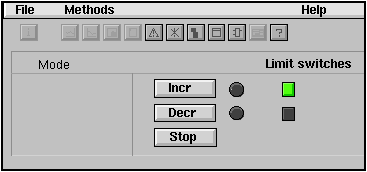
 The figure shows when manual mode only is configured. The ExtIncr, ExtDecr and Local
 inputs of the function object is not used. The Auto/Man and Local indicator
 are invisible. To get this configuration, set OpIntOnly and OpNoLocal to 1.
Local mode
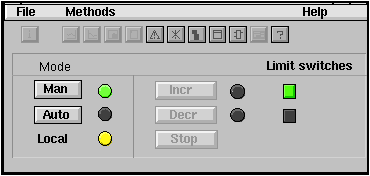
 The figure shows when local mode is activated, i.e the LocalMod input is 1.
 The control of the order output is now handled by pushbuttons on a local panel
 via inputs in the function object. Local mode disables auto and manual control,
 i.e. local control has highest priority.
Incr/Decr/Stop buttons and indication
 Normally the Incr/Decr buttons have a toggle function, but if OpNoStopButton
 is set to 1, the order output is set as long the buttons are pressed instead.
 The Stop button in removed in this configuration.

 The Incr/Decr indications are green when the feedback for the orders, FeedbackIncr
 or FeedbackDecr, is high. These inputs of the function object are normally connected
 to contactor feedback.
Limit switches
 If limit switches are present the manual increment and decrement output is set
 until the corresponding limit switch is affected, or until the OrderTimeLimit
 (default 10 s) is reached. If OrderTimeLimit is reached, the Error output it
 set and an alarm is sent. Normally the mode is switched to manual, if not
 OpNoAutoToMan is configured.
Error handling
 If the Ready input is reset, the normal behavior is to force the object to
 manual mode. This force can be disabled by setting OpNoAutoToMan to 1.
 The ForceMan input of the function object can also force the object into
 manual mode. This function is not affected of the OpNoAutoToMan setting.

 If ready is 0 the order output is interlocked in all different modes.

 If the object is interlocked when the operator tries to change mode, an
 alarm is sent. Normally buttons are dimmed to avoid incorrect actions.

 NoteWhen Auto/Man is controlled externally, it is important to look
 at the Error output and reset any control order to inhibit unwanted
 restarts.
Plc coding
For plc coding the function object CompModeD2Fo is used.
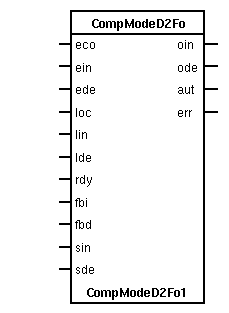
 Create a function object in the plc editor and connect it to the current
 object with the connect function.
See also
|
RtBody attributes pwr_sClass_CompModeD2 |
| String104 |
Description |
|
 Optional description.
 The description is for example viewed in the navigator and in
the object graph. |
| CompModeD2GCEnum |
GraphConfiguration |
|
 Enumeration for object graph configuration.
Handled by the ConfigureComponent method. |
| Boolean |
OpAuto |
|
 Switch to Auto mode.
 OpAuto is normally set from the Auto button in the object graph,
and automatically reset by the program. |
| Boolean |
OpMan |
|
 Switch to Manual mode.
 OpMan is normally set from the Auto button in the object graph,
and automatically reset by the program. |
| Boolean |
OpManIncr |
|
 Manual increment order.
 OpManIncr is normally set from the Incr button in the object graph,
and automatically reset by the program. |
| Boolean |
OpManDecr |
|
 Manual decrement order.
 OpManDecr is normally set from the Decr button in the object graph,
and automatically reset by the program. |
| Boolean |
OpManStop |
|
 Manual stop order.
 OpManStop is normally set from the Stop button in the object graph,
and automatically reset by the program. |
| Boolean |
LocalMode |
|
 Shows if Local mode is active.
 Local mode is normally set by a switch on a local panel, which is
connected to the LocalMode input of the function object. |
| Boolean |
LocalIncr |
|
 Shows if local increment is active.
 Local increment is normally set by a button on a local panel, which is
connected to the LocalIncr input of the function object. |
| Boolean |
LocalDecr |
|
 Shows if local decrement is active.
 Local decrement is normally set by a button on a local panel, which is
connected to the LocalDecr input of the function object. |
| Boolean |
Ready |
|
 Shows if object is ready to start.
 Reflects the value of the Ready input of the function object.
If ready is not set, start is inhibited for all modes. |
| Boolean |
FeedbackIncr |
|
 Shows the increment feedback value, normally the contactor feedback.
Reflects the value of the FeedbackIncr input of the function object. |
| Boolean |
FeedbackDecr |
|
 Shows the decrement feedback value, normally the contactor feedback.
Reflects the value of the FeedbackDecr input of the function object. |
| Boolean |
LimitSwitchDecr |
|
Shows the value of the decrement limit switch. |
| Boolean |
LimitSwitchIncr |
|
Shows the value of the increment limit switch. |
| Boolean |
ErrorDecr |
|
 Decrement error, that is set for 2 s if order decrement is activated and
the decrement limit switch is not reached within the OrderTimeLimit time. |
| Boolean |
ErrorIncr |
|
 Increment error, that is set for 2 s if order increment is activated and
the increment limit switch is not reached within the OrderTimeLimit time. |
| Boolean |
OrderIncr |
|
 The increment order output.
Reflects the value of the OrderIncr output of the function object. |
| Boolean |
OrderDecr |
|
 The decrement order output.
Reflects the value of the OrderDecr output of the function object. |
| Boolean |
AutoMode |
|
Auto mode is active. |
| Boolean |
ManOrdDim |
|
When ManOrdDim is set, the Start/Stop buttons in the object graph are dimmed. |
| Boolean |
AutoModDim |
|
When AutoOrdDim is set, the Auto button in the object graph is dimmed. |
| Boolean |
ManModDim |
|
When ManModDim is set, the Man button in the object graph is dimmed. |
| Boolean |
LocalModHide |
|
When LocalModeHide is set, the Local indicator in the object graph is hidden. |
| Boolean |
ManAutoHide |
|
When LocalModeHide is set, the Auto/Man buttons in the object graph is hidden. |
| Boolean |
ManOrdHide |
|
 When ManOrdHide is set, the Incr/Decr/Stop buttons in the object
graph are hidden. |
| Boolean |
ManStopHide |
|
When ManStopHide is set, the manual Stop button in the object graph is hidden. |
| Boolean |
ExternOrdHide |
|
When ExternOrdHide is set, the Extern indicator in the object graph is hidden. |
| Boolean |
OpIntOnly |
|
 Configures that only the manual mode is available. The ExtControl input
is not used, and the Man/Auto buttons in the object graph are hidden. |
| Boolean |
OpNoLocal |
|
Configures that local mode is not used. |
| Boolean |
OpNoAutoToMan |
|
 Configures that if the Ready input is reset, and the mode is auto,
 the auto-mode is kept. If OpNoAutoToMan is false, the mode will
switch to manual. |
| Boolean |
OpExtOnly |
|
 Configures that only auto mode is available, and there is
no way to switch to manual mode. |
| Boolean |
OpExtAndIntMan |
|
 Configures that the ExtControl input controls whether the mode
 is auto or manual. When ExtControl is 0, the mode is manual, and
 when ExtControl is 1, the mode is auto. The operator can not
switch the mode from the object graph. |
| Boolean |
OpNoLimitSwitch |
|
 Configures that the limit switches will not be used to reset the
manual increment or decrement action when the limit switch is reached. |
| Boolean |
OpNoStopButton |
|
 The function of the Incr and Decr buttons for manual control can be configured
 to set the corresponding output as long as the button is pressed, or to set
 the output when the Incr/Decr button is clicked, and to reset when the Stop button
 is clicked, or when the Incr/Decr button is clicked again. This is configured with
OpNoStopButton. |
| Boolean |
OpDisableLocalAlarm |
|
Configuration attribut to disable the alarm when local mode is activated. |
| Boolean |
ManIncr |
|
Manual increment order is active. |
| Boolean |
ManDecr |
|
Manual decrement order is active. |
| Float32 |
OrderTimeLimit |
|
 Timeout time for limit switches. If an output order is set and the
 corresponding limit switch is not reached within this time, the order
is stopped, alarm is sent and error attribute is set. |
| DSupComp |
AlarmNotReadyM |
|
Alarm text for manual start attempt when unit is not ready. B-alarm. |
| DSupComp |
AlarmNotReadyA |
|
Alarm text for attempt to set Auto mode when unit is not ready. B-alarm. |
| DSupComp |
Alarm1LocalMod |
|
Alarm text for manual start attempt when unit is in local mode. B-alarm. |
| DSupComp |
Alarm2LocalMod |
|
Alarm text when local mode is activated. B-alarm. |
| DSupComp |
AlarmNotManOrd |
|
Alarm text for manual start attempt when unit is in Auto mode. B-alarm. |
| DSupComp |
AlarmOrderTimeOut |
|
Alarm text when limit switch is not reached within timeout time. |
| String8 |
IndMode |
|
 Text string to show the current mode in the object symbol.
Contains "L" in local mode, "M" in manual mode and is empty in auto mode. |
| AttrRef |
PlcConnect |
|
The plc function object connected to this object.
|
| Template Object |
| OrderTimeLimit |
1.000000e+01 |
| AlarmNotReadyM.DetectOn |
1 |
| AlarmNotReadyM.DetectText |
Check interlocks. Manual start is not allowed, not ready |
| AlarmNotReadyM.EventType |
64 |
| AlarmNotReadyM.EventPriority |
66 |
| AlarmNotReadyM.EventFlags |
7 |
| AlarmNotReadyM.MoreText |
|
| AlarmNotReadyM.Attribute |
BaseComponent:Class-CompModeD2-Template |
| AlarmNotReadyM.CtrlPosition |
1 |
| AlarmNotReadyM.LockAttribute |
1 |
| AlarmNotReadyA.DetectOn |
1 |
| AlarmNotReadyA.DetectText |
Check interlocks. Automode is not allowed, not ready |
| AlarmNotReadyA.EventType |
64 |
| AlarmNotReadyA.EventPriority |
66 |
| AlarmNotReadyA.EventFlags |
7 |
| AlarmNotReadyA.MoreText |
|
| AlarmNotReadyA.Attribute |
BaseComponent:Class-CompModeD2-Template |
| AlarmNotReadyA.CtrlPosition |
1 |
| AlarmNotReadyA.LockAttribute |
1 |
| Alarm1LocalMod.DetectOn |
1 |
| Alarm1LocalMod.DetectText |
Local mode is activated, remote control is not allowed |
| Alarm1LocalMod.EventType |
64 |
| Alarm1LocalMod.EventPriority |
66 |
| Alarm1LocalMod.EventFlags |
7 |
| Alarm1LocalMod.MoreText |
|
| Alarm1LocalMod.Attribute |
BaseComponent:Class-CompModeD2-Template |
| Alarm1LocalMod.CtrlPosition |
1 |
| Alarm1LocalMod.LockAttribute |
1 |
| Alarm2LocalMod.DetectOn |
1 |
| Alarm2LocalMod.DetectText |
Local mode is activated |
| Alarm2LocalMod.EventType |
64 |
| Alarm2LocalMod.EventPriority |
66 |
| Alarm2LocalMod.EventFlags |
7 |
| Alarm2LocalMod.MoreText |
|
| Alarm2LocalMod.Attribute |
BaseComponent:Class-CompModeD2-Template |
| Alarm2LocalMod.CtrlPosition |
1 |
| Alarm2LocalMod.LockAttribute |
1 |
| AlarmNotManOrd.DetectOn |
1 |
| AlarmNotManOrd.DetectText |
Automode active. Manual order is not allowed |
| AlarmNotManOrd.EventType |
64 |
| AlarmNotManOrd.EventPriority |
66 |
| AlarmNotManOrd.EventFlags |
7 |
| AlarmNotManOrd.MoreText |
|
| AlarmNotManOrd.Attribute |
BaseComponent:Class-CompModeD2-Template |
| AlarmNotManOrd.CtrlPosition |
1 |
| AlarmNotManOrd.LockAttribute |
1 |
| AlarmOrderTimeOut.DetectOn |
1 |
| AlarmOrderTimeOut.DetectText |
Timeout, limit switch not reached |
| AlarmOrderTimeOut.EventType |
64 |
| AlarmOrderTimeOut.EventPriority |
67 |
| AlarmOrderTimeOut.EventFlags |
7 |
| AlarmOrderTimeOut.MoreText |
|
| AlarmOrderTimeOut.Attribute |
BaseComponent:Class-CompModeD2-Template |
| AlarmOrderTimeOut.CtrlPosition |
1 |
| AlarmOrderTimeOut.LockAttribute |
1 |
Attributes detail
Optional description.
The description is for example viewed in the navigator and in
the object graph.
Enumeration for object graph configuration.
Handled by the ConfigureComponent method.
Switch to Auto mode.
OpAuto is normally set from the Auto button in the object graph,
and automatically reset by the program.
Switch to Manual mode.
OpMan is normally set from the Auto button in the object graph,
and automatically reset by the program.
Manual increment order.
OpManIncr is normally set from the Incr button in the object graph,
and automatically reset by the program.
Manual decrement order.
OpManDecr is normally set from the Decr button in the object graph,
and automatically reset by the program.
Manual stop order.
OpManStop is normally set from the Stop button in the object graph,
and automatically reset by the program.
Shows if Local mode is active.
Local mode is normally set by a switch on a local panel, which is
connected to the LocalMode input of the function object.
Shows if local increment is active.
Local increment is normally set by a button on a local panel, which is
connected to the LocalIncr input of the function object.
Shows if local decrement is active.
Local decrement is normally set by a button on a local panel, which is
connected to the LocalDecr input of the function object.
Shows if object is ready to start.
Reflects the value of the Ready input of the function object.
If ready is not set, start is inhibited for all modes.
Shows the increment feedback value, normally the contactor feedback.
Reflects the value of the FeedbackIncr input of the function object.
Shows the decrement feedback value, normally the contactor feedback.
Reflects the value of the FeedbackDecr input of the function object.
Shows the value of the decrement limit switch.
Shows the value of the increment limit switch.
Decrement error, that is set for 2 s if order decrement is activated and
the decrement limit switch is not reached within the OrderTimeLimit time.
Increment error, that is set for 2 s if order increment is activated and
the increment limit switch is not reached within the OrderTimeLimit time.
The increment order output.
Reflects the value of the OrderIncr output of the function object.
The decrement order output.
Reflects the value of the OrderDecr output of the function object.
When ManOrdDim is set, the Start/Stop buttons in the object graph are dimmed.
When AutoOrdDim is set, the Auto button in the object graph is dimmed.
When ManModDim is set, the Man button in the object graph is dimmed.
When LocalModeHide is set, the Local indicator in the object graph is hidden.
When LocalModeHide is set, the Auto/Man buttons in the object graph is hidden.
When ManOrdHide is set, the Incr/Decr/Stop buttons in the object
graph are hidden.
When ManStopHide is set, the manual Stop button in the object graph is hidden.
When ExternOrdHide is set, the Extern indicator in the object graph is hidden.
Configures that only the manual mode is available. The ExtControl input
is not used, and the Man/Auto buttons in the object graph are hidden.
Configures that local mode is not used.
Configures that if the Ready input is reset, and the mode is auto,
the auto-mode is kept. If OpNoAutoToMan is false, the mode will
switch to manual.
Configures that only auto mode is available, and there is
no way to switch to manual mode.
Configures that the ExtControl input controls whether the mode
is auto or manual. When ExtControl is 0, the mode is manual, and
when ExtControl is 1, the mode is auto. The operator can not
switch the mode from the object graph.
Configures that the limit switches will not be used to reset the
manual increment or decrement action when the limit switch is reached.
The function of the Incr and Decr buttons for manual control can be configured
to set the corresponding output as long as the button is pressed, or to set
the output when the Incr/Decr button is clicked, and to reset when the Stop button
is clicked, or when the Incr/Decr button is clicked again. This is configured with
OpNoStopButton.
Configuration attribut to disable the alarm when local mode is activated.
Manual increment order is active.
Manual decrement order is active.
Timeout time for limit switches. If an output order is set and the
corresponding limit switch is not reached within this time, the order
is stopped, alarm is sent and error attribute is set.
Alarm text for manual start attempt when unit is not ready. B-alarm.
Alarm text for attempt to set Auto mode when unit is not ready. B-alarm.
Alarm text for manual start attempt when unit is in local mode. B-alarm.
Alarm text when local mode is activated. B-alarm.
Alarm text for manual start attempt when unit is in Auto mode. B-alarm.
Alarm text when limit switch is not reached within timeout time.
Text string to show the current mode in the object symbol.
Contains "L" in local mode, "M" in manual mode and is empty in auto mode.
 The plc function object connected to this object.
 This attribute is set when the function object is connected from
 the plc editor by the connect function.