 Simple mode object for digital components with one order output.
 CompModeDM handles one digital order output and an object graph with
 Auto/Man and Open/Close buttons. It is for example used in BaseMValve.

 The mode object handles several modes and configurations. The controlled
 unit can be handled locally or remotely.

 - Local mode    The unit is controlled from a local panel close to the drive.

 - Remote mode   The unit is controlled from the control system, either by
                 the operator from the object graph, or by PLC program.

 The local mode has higher priority than the remote.

 The mode handling also contains an extern and intern mode.

 - Intern mode   The unit is handled by the built-in Auto/Man function,
                 basically from the Auto/Man buttons in the object graph.

 - Extern mode   The built-in Auto/Man function is not used. Auto/Man is
                 handled from the plc program and other graphs.

 Which of these modes that are present depends on the configuration.

 Modes that can be configured

 - Intern          Auto/Manual mode is controlled from buttons in the
                   object graph. This is the default configuration.
 - Extern          Auto/Manual mode is controlled from the PLC program.
                   The Auto/Man buttons are removed from the object graph
                   but the Start/Stop buttons are still present.
                   Set attribute OpIntOnly to 1.
 - Local           When the local panel is activated, and the Open/Close
                   buttons of the local panel is used.
Object Graph
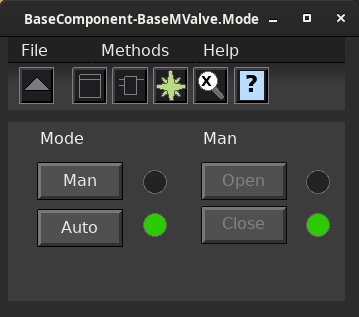
 Auto or manual mode is selected with the Auto/Man buttons, and in
 manual mode, the Open/Close buttons are used to handle the unit.

 - In auto and local mode, the Open/Close buttons are dimmed.

 - In local mode, control via Auto/Man is interlocked, and the Open/Close
   buttons are dimmed. There is no indicator that displays that local mode
   is active

 - The Open/Close indicators shows the order output only in manual mode (not
   in auto mode).
Configuration
 The mode object CompModeDM handles one digital order output and contains
 the functions:

 - Open/Close order.
 - Buttons in the object graph are dimmed to avoid incorrect actions.

 The Open/Close order output, OutRef, is controlled in three modes:

 - Auto mode, the order output is controlled by the RefAuto input of
   the function object.
 - Manual mode, the order output put is controlled by the Open/Close
   buttons in the object graph.
 - Local mode is set when the LocalMode input of the function object
   is high. The order output is now controlled by the LocalOrder input.
Mode control from object graph
 The figure displays the default configuration. The operator selects manual
 or auto mode with the Auto/Man buttons. In auto mode, the order output, OutRef,
 is controlled by the RefAuto input of the function object.
Auto only
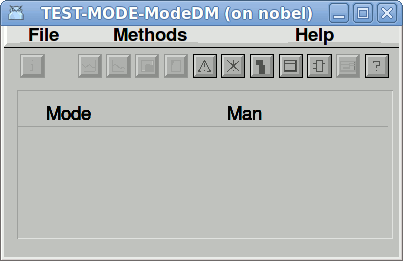
 The figure displays a configuration where the manual mode is disabled, i.e. the
 order output is controlled by the RefAuto input of the function object. This is
 achived by setting the attribute OpOnlyAuto to 1.
Error handling
 If Ready is not set, the order output is interlocked in all modes.
 Note that if Ready is lost, the mode is not forced to manual, as in some other
 mode objects.
Plc coding
For plc coding the function object CompModeDMFo is used.
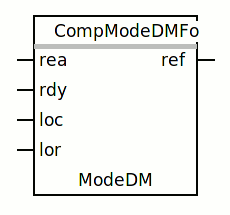
 Create a function object in the plc editor and connect it to the current
 object with the connect function.
See also
|
RtBody attributes pwr_sClass_CompModeDM |
| Boolean |
OpAuto |
|
 Switch to Auto mode.
 OpAuto is normally set from the Auto button in the object graph,
and automatically reset by the program. |
| Boolean |
OpMan |
|
 Switch to Manual mode.
 OpMan is normally set from the Auto button in the object graph,
and automatically reset by the program. |
| Boolean |
ManMode |
|
Manual mode is active. |
| Boolean |
LocalMode |
|
 Shows if Local mode is active.
 Local mode is normally set by a switch on a local panel, which is
connected to the LocalMode input of the function object. |
| Boolean |
LocalOrder |
|
 Input to control the order output in local mode.
Normally connected to a button on a local panel. |
| Boolean |
OpAutoOnly |
|
 Configuration attribute to disable manual mode.
No buttons are present in the object graph. |
| Boolean |
OpRefMan |
|
 Manual order set and reset by the Open/Close buttons in the object
graph. |
| Boolean |
OpManDimmed |
|
Open/Close buttons in object graph are dimmed. |
| Boolean |
LocalUsed |
|
Configuration attribute to enable local mode. |
| String8 |
IndMode |
|
 Text string to show the current mode in the object symbol.
Contains "L" in local mode, "M" in manual mode and is empty in auto mode. |
| AttrRef |
PlcConnect |
|
The plc function object connected to this object.
|
