
| Volume BaseComponent | |
| Attributes: Runtime | Development | System | Template | Detail C Binding: Struct | Class | Code ClassTree | INDEX NO INDEX |
|
Class CompModePID_Fo
|
||
|---|---|---|
| Version | 1.0 | |
| Modified | 18-MAY-2006 14:25:59.63 | |
| Code | rt_plc_bcomp.c | |
Plc function object to CompModePID.
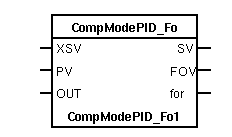
 Connect the function object to an object of class or subclass of
 CompModePID.
See also
| RtBody attributes pwr_sClass_CompModePID_Fo | |||
|---|---|---|---|
| Float32 | XSetVal | XSV | External set point value. This value is used only in the control mode CASCADE in such a way that SetVal = XSetVal. |
| Float32 | ProcVal | PV | Process value. Only used to show the process value in the object display of the Mode object. |
| Float32 | XForcVal | XFO | External forced control value. This value is used only at forced control (i.e. Force1 or Force2 is set) in such a way that ForceVal = XForceVal. |
| Boolean | Forc1 | fo1 | Specifies whether to enable or disable unconditional forced control. FALSE disables the unconditional forced control function; TRUE means that ForcVal = XForceVal and Force is set. In a usual configuration the value of ForcVal is used as control signal by the Pid object. |
| Boolean | Forc2 | fo2 | Specifies whether to enable or disable forced control when OpMod = AUTO or CASCADE. FALSE disables the conditional forced control function; TRUE means that ForcVal = XForceVal and Force is set -- if, and only if, -- OpMod = AUTO or CASCADE. In a usual configuration the value of ForcVal is used as control signal by the Pid object in this case. |
| Float32 | OutVal | OUT | The value of the last set control signal. Is usually fetched by means of an analog feedback connection to the OutVal of the Pid object. When the controlled loop is switched to MANUAL control, the process will "bump" unless ForcVal is aligned with the present process value. To avoid this ForcVal is set equal to OutVal at the switching to MANUAL control. |
| AttrRef | PlcConnect | The main object connected to this object. | |
| Pointer to Char | PlcConnectP | Contains a pointer to the connected main object. | |
| Float32 | SetVal | SV | Current set point value used in the control modes AUTO and CASCADE. The value may be changed in the control modes MANUAL and AUTO, e.g. from the object display of the Mode object. At CASCADE control SetVal is internally assigned the value of XSetVal; i.e. SetVal = XSetVal. |
| Float32 | ForcVal | FOV | In the usual configuration the value of ForcVal is used as control signal by the Pid object in the following cases: 1 unconditional forced control, i.e. Forc1 is set. ForceVal = XForceVal. 2 conditional forced control when Force2 is set and OpMod = AUTO or CASCADE. ForceVal = XForceVal. 3 OpMod = MANUAL. ForcVal is manipulated by the operator, e.g. from the object display of the Mode object. |
| Boolean | Force | for | Specifies, for instance, to a subsequent Pid object, whether to use the result of the algorithm or not as a control signal. FALSE means AUTO or CASCADE control, i.e. the control signal depends on the result of the algorithm. TRUE means forced control or MANUAL control. |
| Boolean | AutMode | aut | Indicates if the control mode AUTO is selected or not. FALSE means that AUTO is not the control mode; TRUE means that AUTO is the control mode. A subsequent Pid object does not have to make any distinction between AUTO or CASCADE, so this attribute is often used only as information. |
| Boolean | CascMod | cas | Indicates if the control mode CASCADE is selected or not. FALSE means that CASCADE is not the control mode; TRUE means that CASCADE is the control mode. A subsequent Pid object does not have to make any distinction between AUTO or CASCADE, so this attribute is often used only as information. |
| DevBody attributes | |||
|---|---|---|---|
| pwrs:Class-$PlcNode | PlcNode | ||
| GraphPlcNode | |
|---|---|
| object_type | 11 |
| parameters[0] | 6 |
| parameters[1] | 2 |
| parameters[2] | 5 |
| parameters[3] | 0 |
| graphmethod | 0 (standard, individual attributes) |
| graphindex | 0 |
| default_mask[0] | 35 |
| default_mask[1] | 7 |
| segname_annotation | 1 |
| compmethod | 35 |
| compindex | 0 |
| tracemethod | 0 |
| traceindex | 0 |
| connectmethod | 10 |
| executeordermethod | 2 |
| objname | CompModePID_Fo |
| graphname | CompModePID_Fo |
| Template Object |
|---|
| XSetVal Input | ||
|---|---|---|
| Class | Input | |
| Type | Float32 | |
| Flags | State|Noedit | |
| GraphName | XSV | |
| Body | RtBody | |
 External set point value. This value is used only in
 the control mode CASCADE in such a way that SetVal =
 XSetVal.
| ProcVal Input | ||
|---|---|---|
| Class | Input | |
| Type | Float32 | |
| Flags | State|Noedit | |
| GraphName | PV | |
| Body | RtBody | |
 Process value. Only used to show the process value in
 the object display of the Mode object.
| XForcVal Input | ||
|---|---|---|
| Class | Input | |
| Type | Float32 | |
| Flags | ||
| GraphName | XFO | |
| Body | RtBody | |
 External forced control value. This value is used only
 at forced control (i.e. Force1 or Force2 is set) in
 such a way that ForceVal = XForceVal.
| Forc1 Input | ||
|---|---|---|
| Class | Input | |
| Type | Boolean | |
| Flags | State|Noedit|Noinvert | |
| GraphName | fo1 | |
| Body | RtBody | |
 Specifies whether to enable or disable unconditional
 forced control.
 FALSE disables the unconditional forced control function;
 TRUE means that ForcVal = XForceVal and Force is set.
 In a usual configuration the value of ForcVal is used
 as control signal by the Pid object.
| Forc2 Input | ||
|---|---|---|
| Class | Input | |
| Type | Boolean | |
| Flags | State|Noedit|Noinvert | |
| GraphName | fo2 | |
| Body | RtBody | |
 Specifies whether to enable or disable forced control
 when OpMod = AUTO or CASCADE.
 FALSE disables the conditional forced control
 function; TRUE means that ForcVal = XForceVal and Force
 is set -- if, and only if, -- OpMod = AUTO or CASCADE.
 In a usual configuration the value of ForcVal is used
 as control signal by the Pid object in this case.
| OutVal Input | ||
|---|---|---|
| Class | Input | |
| Type | Float32 | |
| Flags | State|Noedit | |
| GraphName | OUT | |
| Body | RtBody | |
 The value of the last set control signal. Is usually
 fetched by means of an analog feedback connection to
 the OutVal of the Pid object. When the controlled loop
 is switched to MANUAL control, the process will "bump"
 unless ForcVal is aligned with the present process
 value. To avoid this ForcVal is set equal to OutVal at
 the switching to MANUAL control.
| PlcConnect Intern | ||
|---|---|---|
| Class | Intern | |
| Type | AttrRef | |
| Flags | ||
| Body | RtBody | |
 The main object of class CompModePID (or a subclass of this class).
 This attribute is set when the object is connected to the main object
 with the connect function in the plc editor.
| PlcConnectP Intern | ||
|---|---|---|
| Class | Intern | |
| Type | Pointer to Char | |
| Flags | Pointer|Invisible|Private | |
| Body | RtBody | |
Contains a pointer to the connected main object.
| SetVal Output | ||
|---|---|---|
| Class | Output | |
| Type | Float32 | |
| Flags | ReduTransfer|State|Noedit | |
| GraphName | SV | |
| Body | RtBody | |
 Current set point value used in the control modes AUTO
 and CASCADE. The value may be changed in the control
 modes MANUAL and AUTO, e.g. from the object display of
 the Mode object. At CASCADE control SetVal is
 internally assigned the value of XSetVal; i.e. SetVal =
 XSetVal.
| ForcVal Output | ||
|---|---|---|
| Class | Output | |
| Type | Float32 | |
| Flags | ReduTransfer|State|Noedit | |
| GraphName | FOV | |
| Body | RtBody | |
 In the usual configuration the value of ForcVal is used
 as control signal by the Pid object in the following
 cases:

 1  unconditional forced control, i.e. Forc1 is set.
    ForceVal = XForceVal.
 2  conditional forced control when Force2 is set and
    OpMod = AUTO or CASCADE. ForceVal = XForceVal.

 3  OpMod = MANUAL. ForcVal is manipulated by the
    operator, e.g. from the object display of the Mode
    object.
| Force Output | ||
|---|---|---|
| Class | Output | |
| Type | Boolean | |
| Flags | ReduTransfer|State|Noedit | |
| GraphName | for | |
| Body | RtBody | |
 Specifies, for instance, to a subsequent Pid object,
 whether to use the result of the algorithm or not as a
 control signal. FALSE means AUTO or CASCADE control,
 i.e. the control signal depends on the result of the
 algorithm. TRUE means forced control or MANUAL control.
| AutMode Output | ||
|---|---|---|
| Class | Output | |
| Type | Boolean | |
| Flags | ReduTransfer|State|Noedit | |
| GraphName | aut | |
| Body | RtBody | |
 Indicates if the control mode AUTO is selected or not.
 FALSE means that AUTO is not the control mode; TRUE
 means that AUTO is the control mode.
 A subsequent Pid object does not have to make any
 distinction between AUTO or CASCADE, so this attribute
 is often used only as information.
| CascMod Output | ||
|---|---|---|
| Class | Output | |
| Type | Boolean | |
| Flags | ReduTransfer|State|Noedit | |
| GraphName | cas | |
| Body | RtBody | |
 Indicates if the control mode CASCADE is selected or
 not. FALSE means that CASCADE is not the control mode;
 TRUE means that CASCADE is the control mode.
 A subsequent Pid object does not have to make any
 distinction between AUTO or CASCADE, so this attribute
 is often used only as information.
| PlcNode Buffer | ||
|---|---|---|
| Class | Buffer | |
| Type | pwrs:Class-$PlcNode | |
| Flags | Invisible | |
| Body | DevBody | |