
| Volume pwrb | |
| Attributes: Runtime | Development | System | Template | Detail C Binding: Struct | Class ClassTree | INDEX NO INDEX |
|
Class Head
|
||
|---|---|---|
| Version | 1.0 | |
| Modified | 08-MAR-2026 11:05:32.00 | |
 Single-row text object.

 If no text is specified, in e.g. a Frame object, the
 object can be used to frame other objects.

 The only difference between Frame, Head, Text, and
 Title is the default values of the attributes.

 They are used in Document objects where, for instance,
  - Title specifies what the configuration is doing, i.e.
    the function.
  - Sub-functions are named by Head objects.
  - Frame and Text are used to information of details.
HintsA well-done PLC program ought to contain not only objects necessary to the computer execution but also objects whose purpose are to make the program more easy to understand to later readers. See figure below.
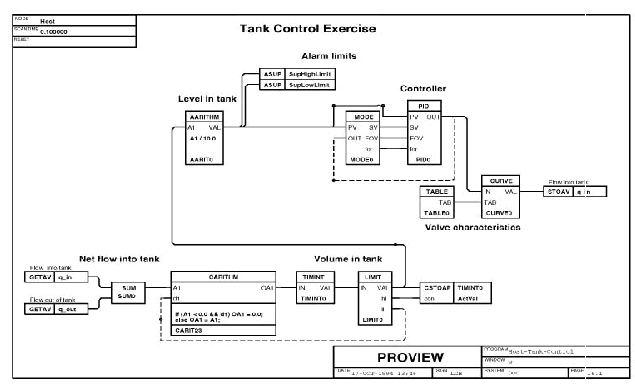
Title, Head and Text Objects Make the Program Easy to Read.
| DevBody attributes | |||
|---|---|---|---|
| String80 | Text | Text | Specifies the text to be shown in the object. |
| TextAttrEnum | TextAttribute | The attribute influence the appearance of the text. The following values are used: 0, 1, 2, 3. |
|
| FrameAttrEnum | FrameAttribute | Specifies if the text is to be surrounded by a some kind of frame. |
|
| Float32 | FrameWidth | If the object has a frame the attributes will determine the size of the frame. 0, 0 means the size of the frame is accommodated to the current text. If the object is used only to frame other objects the attributes have to be increased in suitable way. |
|
| Float32 | FrameHeight | ||
| PlcNode | PlcNode | ||
| GraphPlcNode | |
|---|---|
| object_type | 11 |
| parameters[0] | 0 |
| parameters[1] | 1 |
| parameters[2] | 0 |
| parameters[3] | 0 |
| subwindows | 0 |
| graphmethod | 3 (text) |
| graphindex | 1 |
| default_mask[0] | 0 |
| default_mask[1] | 0 |
| segname_annotation | 0 |
| devbody_annotation | 1 |
| compmethod | 2 |
| compindex | 0 |
| tracemethod | 0 |
| traceindex | 0 |
| objname | Head |
| graphname | Head |
| debugpar | |
| Template Object | |
|---|---|
| TextAttribute | 2 |
| FrameAttribute | 2 |
| Text Intern | ||
|---|---|---|
| Class | Intern | |
| Type | String80 | |
| Flags | ||
| GraphName | Text | |
| Body | DevBody | |
Specifies the text to be shown in the object.
| TextAttribute Intern | ||
|---|---|---|
| Class | Intern | |
| Type | TextAttrEnum | |
| Flags | ||
| Body | DevBody | |
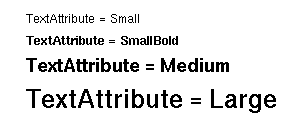
 The attribute influence the appearance of the text. The
 following values are used: 0, 1, 2, 3.
| FrameAttribute Intern | ||
|---|---|---|
| Class | Intern | |
| Type | FrameAttrEnum | |
| Flags | ||
| Body | DevBody | |
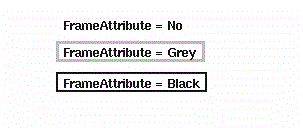
 Specifies if the text is to be surrounded by a some
 kind of frame.
| FrameWidth Intern | ||
|---|---|---|
| Class | Intern | |
| Type | Float32 | |
| Flags | ||
| Body | DevBody | |
 If the object has a frame the attributes will determine
 the size of the frame.
 0, 0 means the size of the frame is accommodated to the
 current text.

 If the object is used only to frame other objects the
 attributes have to be increased in suitable way.
| FrameHeight Intern | ||
|---|---|---|
| Class | Intern | |
| Type | Float32 | |
| Flags | ||
| Body | DevBody | |
| PlcNode Buffer | ||
|---|---|---|
| Class | Buffer | |
| Type | PlcNode | |
| Flags | INVISIBLE | |
| Body | DevBody | |