
| Volume pwrb | |
| Attributes: Runtime | Development | System | Template | Detail C Binding: Struct | Class | Code ClassTree | INDEX NO INDEX |
|
Class Mode
|
||
|---|---|---|
| Version | 2.0 | |
| Modified | 08-MAR-2026 11:05:32.00 | |
| Code | rt_plc_pid.c | |
 Used to select control modes (MANUAL / AUTO / CASCADE)
 or forced control of Pid objects.
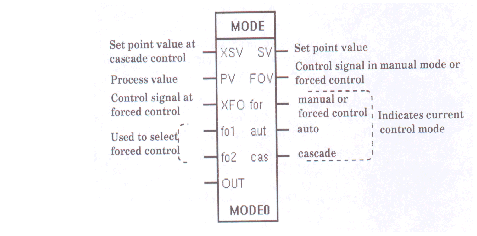
 The control modes are:

  - MANUAL -- when the 'operator' sets the output of the
    Pid object
  - AUTO   -- when the 'operator' chooses the set point
    value
  - CASCADE -- the output from a Pid object is used to
    adjust the set point value in a
    secondary Pid object.

 Forced control means that the control signal from the
 Pid object is not taken from the PID-algorithm but from
 the XForcVal-attribute in the Mode object. See control
 examples at the Pid object.
Object graph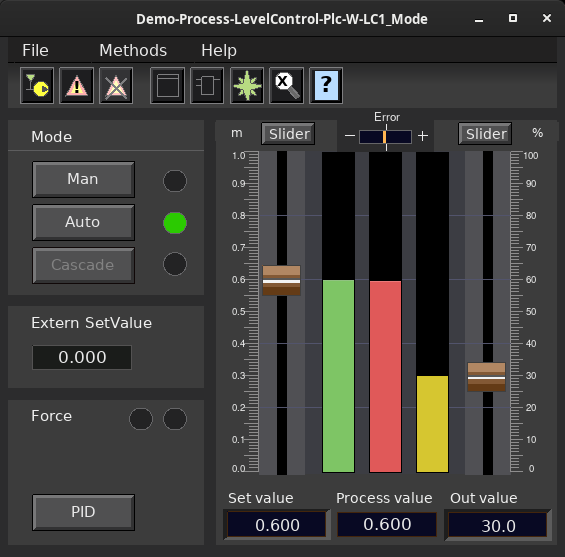
See also
| RtBody attributes pwr_sClass_mode | |||
|---|---|---|---|
| Float32 | XSetVal | XSV | External set point value. This value is used only in the control mode CASCADE in such a way that SetVal = XSetVal. |
| Float32 | ProcVal | PV | Process value. Only used to show the process value in the object display of the Mode object. |
| Float32 | XForcVal | XFO | External forced control value. This value is used only at forced control (i.e. Force1 or Force2 is set) in such a way that ForceVal = XForceVal. |
| Boolean | Forc1 | fo1 | Specifies whether to enable or disable unconditional forced control; see figure 3-29, p. 3-209. FALSE disables the unconditional forced control function; TRUE means that ForcVal = XForceVal and Force is set. In a usual configuration the value of ForcVal is used as control signal by the Pid object. |
| Boolean | Forc2 | fo2 | Specifies whether to enable or disable forced control when OpMod = AUTO or CASCADE. FALSE disables the conditional forced control function; TRUE means that ForcVal = XForceVal and Force is set -- if, and only if, -- OpMod = AUTO or CASCADE. In a usual configuration the value of ForcVal is used as control signal by the Pid object in this case. |
| Float32 | OutVal | OUT | The value of the last set control signal. Is usually fetched by means of an analog feedback connection to the OutVal of the Pid object. When the controlled loop is switched to MANUAL control, the process will "bump" unless ForcVal is aligned with the present process value. To avoid this ForcVal is set equal to OutVal at the switching to MANUAL control. |
| Float32 | SetVal | SV | Current set point value used in the control modes AUTO and CASCADE. The value may be changed in the control modes MANUAL and AUTO, e.g. from the object display of the Mode object. At CASCADE control SetVal is internally assigned the value of XSetVal; i.e. SetVal = XSetVal. |
| Float32 | ForcVal | FOV | In the usual configuration the value of ForcVal is used as control signal by the Pid object in the following cases: 1 unconditional forced control, i.e. Forc1 is set. ForceVal = XForceVal. 2 conditional forced control when Force2 is set and OpMod = AUTO or CASCADE. ForceVal = XForceVal. 3 OpMod = MANUAL. ForcVal is manipulated by the operator, e.g. from the object display of the Mode object. |
| Boolean | Force | for | Specifies, for instance, to a subsequent Pid object, whether to use the result of the algorithm or not as a control signal. FALSE means AUTO or CASCADE control, i.e. the control signal depends on the result of the algorithm. TRUE means forced control or MANUAL control. |
| Boolean | AutMode | aut | Indicates if the control mode AUTO is selected or not. FALSE means that AUTO is not the control mode; TRUE means that AUTO is the control mode. A subsequent Pid object does not have to make any distinction between AUTO or CASCADE, so this attribute is often used only as information. |
| Boolean | CascMod | cas | Indicates if the control mode CASCADE is selected or not. FALSE means that CASCADE is not the control mode; TRUE means that CASCADE is the control mode. A subsequent Pid object does not have to make any distinction between AUTO or CASCADE, so this attribute is often used only as information. |
| Boolean | ManMode | man | Indicates if the control mode MANUAL is selected or not. FALSE means that MANUAL is not the control mode; TRUE means that MANUAL is the control mode. This attribute is used only as information. |
| PidOpModeEnum | OpMod | OpMod | Specifies the actual control mode. The value is changed from the object display of the Mode object. = 1 MANUAL. The operator selects the control signal of the controller. The control signal is forced to the value of ForceVal. MinOut and MaxOut define the valid interval of the control signal. = 2 AUTO. The operator selects and sets the set point value, SetVal. MinSet and MaxSet define the valid interval of SetVal. The controller uses SetVal as set point value and calculates the control signal. = 4 CASCADE. The controller uses XSetVal as set point value and calculates the control signal. Illustrates the Connection between Forced Control and Control Modes |
| PidModeEnum | AccMod | AccMod | The operator's authorities to change OpMod. The possible bit map values allow the following modes: 1 -- Only MANUAL 2 -- Only AUTO 3 -- MANUAL / AUTO 4 -- Only CASCADE 5 -- CASCADE / MANUAL 6 -- CASCADE / AUTO 7 -- MANUAL / AUTO / CASCADE |
| Int32 | AccOut | AccOut | The operator's authorities to change ForcVal. 0 -- Changes not allowed. != 0 -- Changes allowed. |
| Float32 | MinOut | MinOut | The choice of the operator of ForcVal is checked against the interval { MinOut, MaxOut}. ForcVal may be changed in the control mode MANUAL from the display of the Mode object. |
| Float32 | MaxOut | MaxOut | |
| Int32 | AccSet | AccSet | The operator's authorities to change SetVal. 0 -- Changes not allowed. != 0 -- Changes allowed. |
| Float32 | MinSet | MinSet | The choice of the operator of SetVal is checked against the interval { MinSet, MaxSet}. The value may be changed in the control modes MANUAL and AUTO from the display of the Mode object. |
| Float32 | MaxSet | MaxSet | |
| Float32 | SetMinShow | SetMinShow | The lower respectively upper limits in the bar graphs at presentation of process and set point values in the Mode object display. The values may be changed in the more info form of the Mode object. |
| Float32 | SetMaxShow | SetMaxShow | |
| String16 | SetEngUnit | SetEngUnit | Specifies the engineering unit of XSetVal / SetVal / SetMinShow / SetMaxShow, e.g. kg. Used in the Mode object display. |
| FloatPrecisionEnum | SetPrecision | SetPrecision | Specifies the number of characters displayed after the decimal point for set value and process value in the object graph. |
| Float32 | OutMinShow | OutMinShow | The lower respectively upper limits in the bar graph at presentation of the control signal, OutVal, of the Pid object in the Mode display. The values may be changed in the more info form of the Mode object. |
| Float32 | OutMaxShow | OutMaxShow | |
| String16 | OutEngUnit | OutEngUnit | Specifies the engineering unit of XForcVal / OutVal / ForcVal / OutMinShow / OutMaxShow e.g. %. Used in the Mode object display. |
| FloatPrecisionEnum | OutPrecision | OutPrecision | Specifies the number of characters displayed after the decimal point for output value in the object graph. |
| Float32 | Error | Error | The difference between process value and set value. |
| Float32 | ErrorMinShow | ErrorMinShow | The lower respectively upper limits in the graphical display of the error in the object graph. |
| Float32 | ErrorMaxShow | ErrorMaxShow | |
| Boolean | AdjustableRanges | Specifies that the ranges for set value, process value and output in the object graph can be adjusted. |
|
| Objid | PidObjDId | PidObjDId | Specifies the complete name of the Pid object associated to this Mode object. The attribute makes it possible to start the object display of the associated Pid from a button in the object display of the Mode |
| DevBody attributes | |||
|---|---|---|---|
| PlcNode | PlcNode | ||
| GraphPlcNode | |
|---|---|
| object_type | 151 |
| parameters[0] | 6 |
| parameters[1] | 0 |
| parameters[2] | 5 |
| parameters[3] | 0 |
| subwindows | 0 |
| graphmethod | 0 (standard, individual attributes) |
| graphindex | 0 |
| default_mask[0] | 35 |
| default_mask[1] | 7 |
| segname_annotation | 1 |
| compmethod | 4 |
| compindex | 0 |
| executeordermethod | 2 |
| objname | Mode |
| graphname | Mode |
| debugpar | |
| Template Object | |
|---|---|
| OpMod | 1 |
| AccMod | 3 |
| AccOut | 15 |
| AccSet | 15 |
| MaxOut | 100.0 |
| MaxSet | 100.0 |
| OutMaxShow | 100.0 |
| SetMaxShow | 100.0 |
| OutEngUnit | % |
| SetEngUnit | % |
| SetPrecision | 1 |
| OutPrecision | 1 |
| ErrorMinShow | -10.0 |
| ErrorMaxShow | 10.0 |
| XSetVal Input | ||
|---|---|---|
| Class | Input | |
| Type | Float32 | |
| Flags | STATE | NOEDIT | REDUTRANSFER | |
| GraphName | XSV | |
| Body | RtBody | |
 External set point value. This value is used only in
 the control mode CASCADE in such a way that SetVal =
 XSetVal.
| ProcVal Input | ||
|---|---|---|
| Class | Input | |
| Type | Float32 | |
| Flags | STATE | NOEDIT | REDUTRANSFER | |
| GraphName | PV | |
| Body | RtBody | |
 Process value. Only used to show the process value in
 the object display of the Mode object.
| XForcVal Input | ||
|---|---|---|
| Class | Input | |
| Type | Float32 | |
| Flags | REDUTRANSFER | |
| GraphName | XFO | |
| Body | RtBody | |
 External forced control value. This value is used only
 at forced control (i.e. Force1 or Force2 is set) in
 such a way that ForceVal = XForceVal.
| Forc1 Input | ||
|---|---|---|
| Class | Input | |
| Type | Boolean | |
| Flags | STATE | NOEDIT | NOINVERT | REDUTRANSFER | |
| GraphName | fo1 | |
| Body | RtBody | |
 Specifies whether to enable or disable unconditional
 forced control; see figure 3-29, p. 3-209. FALSE
 disables the unconditional forced control function;
 TRUE means that ForcVal = XForceVal and Force is set.
 In a usual configuration the value of ForcVal is used
 as control signal by the Pid object.
| Forc2 Input | ||
|---|---|---|
| Class | Input | |
| Type | Boolean | |
| Flags | STATE | NOEDIT | NOINVERT | REDUTRANSFER | |
| GraphName | fo2 | |
| Body | RtBody | |
 Specifies whether to enable or disable forced control
 when OpMod = AUTO or CASCADE.
 FALSE disables the conditional forced control
 function; TRUE means that ForcVal = XForceVal and Force
 is set -- if, and only if, -- OpMod = AUTO or CASCADE.
 In a usual configuration the value of ForcVal is used
 as control signal by the Pid object in this case.
| OutVal Input | ||
|---|---|---|
| Class | Input | |
| Type | Float32 | |
| Flags | STATE | NOEDIT | REDUTRANSFER | |
| GraphName | OUT | |
| Body | RtBody | |
 The value of the last set control signal. Is usually
 fetched by means of an analog feedback connection to
 the OutVal of the Pid object. When the controlled loop
 is switched to MANUAL control, the process will "bump"
 unless ForcVal is aligned with the present process
 value. To avoid this ForcVal is set equal to OutVal at
 the switching to MANUAL control.
| SetVal Output | ||
|---|---|---|
| Class | Output | |
| Type | Float32 | |
| Flags | REDUTRANSFER | |
| GraphName | SV | |
| Body | RtBody | |
 Current set point value used in the control modes AUTO
 and CASCADE. The value may be changed in the control
 modes MANUAL and AUTO, e.g. from the object display of
 the Mode object. At CASCADE control SetVal is
 internally assigned the value of XSetVal; i.e. SetVal =
 XSetVal.
| ForcVal Output | ||
|---|---|---|
| Class | Output | |
| Type | Float32 | |
| Flags | STATE | NOEDIT | REDUTRANSFER | |
| GraphName | FOV | |
| Body | RtBody | |
 In the usual configuration the value of ForcVal is used
 as control signal by the Pid object in the following
 cases:

 1  unconditional forced control, i.e. Forc1 is set.
    ForceVal = XForceVal.
 2  conditional forced control when Force2 is set and
    OpMod = AUTO or CASCADE. ForceVal = XForceVal.

 3  OpMod = MANUAL. ForcVal is manipulated by the
    operator, e.g. from the object display of the Mode
    object.
| Force Output | ||
|---|---|---|
| Class | Output | |
| Type | Boolean | |
| Flags | STATE | NOEDIT | REDUTRANSFER | |
| GraphName | for | |
| Body | RtBody | |
 Specifies, for instance, to a subsequent Pid object,
 whether to use the result of the algorithm or not as a
 control signal. FALSE means AUTO or CASCADE control,
 i.e. the control signal depends on the result of the
 algorithm. TRUE means forced control or MANUAL control.
| AutMode Output | ||
|---|---|---|
| Class | Output | |
| Type | Boolean | |
| Flags | STATE | NOEDIT | REDUTRANSFER | |
| GraphName | aut | |
| Body | RtBody | |
 Indicates if the control mode AUTO is selected or not.
 FALSE means that AUTO is not the control mode; TRUE
 means that AUTO is the control mode.
 A subsequent Pid object does not have to make any
 distinction between AUTO or CASCADE, so this attribute
 is often used only as information.
| CascMod Output | ||
|---|---|---|
| Class | Output | |
| Type | Boolean | |
| Flags | STATE | NOEDIT | REDUTRANSFER | |
| GraphName | cas | |
| Body | RtBody | |
 Indicates if the control mode CASCADE is selected or
 not. FALSE means that CASCADE is not the control mode;
 TRUE means that CASCADE is the control mode.
 A subsequent Pid object does not have to make any
 distinction between AUTO or CASCADE, so this attribute
 is often used only as information.
| ManMode Intern | ||
|---|---|---|
| Class | Intern | |
| Type | Boolean | |
| Flags | STATE | NOEDIT | REDUTRANSFER | |
| GraphName | man | |
| Body | RtBody | |
 Indicates if the control mode MANUAL is selected or not.
 FALSE means that MANUAL is not the control mode; TRUE
 means that MANUAL is the control mode.
 This attribute is used only as information.
| OpMod Intern | ||
|---|---|---|
| Class | Intern | |
| Type | PidOpModeEnum | |
| Flags | REDUTRANSFER | |
| GraphName | OpMod | |
| Body | RtBody | |
 Specifies the actual control mode. The value is changed
 from the object display of the Mode object.

  = 1  MANUAL. The operator selects the control signal
     of the controller. The control signal is forced
     to the value of ForceVal. MinOut and MaxOut define
     the valid interval of the control signal.

  = 2  AUTO. The operator selects and sets the set
     point value, SetVal.
     MinSet and MaxSet define the valid interval of SetVal.
     The controller uses SetVal as set point value and
     calculates the control signal.

  = 4  CASCADE. The controller uses XSetVal as set
     point value and calculates the control signal.
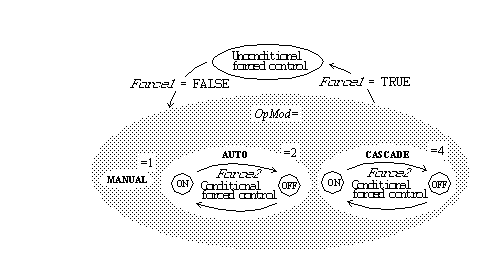
 Illustrates the Connection between Forced Control and
 Control Modes
| AccMod Intern | ||
|---|---|---|
| Class | Intern | |
| Type | PidModeEnum | |
| Flags | ||
| GraphName | AccMod | |
| Body | RtBody | |
 The operator's authorities to change OpMod. The
 possible bit map values allow the following modes:

  1 -- Only MANUAL
  2 -- Only AUTO
  3 -- MANUAL / AUTO
  4 -- Only CASCADE
  5 -- CASCADE / MANUAL
  6 -- CASCADE / AUTO
  7 -- MANUAL / AUTO / CASCADE
| AccOut Intern | ||
|---|---|---|
| Class | Intern | |
| Type | Int32 | |
| Flags | ||
| GraphName | AccOut | |
| Body | RtBody | |
 The operator's authorities to change ForcVal.

 0   -- Changes not allowed.
 != 0 -- Changes allowed.
| MinOut Intern | ||
|---|---|---|
| Class | Intern | |
| Type | Float32 | |
| Flags | REDUTRANSFER | |
| GraphName | MinOut | |
| Body | RtBody | |
 The choice of the operator of ForcVal is checked
 against the interval { MinOut, MaxOut}. ForcVal may be
 changed in the control mode MANUAL from the display of
 the Mode object.
| MaxOut Intern | ||
|---|---|---|
| Class | Intern | |
| Type | Float32 | |
| Flags | REDUTRANSFER | |
| GraphName | MaxOut | |
| Body | RtBody | |
| AccSet Intern | ||
|---|---|---|
| Class | Intern | |
| Type | Int32 | |
| Flags | ||
| GraphName | AccSet | |
| Body | RtBody | |
 The operator's authorities to change SetVal.

   0   -- Changes not allowed.
   != 0 -- Changes allowed.
| MinSet Intern | ||
|---|---|---|
| Class | Intern | |
| Type | Float32 | |
| Flags | ||
| GraphName | MinSet | |
| Body | RtBody | |
 The choice of the operator of SetVal is checked against
 the interval { MinSet, MaxSet}. The value may be
 changed in the control modes MANUAL and AUTO from the
 display of the Mode object.
| MaxSet Intern | ||
|---|---|---|
| Class | Intern | |
| Type | Float32 | |
| Flags | ||
| GraphName | MaxSet | |
| Body | RtBody | |
| SetMinShow Intern | ||
|---|---|---|
| Class | Intern | |
| Type | Float32 | |
| Flags | REDUTRANSFER | |
| GraphName | SetMinShow | |
| Body | RtBody | |
 The lower respectively upper limits in the bar graphs
 at presentation of process and set point values in the
 Mode object display. The values may be changed in the
 more info form of the Mode object.
| SetMaxShow Intern | ||
|---|---|---|
| Class | Intern | |
| Type | Float32 | |
| Flags | REDUTRANSFER | |
| GraphName | SetMaxShow | |
| Body | RtBody | |
| SetEngUnit Intern | ||
|---|---|---|
| Class | Intern | |
| Type | String16 | |
| Flags | ||
| GraphName | SetEngUnit | |
| Body | RtBody | |
 Specifies the engineering unit of XSetVal / SetVal / SetMinShow /
 SetMaxShow, e.g. kg. Used in the Mode object display.
| SetPrecision Intern | ||
|---|---|---|
| Class | Intern | |
| Type | FloatPrecisionEnum | |
| Flags | ||
| GraphName | SetPrecision | |
| Body | RtBody | |
 Specifies the number of characters displayed after the decimal point
 for set value and process value in the object graph.
| OutMinShow Intern | ||
|---|---|---|
| Class | Intern | |
| Type | Float32 | |
| Flags | REDUTRANSFER | |
| GraphName | OutMinShow | |
| Body | RtBody | |
 The lower respectively upper limits in the bar graph at
 presentation of the control signal, OutVal, of the Pid
 object in the Mode display. The values may be changed
 in the more info form of the Mode object.
| OutMaxShow Intern | ||
|---|---|---|
| Class | Intern | |
| Type | Float32 | |
| Flags | REDUTRANSFER | |
| GraphName | OutMaxShow | |
| Body | RtBody | |
| OutEngUnit Intern | ||
|---|---|---|
| Class | Intern | |
| Type | String16 | |
| Flags | ||
| GraphName | OutEngUnit | |
| Body | RtBody | |
 Specifies the engineering unit of XForcVal / OutVal /
 ForcVal / OutMinShow / OutMaxShow e.g. %.
 Used in the Mode object display.
| OutPrecision Intern | ||
|---|---|---|
| Class | Intern | |
| Type | FloatPrecisionEnum | |
| Flags | ||
| GraphName | OutPrecision | |
| Body | RtBody | |
 Specifies the number of characters displayed after the decimal point
 for output value in the object graph.
| Error Intern | ||
|---|---|---|
| Class | Intern | |
| Type | Float32 | |
| Flags | STATE | NOEDIT | |
| GraphName | Error | |
| Body | RtBody | |
The difference between process value and set value.
| ErrorMinShow Intern | ||
|---|---|---|
| Class | Intern | |
| Type | Float32 | |
| Flags | ||
| GraphName | ErrorMinShow | |
| Body | RtBody | |
 The lower respectively upper limits in the graphical
 display of the error in the object graph.
| ErrorMaxShow Intern | ||
|---|---|---|
| Class | Intern | |
| Type | Float32 | |
| Flags | ||
| GraphName | ErrorMaxShow | |
| Body | RtBody | |
| AdjustableRanges Intern | ||
|---|---|---|
| Class | Intern | |
| Type | Boolean | |
| Flags | ||
| Body | RtBody | |
 Specifies that the ranges for set value, process value and output
 in the object graph can be adjusted.
| PidObjDId Intern | ||
|---|---|---|
| Class | Intern | |
| Type | Objid | |
| Flags | ||
| GraphName | PidObjDId | |
| Body | RtBody | |
 Specifies the complete name of the Pid object
 associated to this Mode object. The attribute makes it
 possible to start the object display of the associated
 Pid from a button in the object display of the Mode
| PlcNode Buffer | ||
|---|---|---|
| Class | Buffer | |
| Type | PlcNode | |
| Flags | INVISIBLE | |
| Body | DevBody | |