
| Volume pwrb | |
| Attributes: Runtime | Development | System | Template | Detail C Binding: Struct | Class | Code ClassTree | INDEX NO INDEX |
|
Class MValve
|
||
|---|---|---|
| Version | 1.0 | |
| Modified | 08-MAR-2026 11:05:32.00 | |
| Code | rt_plc_drive.c | |
 Motor valve positioner with three operating states and
 supervision of operation time and contactor response.
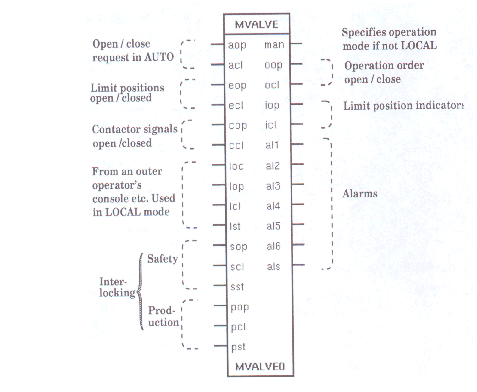
 This object is similar to the Valve object but can
 furthermore be stopped in a continues order, i.e.
 three-level action.
 The operating states, here named OPEN, STOP, and CLOSE,
 can be interpreted as: up - stop - down, right - stop -
 left, increase - stop - decrease etc.

 By means of the operation time supervision it is
 possible to detect if the final control element is
 stopped between the two operating states.

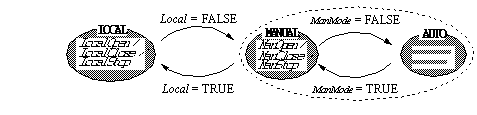
 One of three operating modes, LOCAL / MANUAL / AUTO, is
 selected by means of the input signal Local and the
 output signal ManMode in the following way:
 In AUTO mode AutoOpen/AutoClose-request remains as long
 as the operation has to continue, else the motion stops
 in some intermediate position.
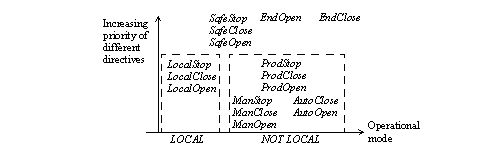
 If there are conflicting requests the request with the
 highest priority wins; see below.
 Contactor alarm, Alarm5 or Alarm 6, stops current
 operation. A new order resets the alarms and initiates
 a new operation.
Carriage Operation
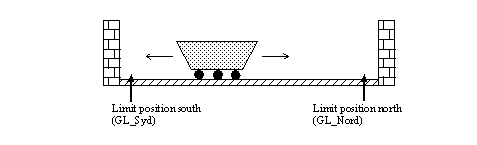
 The carriage is run only in MANUAL mode.

 Contactor response and motion guard have the same supervision time.
 The supervision of the operation response also have to make an alarm.
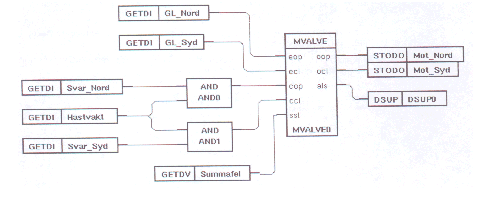
MValve Object Used in Motor ControlControl Valve
 Motor Valve Control

 At LowLow-level the valve runs to closed position and at emergency
 stop ( 'nödstopp' in Swedish) all control of the valve stops.

 Alarm at error in contactor response or too long operation time.
 Operational order is broken by activated end limit position.
| RtBody attributes pwr_sClass_mvalve | |||
|---|---|---|---|
| Boolean | AutoOpen | aop | Specifies an OPEN request in operational mode AUTO. FALSE has no meaning and TRUE means OPEN request. |
| Boolean | AutoClose | acl | Specifies a CLOSE request in operational mode AUTO. FALSE has no meaning and TRUE means CLOSE request. |
| Boolean | EndOpen | eop | Specifies whether the end limit position of OPEN is activated or not. FALSE means "no" and TRUE means that the answer is yes and OrderOpen is reset. Used by Alarm1 and Alarm3. |
| Boolean | EndClose | ecl | Specifies whether the end limit position of CLOSE is activated or not. FALSE means "no" and TRUE means that the answer is yes and OrderClose is reset. Used by Alarm2 and Alarm4. |
| Boolean | ConOpen | cop | Contactor response at OPEN-order. If the cop-input is left open the oop-output will be used as an internal input signal and the value is stored in ConOpen. FALSE means that the contactor has not been closed, but TRUE means that it has. |
| Boolean | ConClose | ccl | Contactor response at CLOSE-order. If the ccl-input is left open the ocl-output will be used as an internal input signal and the value is stored in ConClose. FALSE means that the contactor has not been closed, but TRUE means that it has. |
| Boolean | Local | loc | Selection of operational mode. The signal may proceed from a rotary switch, for example. FALSE means that the operational mode 'NOT LOCAL' is selected and ManMode whether it is MANUAL or AUTO. TRUE means that the operational mode LOCAL has been selected. |
| Boolean | LocalOpen | lop | Specifies OPEN, CLOSE respectively STOP request in operational mode LOCAL. FALSE means no action. LocalOpen = TRUE, implies that the operation order OrderOpen is set and will be set until a CLOSE or STOP request is made. LocalClose = TRUE, implies the operation order OrderClose is set and will be set until an OPEN or STOP request is made. LocalStop = TRUE, implies that the operation orders, OrderClose and OrderOpen, will be reset and remain reset until an OPEN or CLOSE request is made. |
| Boolean | LocalClose | lcl | |
| Boolean | LocalStop | lst | |
| Boolean | SafeOpen | sop | Specifies the state of the safety interlocking at OPEN operation. This interlocking is valid independent of operational mode. FALSE means that this safety interlocking is not activated. TRUE means unconditionally OPEN, i.e. the operation order OrderOpen is set, unless any of SafeClose, SafeStop or Alarm5 is TRUE. If SafeClose = SafeOpen = SafeStop = TRUE SafeStop wins. |
| Boolean | SafeClose | scl | Specifies the state of the safety interlocking at CLOSE operation. This interlocking is valid independent of operational mode. FALSE means that this safety interlocking is not activated. TRUE means unconditionally CLOSE, i.e. the operation order OrderClose is set, unless any of SafeOpen, SafeStop or Alarm6 is TRUE. If SafeClose = SafeOpen = SafeStop = TRUE SafeStop wins. |
| Boolean | SafeStop | sst | Specifies the state of the safety interlocking at STOP operation. This interlocking is valid independent of operational mode. FALSE means that this safety interlocking is not activated. TRUE means unconditional STOP, i.e. both the operation orders, OrderClose and OrderOpen are reset. If SafeClose = SafeOpen = SafeStop = TRUE SafeStop wins. |
| Boolean | ProdOpen | pop | Specifies the state of the production interlocking at OPEN operation and is valid only for the operational modes AUTO and MANUAL. FALSE means that the production interlocking is not activated. TRUE means that the operation order OrderOpen is set, unless SafeClose, SafeStop, ProdClose, ProdStop, Alarm5, or Local is set. |
| Boolean | ProdClose | pcl | Specifies the state of the production interlocking at CLOSE operation and is valid only for the operational modes AUTO and MANUAL. FALSE means that the production interlocking is not activated. TRUE means that the operation order OrderClose is set, unless SafeOpen, SafeStop, ProdStop, Alarms, or Local is set. |
| Boolean | ProdStop | pst | Specifies the state of the production interlocking at STOP operation and is valid only for the operational modes AUTO and MANUAL. FALSE means that the production interlocking is not activated. TRUE means that operation orders, OrderClose and OrderOpen are reset, unless SafeOpen, SafeClose, or Local is set. |
| Boolean | ManMode | man | Specifies required operational mode ( MANUAL or AUTO) when LOCAL is FALSE. Used as an ordinary parameter, e.g. it may be written into from display programs. The advantage of placing this attribute as an output is that it will be easier to use it in the graphic configuration. If Local is FALSE means FALSE -- required operational mode is AUTO TRUE -- - " - MANUAL |
| Boolean | OrderOpen | oop | This operational order specifies one of the three operating states. FALSE means here that OPEN state is not activated, and if OrderClose is also FALSE it means STOP state. TRUE means OPEN state. |
| Boolean | OrderClose | ocl | This operational order specifies one of the three operating states. FALSE means here that CLOSE state is not activated, and if OrderOpen is also FALSE it means STOP state. TRUE means CLOSE state. |
| Boolean | IndOpen | iop | The attribute is a confirmation of the current OPENED state and that an OPENING operation has not yet started. TRUE indicates EndOpen = TRUE and IndClosed = OrderClose = Local = EndClose = FALSE, otherwise IndOpen is FALSE. |
| Boolean | IndClosed | icl | The attribute is a confirmation of the current CLOSED state and that a CLOSING operation has not yet started. TRUE indicates EndClose = TRUE and IndOpen = OrderOpen = Local = EndOpen = FALSE, otherwise IndOpen is FALSE. |
| Boolean | Alarm1 | al1 | Specifies if the OrderOpen has been set during a time longer than RunTime without any activating of the end position, i.e. EndOpen has not been set. FALSE means no alarm; TRUE means that EndOpen was not set within the time limit value RunTime. The operational order, OrderOpen, is not influenced by the alarm. The alarm remains until EndOpen is TRUE or a CLOSE request is made; it is not affected by a STOP-request. Connects a DSup object to the output if a message will be sent and specifies DetectText in the DSup object; e.g. 'Too long operation time at OPEN-order on xxx' |
| Boolean | Alarm2 | al2 | Specifies if the OrderClose has been set during a time longer than RunTime without any activating of the end position, i.e. EndClosed has not been set. FALSE means no alarm; TRUE means that EndClosed was not set within the time limit value RunTime. The operational order, OrderClose, is not influenced by the alarm. The alarm remains until EndClosed is TRUE or an OPEN request is made; it is not affected by a STOP-request. Connects a DSup object to the output if a message will be sent and specifies DetectText in the DSup object; e.g. 'Too long operation time at CLOSE-order on xxx' |
| Boolean | Alarm3 | al3 | Specifies if the EndOpen signal is lost, i.e. makes the transition TRUE -> FALSE without OrderClose being TRUE or if both limit position indicators ( EndClose and EndClosed) are activated at the same time. The operational order, OrderOpen, is not influenced by the alarm. The alarm remains until EndOpen = TRUE and EndClose = FALSE or OrderClose is set. Connects a DSup object to the output if a message will be sent and specifies DetectText in the DSup object; e.g. 'Lost limit position OPENED on xxx'. |
| Boolean | Alarm4 | al4 | Specifies if the EndClosed signal is lost, i.e. makes the transition TRUE -> FALSE without OrderOpen being TRUE or if both limit position indicators ( EndClose and EndClosed) are activated at the same time. The operational order OrderClose is not influenced by the alarm. The alarm remains until EndClose = TRUE and EndOpen = FALSE or OrderClose is set. Connect a DSup object to the output if message is to be sent and specifies DetectText in the DSup object; e.g. 'Lost limit position CLOSED on xxx'. If EndClose = EndOpen = TRUE are both Alarm3 and Alarm4 set. |
| Boolean | Alarm5 | al5 | Specifies if the contactor response at an OPEN operation arrived within the time limit value Ctime and still remains or not. FALSE means no alarm; TRUE means that the contactor response arrived within the time limit value Ctime but disappeared later; OrderOpen is reset by the ProviewR system. Connects a DSup object to the output if a message will be sent and specifies DetectText in the DSup object; e.g. 'The contactor response is lost at OPEN operation on xxxx'. The alarm remains until either OrderOpen or OrderClose is set. |
| Boolean | Alarm6 | al6 | Specifies if the contactor response at an CLOSE operation arrived within the time limit value Ctime and still remains or not. FALSE means no alarm; TRUE means that the contactor response arrived within the time limit value Ctime but disappeared later; OrderClose is reset by the ProviewR system. Connects a DSup object to the output if a message will be sent and specifies DetectText in the DSup object; e.g. 'The contactor response is lost at CLOSE operation on xxxx'. The alarm remains until either OrderOpen or OrderClose is set. |
| Boolean | SumAlarm | als | Sum of alarms. Specifies if any of the alarms exist or not. FALSE means no active alarms at all in this object; TRUE means that at least one of Alarm1, ... , Alarm6 is on. Connects a DSup object to the output if a message will be sent and specifies DetectText in the DSup object. |
| Float32 | Ctime | Ctime | Specifies, in seconds, the time limit value ( ³ 0 ) of the contactor response. If the response exceeds this value Alarm5 or Alarm6 is set. The time is counted from the moment when OrderOpen or OrderClose becomes TRUE. |
| Float32 | RunTime | RunTime | Specifies the value, in seconds, of the operation timer. If OrderOpen has been set or reset during a time longer then TimerTime without any activating of the end corresponding position Alarm1 or Alarm2 is set. |
| Boolean | TimerFlag | Indicates an active timer. | |
| Pointer to Boolean | TimerNext | Points to the next element in the timer queue. | |
| UInt32 | TimerCount | Number of remaining ticks. | |
| Pointer to Boolean | TimerDO | Points to a Do or Dv object or, if these are not used, to TimerDoDum. After a time of TimerTime the signal specified by TimerDo is cleared. |
|
| Float32 | TimerTime | The value of the timer in seconds. It is set in run time to Ctime or RunTime. |
|
| Boolean | TimerDODum | Dummy. If TimerDoDum does not point to a Do or Dv object it points to this attribute. |
|
| Objid | TimerObjDId | Identity of this object is set at load file creation. Used by the run time system. |
|
| Int32 | ManAcc | ManAcc | The operator's authorities to change between the operational modes MANUAL / AUTO can be restricted. 0 -- Changes not allowed. != 0 -- Changes allowed. |
| Int32 | Status | Status | The possible statues values are as follows: 1 or -1 -- Waiting for OPEN or CLOSE indication 2 or -2 -- OPENING or CLOSING 3 or -3 -- OPEN or CLOSED |
| Boolean | ManOpen | ManOpen | Specifies OPEN request in the operational mode MANUAL. FALSE means no request; TRUE means OPEN request. The request is reset by the ProviewR system when it has been noticed. |
| Boolean | ManClose | ManClose | Specifies CLOSE request in the operational mode MANUAL. FALSE means no request; TRUE means CLOSE request. The request is reset by the ProviewR system when it has been noticed. |
| Boolean | ManStop | ManStop | Specifies STOP request in the operational mode MANUAL. FALSE means no request; TRUE means STOP request. The request is reset by the ProviewR system when it has been noticed. |
| DevBody attributes | |||
|---|---|---|---|
| PlcNode | PlcNode | ||
| GraphPlcNode | |
|---|---|
| object_type | 182 |
| parameters[0] | 16 |
| parameters[1] | 0 |
| parameters[2] | 12 |
| parameters[3] | 0 |
| subwindows | 0 |
| graphmethod | 0 (standard, individual attributes) |
| graphindex | 0 |
| default_mask[0] | 63 |
| default_mask[1] | 2078 |
| segname_annotation | 1 |
| compmethod | 31 |
| compindex | 0 |
| executeordermethod | 2 |
| objname | MValve |
| graphname | MValve |
| debugpar | |
| Template Object | |
|---|---|
| Ctime | 1.0 |
| RunTime | 60.0 |
| ManAcc | 15 |
| AutoOpen Input | ||
|---|---|---|
| Class | Input | |
| Type | Boolean | |
| Flags | STATE | NOEDIT | NOINVERT | REDUTRANSFER | |
| GraphName | aop | |
| Body | RtBody | |
 Specifies an OPEN request in operational mode AUTO.
 FALSE has no meaning and TRUE means OPEN request.
| AutoClose Input | ||
|---|---|---|
| Class | Input | |
| Type | Boolean | |
| Flags | STATE | NOEDIT | NOINVERT | REDUTRANSFER | |
| GraphName | acl | |
| Body | RtBody | |
 Specifies a CLOSE request in operational mode AUTO.
 FALSE has no meaning and TRUE means CLOSE request.
| EndOpen Input | ||
|---|---|---|
| Class | Input | |
| Type | Boolean | |
| Flags | STATE | NOEDIT | NOINVERT | REDUTRANSFER | |
| GraphName | eop | |
| Body | RtBody | |
 Specifies whether the end limit position of OPEN is
 activated or not. FALSE means "no" and TRUE means that
 the answer is yes and OrderOpen is reset. Used by
 Alarm1 and Alarm3.
| EndClose Input | ||
|---|---|---|
| Class | Input | |
| Type | Boolean | |
| Flags | STATE | NOEDIT | NOINVERT | REDUTRANSFER | |
| GraphName | ecl | |
| Body | RtBody | |
 Specifies whether the end limit position of CLOSE is
 activated or not. FALSE means "no" and TRUE means that
 the answer is yes and OrderClose is reset.
 Used by Alarm2 and Alarm4.
| ConOpen Input | ||
|---|---|---|
| Class | Input | |
| Type | Boolean | |
| Flags | STATE | NOEDIT | NOINVERT | REDUTRANSFER | |
| GraphName | cop | |
| Body | RtBody | |
 Contactor response at OPEN-order.
 If the cop-input is left open the oop-output will be
 used as an internal input signal and the value is
 stored in ConOpen. FALSE means that the contactor has
 not been closed, but TRUE means that it has.
| ConClose Input | ||
|---|---|---|
| Class | Input | |
| Type | Boolean | |
| Flags | STATE | NOEDIT | NOINVERT | REDUTRANSFER | |
| GraphName | ccl | |
| Body | RtBody | |
 Contactor response at CLOSE-order.
 If the ccl-input is left open the ocl-output will be
 used as an internal input signal and the value is
 stored in ConClose. FALSE means that the contactor has
 not been closed, but TRUE means that it has.
| Local Input | ||
|---|---|---|
| Class | Input | |
| Type | Boolean | |
| Flags | NOINVERT | REDUTRANSFER | |
| GraphName | loc | |
| Body | RtBody | |
 Selection of operational mode. The signal may proceed
 from a rotary switch, for example. FALSE means that the
 operational mode 'NOT LOCAL' is selected and ManMode
 whether it is MANUAL or AUTO. TRUE means that the
 operational mode LOCAL has been selected.
| LocalOpen Input | ||
|---|---|---|
| Class | Input | |
| Type | Boolean | |
| Flags | STATE | NOEDIT | NOINVERT | REDUTRANSFER | |
| GraphName | lop | |
| Body | RtBody | |
 Specifies OPEN, CLOSE respectively STOP request in
 operational mode LOCAL. FALSE means no action.
 LocalOpen = TRUE, implies that the operation order
 OrderOpen is set and will be set until a CLOSE or STOP
 request is made.

 LocalClose = TRUE, implies the operation order
 OrderClose is set and will be set until an OPEN or STOP
 request is made.
 LocalStop = TRUE, implies that the operation orders,
 OrderClose and OrderOpen, will be reset and remain
 reset until an OPEN or CLOSE request is made.
| LocalClose Input | ||
|---|---|---|
| Class | Input | |
| Type | Boolean | |
| Flags | STATE | NOEDIT | NOINVERT | REDUTRANSFER | |
| GraphName | lcl | |
| Body | RtBody | |
| LocalStop Input | ||
|---|---|---|
| Class | Input | |
| Type | Boolean | |
| Flags | STATE | NOEDIT | NOINVERT | REDUTRANSFER | |
| GraphName | lst | |
| Body | RtBody | |
| SafeOpen Input | ||
|---|---|---|
| Class | Input | |
| Type | Boolean | |
| Flags | STATE | NOEDIT | NOINVERT | REDUTRANSFER | |
| GraphName | sop | |
| Body | RtBody | |
 Specifies the state of the safety interlocking at OPEN
 operation. This interlocking is valid independent of
 operational mode.

 FALSE means that this safety interlocking is not
 activated. TRUE means unconditionally OPEN, i.e. the
 operation order OrderOpen is set, unless any of
 SafeClose, SafeStop or Alarm5 is TRUE. If SafeClose =
 SafeOpen = SafeStop = TRUE SafeStop wins.
| SafeClose Input | ||
|---|---|---|
| Class | Input | |
| Type | Boolean | |
| Flags | STATE | NOEDIT | NOINVERT | REDUTRANSFER | |
| GraphName | scl | |
| Body | RtBody | |
 Specifies the state of the safety interlocking at CLOSE
 operation. This interlocking is valid independent of
 operational mode.

 FALSE means that this safety interlocking is not
 activated. TRUE means unconditionally CLOSE, i.e. the
 operation order OrderClose is set, unless any of
 SafeOpen, SafeStop or Alarm6 is TRUE. If SafeClose =
 SafeOpen = SafeStop = TRUE SafeStop wins.
| SafeStop Input | ||
|---|---|---|
| Class | Input | |
| Type | Boolean | |
| Flags | STATE | NOEDIT | NOINVERT | REDUTRANSFER | |
| GraphName | sst | |
| Body | RtBody | |
 Specifies the state of the safety interlocking at STOP
 operation. This interlocking is valid independent of
 operational mode.
 FALSE means that this safety interlocking is not
 activated. TRUE means unconditional STOP, i.e. both the
 operation orders, OrderClose and OrderOpen are reset.
 If SafeClose = SafeOpen = SafeStop = TRUE SafeStop wins.
| ProdOpen Input | ||
|---|---|---|
| Class | Input | |
| Type | Boolean | |
| Flags | STATE | NOEDIT | NOINVERT | REDUTRANSFER | |
| GraphName | pop | |
| Body | RtBody | |
 Specifies the state of the production interlocking at
 OPEN operation and is valid only for the operational
 modes AUTO and MANUAL. FALSE means that the production
 interlocking is not activated. TRUE means that the
 operation order OrderOpen is set, unless SafeClose,
 SafeStop, ProdClose, ProdStop, Alarm5, or Local is set.
| ProdClose Input | ||
|---|---|---|
| Class | Input | |
| Type | Boolean | |
| Flags | STATE | NOEDIT | NOINVERT | REDUTRANSFER | |
| GraphName | pcl | |
| Body | RtBody | |
 Specifies the state of the production interlocking at
 CLOSE operation and is valid only for the operational
 modes AUTO and MANUAL. FALSE means that the production
 interlocking is not activated. TRUE means that the
 operation order OrderClose is set, unless SafeOpen,
 SafeStop, ProdStop, Alarms, or Local is set.
| ProdStop Input | ||
|---|---|---|
| Class | Input | |
| Type | Boolean | |
| Flags | STATE | NOEDIT | NOINVERT | REDUTRANSFER | |
| GraphName | pst | |
| Body | RtBody | |
 Specifies the state of the production interlocking at
 STOP operation and is valid only for the operational
 modes AUTO and MANUAL. FALSE means that the production
 interlocking is not activated. TRUE means that
 operation orders, OrderClose and OrderOpen are reset,
 unless SafeOpen, SafeClose, or Local is set.
| ManMode Output | ||
|---|---|---|
| Class | Output | |
| Type | Boolean | |
| Flags | REDUTRANSFER | |
| GraphName | man | |
| Body | RtBody | |
 Specifies required operational mode ( MANUAL or AUTO)
 when LOCAL is FALSE. Used as an ordinary parameter,
 e.g. it may be written into from display programs. The
 advantage of placing this attribute as an output is
 that it will be easier to use it in the graphic
 configuration. If Local is FALSE means

     FALSE -- required operational mode is AUTO
     TRUE  --    -  "  -              MANUAL
| OrderOpen Output | ||
|---|---|---|
| Class | Output | |
| Type | Boolean | |
| Flags | STATE | NOEDIT | REDUTRANSFER | |
| GraphName | oop | |
| Body | RtBody | |
 This operational order specifies one of the three
 operating states. FALSE means here that OPEN state is
 not activated, and if OrderClose is also FALSE it means
 STOP state. TRUE means OPEN state.
| OrderClose Output | ||
|---|---|---|
| Class | Output | |
| Type | Boolean | |
| Flags | STATE | NOEDIT | REDUTRANSFER | |
| GraphName | ocl | |
| Body | RtBody | |
 This operational order specifies one of the three
 operating states. FALSE means here that CLOSE state is
 not activated, and if OrderOpen is also FALSE it means
 STOP state. TRUE means CLOSE state.
| IndOpen Output | ||
|---|---|---|
| Class | Output | |
| Type | Boolean | |
| Flags | STATE | NOEDIT | REDUTRANSFER | |
| GraphName | iop | |
| Body | RtBody | |
 The attribute is a confirmation of the current OPENED
 state and that an OPENING operation has not yet
 started. TRUE indicates EndOpen = TRUE and IndClosed =
 OrderClose = Local = EndClose = FALSE, otherwise
 IndOpen is FALSE.
| IndClosed Output | ||
|---|---|---|
| Class | Output | |
| Type | Boolean | |
| Flags | STATE | NOEDIT | REDUTRANSFER | |
| GraphName | icl | |
| Body | RtBody | |
 The attribute is a confirmation of the current CLOSED
 state and that a CLOSING operation has not yet started.
 TRUE indicates EndClose = TRUE and IndOpen = OrderOpen
 = Local = EndOpen = FALSE, otherwise IndOpen is FALSE.
| Alarm1 Output | ||
|---|---|---|
| Class | Output | |
| Type | Boolean | |
| Flags | STATE | NOEDIT | REDUTRANSFER | |
| GraphName | al1 | |
| Body | RtBody | |
 Specifies if the OrderOpen has been set during a time
 longer than RunTime without any activating of the end
 position, i.e. EndOpen has not been set.
 FALSE means no alarm; TRUE means that EndOpen was not
 set within the time limit value RunTime. The
 operational order, OrderOpen, is not influenced by the
 alarm.

 The alarm remains until EndOpen is TRUE or a CLOSE
 request is made; it is not affected by a STOP-request.
 Connects a DSup object to the output if a message will
 be sent and specifies DetectText in the DSup object;
 e.g. 'Too long operation time at OPEN-order on xxx'
| Alarm2 Output | ||
|---|---|---|
| Class | Output | |
| Type | Boolean | |
| Flags | STATE | NOEDIT | REDUTRANSFER | |
| GraphName | al2 | |
| Body | RtBody | |
 Specifies if the OrderClose has been set during a time
 longer than RunTime without any activating of the end
 position, i.e. EndClosed has not been set.

 FALSE means no alarm; TRUE means that EndClosed was not
 set within the time limit value RunTime. The
 operational order, OrderClose, is not influenced by the
 alarm.
 The alarm remains until EndClosed is TRUE or an OPEN
 request is made; it is not affected by a STOP-request.

 Connects a DSup object to the output if a message will
 be sent and specifies DetectText in the DSup object;
 e.g. 'Too long operation time at CLOSE-order on xxx'
| Alarm3 Output | ||
|---|---|---|
| Class | Output | |
| Type | Boolean | |
| Flags | STATE | NOEDIT | REDUTRANSFER | |
| GraphName | al3 | |
| Body | RtBody | |
 Specifies if the EndOpen signal is lost, i.e. makes the
 transition TRUE -> FALSE without OrderClose being TRUE
 or if both limit position indicators ( EndClose and
 EndClosed) are activated at the same time. The
 operational order, OrderOpen, is not influenced by the
 alarm.
 The alarm remains until EndOpen = TRUE and EndClose =
 FALSE or OrderClose is set.

 Connects a DSup object to the output if a message will
 be sent and specifies DetectText in the DSup object;
 e.g. 'Lost limit position OPENED on xxx'.
| Alarm4 Output | ||
|---|---|---|
| Class | Output | |
| Type | Boolean | |
| Flags | STATE | NOEDIT | REDUTRANSFER | |
| GraphName | al4 | |
| Body | RtBody | |
 Specifies if the EndClosed signal is lost, i.e. makes
 the transition TRUE -> FALSE without OrderOpen being
 TRUE or if both limit position indicators ( EndClose
 and EndClosed) are activated at the same time. The
 operational order OrderClose is not influenced by the
 alarm.

 The alarm remains until EndClose = TRUE and EndOpen =
 FALSE or OrderClose is set.
 Connect a DSup object to the output if message is to be
 sent and specifies DetectText in the DSup object; e.g.
 'Lost limit position CLOSED on xxx'.

 If EndClose = EndOpen = TRUE are both Alarm3 and Alarm4
 set.
| Alarm5 Output | ||
|---|---|---|
| Class | Output | |
| Type | Boolean | |
| Flags | STATE | NOEDIT | REDUTRANSFER | |
| GraphName | al5 | |
| Body | RtBody | |
 Specifies if the contactor response at an OPEN
 operation arrived within the time limit value Ctime and
 still remains or not. FALSE means no alarm; TRUE means
 that the contactor response arrived within the time
 limit value Ctime but disappeared later; OrderOpen is
 reset by the ProviewR system.
 Connects a DSup object to the output if a message will
 be sent and specifies DetectText in the DSup object;
 e.g. 'The contactor response is lost at OPEN operation
 on xxxx'.

 The alarm remains until either OrderOpen or OrderClose
 is set.
| Alarm6 Output | ||
|---|---|---|
| Class | Output | |
| Type | Boolean | |
| Flags | STATE | NOEDIT | REDUTRANSFER | |
| GraphName | al6 | |
| Body | RtBody | |
 Specifies if the contactor response at an CLOSE
 operation arrived within the time limit value Ctime and
 still remains or not. FALSE means no alarm; TRUE means
 that the contactor response arrived within the time
 limit value Ctime but disappeared later; OrderClose is
 reset by the ProviewR system.
 Connects a DSup object to the output if a message will
 be sent and specifies DetectText in the DSup object;
 e.g. 'The contactor response is lost at CLOSE operation
 on xxxx'.

 The alarm remains until either OrderOpen or OrderClose
 is set.
| SumAlarm Output | ||
|---|---|---|
| Class | Output | |
| Type | Boolean | |
| Flags | STATE | NOEDIT | REDUTRANSFER | |
| GraphName | als | |
| Body | RtBody | |
 Sum of alarms. Specifies if any of the alarms exist or
 not. FALSE means no active alarms at all in this
 object; TRUE means that at least one of Alarm1, ... ,
 Alarm6 is on.

 Connects a DSup object to the output if a message will
 be sent and specifies DetectText in the DSup object.
| Ctime Intern | ||
|---|---|---|
| Class | Intern | |
| Type | Float32 | |
| Flags | ||
| GraphName | Ctime | |
| Body | RtBody | |
 Specifies, in seconds, the time limit value ( ³ 0 ) of
 the contactor response. If the response exceeds this
 value Alarm5 or Alarm6 is set. The time is counted from
 the moment when OrderOpen or OrderClose becomes TRUE.
| RunTime Intern | ||
|---|---|---|
| Class | Intern | |
| Type | Float32 | |
| Flags | REDUTRANSFER | |
| GraphName | RunTime | |
| Body | RtBody | |
 Specifies the value, in seconds, of the operation
 timer. If OrderOpen has been set or reset during a time
 longer then TimerTime without any activating of the end
 corresponding position Alarm1 or Alarm2 is set.
| TimerFlag Intern | ||
|---|---|---|
| Class | Intern | |
| Type | Boolean | |
| Flags | STATE | INVISIBLE | REDUTRANSFER | |
| Body | RtBody | |
Indicates an active timer.
| TimerNext Intern | ||
|---|---|---|
| Class | Intern | |
| Type | Pointer to Boolean | |
| Flags | POINTER | STATE | INVISIBLE | PRIVATE | |
| Body | RtBody | |
Points to the next element in the timer queue.
| TimerCount Intern | ||
|---|---|---|
| Class | Intern | |
| Type | UInt32 | |
| Flags | STATE | INVISIBLE | REDUTRANSFER | |
| Body | RtBody | |
Number of remaining ticks.
| TimerDO Intern | ||
|---|---|---|
| Class | Intern | |
| Type | Pointer to Boolean | |
| Flags | POINTER | STATE | INVISIBLE | PRIVATE | |
| Body | RtBody | |
 Points to a Do or Dv object or, if these are not used,
 to TimerDoDum. After a time of TimerTime the signal
 specified by TimerDo is cleared.
| TimerTime Intern | ||
|---|---|---|
| Class | Intern | |
| Type | Float32 | |
| Flags | STATE | INVISIBLE | REDUTRANSFER | |
| Body | RtBody | |
 The value of the timer in seconds. It is set in run
 time to Ctime or RunTime.
| TimerDODum Intern | ||
|---|---|---|
| Class | Intern | |
| Type | Boolean | |
| Flags | STATE | INVISIBLE | |
| Body | RtBody | |
 Dummy. If TimerDoDum does not point to a Do or Dv
 object it points to this attribute.
| TimerObjDId Intern | ||
|---|---|---|
| Class | Intern | |
| Type | Objid | |
| Flags | INVISIBLE | |
| Body | RtBody | |
 Identity of this object is set at load file creation.
 Used by the run time system.
| ManAcc Intern | ||
|---|---|---|
| Class | Intern | |
| Type | Int32 | |
| Flags | ||
| GraphName | ManAcc | |
| Body | RtBody | |
 The operator's authorities to change between the
 operational modes MANUAL / AUTO can be restricted.
    0   -- Changes not allowed.
    != 0 -- Changes allowed.
| Status Intern | ||
|---|---|---|
| Class | Intern | |
| Type | Int32 | |
| Flags | STATE | NOEDIT | REDUTRANSFER | |
| GraphName | Status | |
| Body | RtBody | |
 The possible statues values are as follows:
  1 or -1 -- Waiting for OPEN or CLOSE indication
  2 or -2 -- OPENING or CLOSING
  3 or -3 -- OPEN or CLOSED
| ManOpen Intern | ||
|---|---|---|
| Class | Intern | |
| Type | Boolean | |
| Flags | STATE | NOEDIT | REDUTRANSFER | |
| GraphName | ManOpen | |
| Body | RtBody | |
 Specifies OPEN request in the operational mode MANUAL.
 FALSE means no request; TRUE means OPEN request. The
 request is reset by the ProviewR system when it has
 been noticed.
| ManClose Intern | ||
|---|---|---|
| Class | Intern | |
| Type | Boolean | |
| Flags | STATE | NOEDIT | REDUTRANSFER | |
| GraphName | ManClose | |
| Body | RtBody | |
 Specifies CLOSE request in the operational mode MANUAL.
 FALSE means no request; TRUE means CLOSE request. The
 request is reset by the ProviewR system when it has
 been noticed.
| ManStop Intern | ||
|---|---|---|
| Class | Intern | |
| Type | Boolean | |
| Flags | STATE | NOEDIT | REDUTRANSFER | |
| GraphName | ManStop | |
| Body | RtBody | |
 Specifies STOP request in the operational mode MANUAL.
 FALSE means no request; TRUE means STOP request. The
 request is reset by the ProviewR system when it has
 been noticed.
| PlcNode Buffer | ||
|---|---|---|
| Class | Buffer | |
| Type | PlcNode | |
| Flags | INVISIBLE | |
| Body | DevBody | |