
| Volume pwrb | |
| Attributes: Runtime | Development | System | Template | Detail C Binding: Struct | Class | Code ClassTree | INDEX NO INDEX |
|
Class Order
|
||
|---|---|---|
| Version | 1.0 | |
| Modified | 08-MAR-2026 11:05:32.00 | |
| Code | rt_plc_macro_grafcet.h | |
A Grafcet order.

 To every sequential step one or more Order objects can
 be connected.
 Activities ( e.g. StoDo, ResDv, And, Or, Wait objects)
 associated to the Order object can either be connected
 direct to the output of the object or be placed in an
 activity window (a sub-window), which can improve the
 structure of the program. The objects in the activity
 window get a WindowOrderact object (see p. 3-395) as
 parent object.

 Note! The object's order list consists of either an
 activity window or one or more Stoxx, Setxx, or Resxx
 objects directly connected to the output of the Order
 object. Remainder objects (e.g. And, Or, Wait, etc.)
 direct connected to the output of the Order object are
 not included in the order list. This means that, such
 objects are executing each time when the PLC program
 executes independent of the state of step or Order
 object.

 Note! Code in the object's order list (see figure 3-34) is
 executing as long as the step, to which the order
 belongs to, is active or the order ( if stored) is
 active. The last execution of the order list will be
 with an inactive Order object. This means that, if the
 state of the Order object, Status[0] is TRUE, when the
 state of the step makes the transition 1 --> 0 or a
 stored order is reset ( by a Reset_SO object), one
 further execution of the object's order list is done.
 From an executing point of view Stoxx, Setxx and Resxx
 objects are treated in the same way if they reside in
 an activity window or they are directly connected to
 the Order object.

 The status of the order can be used as an input signal
 to an activity window. The status of the order is then
 fetched by means of the OrderAct object.
 The Order object can be provided with a delay function,
 time limit, pulse, store, and conditional attributes.
 This is done by means of the Attribute Editor. Selected
 attributes are shown in the symbol of the object.

 If none of these attributes exist the order becomes
 active as long as the step is active and becomes
 inactive when the step does.

 We talk about a C-order when the condition attribute is
 set. The condition of a C-order can be defined in one
 of the following two ways:

 1  by direct connecting of a binary condition to the
    symbol's vertical input.

 2  by a combinational circuit in a conditional window.
    A SetCond object in the conditional window stores
    the condition state in the Order object. The objects
    in the window get a WindowCond object (see p. 3-394)
    as parent object.
    Opposite to an activity window a conditional window is
    evaluated each time when the PLC program executes.
Example
 Figure below illustrates the use of Order objects:

 - Several orders (Ord0, Ord1, ... ) can be connected to a step, here S0.
 - Single activities can be connected direct to a step without any
   intermediate order, see the signals Do1 and Do2.
 -  Several activities can be connected to an Order object; in this case
    two activities are connected to the Ord0 object e.g.
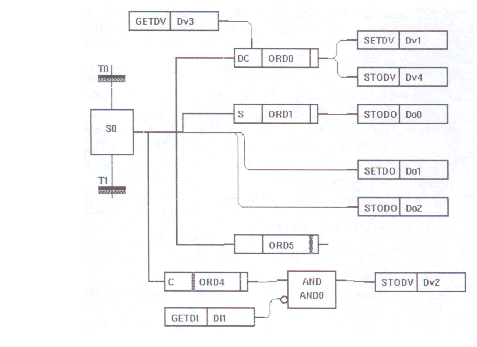
 Example in the Use of Order Objects

 - The thick vertical line in Ord5 indicates that the object has an underlying
   sub-window, in this case an activity window . Such a window is shown in the
   PLC Editor by Shift/MB1 and a double clicking in the right part of the Order
   object.
 - Do1 will be set as long as S0 is active. The SetDo function implies latching
   and the Do1-signal remains set even when S0 becomes inactive. The Do1's SetDo
   is not included in any order list.
 - Since StoDo for Do2 is not included in any order list it will execute each
   time when the PLC program executes. Do2 gets status according to the step
 - Do0 will be set when S0 becomes active. Because Ord1 has an S-order attribute
   it will remain set even when S0 becomes inactive. Do0 is not cleared before
   the ORD1 object is reset by a Reset_SO object; cf. Do2.
 - Dv1 and Dv4 are not set at once when the step S0 becomes active. The Ord0
   object is supplied with D and C attributes. In the beginning there is a delay,
   the duration is specified by the Attribute Editor, and then a condition Dv3
   follows. If S0 is active, the delay has elapsed, and the condition is satisfied
   Dv1 is set. Since the Set-function has latching the Dv-signal remains set also
   when S0 becomes inactive. When the delay has elapsed the Dv4-signal follows the
   condition Dv3 as long as the step is active.
 - The thick vertical line in Ord4 indicates that the order has an underlying
   sub-window, in this case a conditional window . If Ord4 is active, the condition
   is satisfied, and DI1 is not set Dv2 will be set, otherwise Dv2 is cleared. And0
   is not in the object's order list. A conditional window is opened in the following
   way: Specify in the object a C-attribute by means of the Attribute Editor. The
   conditional window is opened from the PLC Editor by Shift/MB1 and double clicking
   in the left part of the Order object.
 - Figure See Step and Order with Activity Window shows a part of a sequential chain.
   ORD0 indicates an activity window, and this is shown to the right.
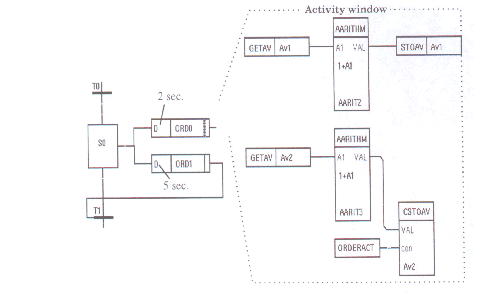
 Step and Order with Activity Window

 Suppose that the PLC program executes by the frequency 10 Hz and the signals
 Av1=Av2=0. ORD1 sees that the active status of the step lasts for 5 seconds. Which
 value did Av1 and Av2 get then? The order list begins to execute as soon as the
 step becomes active. Av1 will be increased and stored 20 times when the status of
 Ord0 is FALSE and then 30 times when the status of Ord0 is TRUE. Since the step
 becomes inactive the order list is executed one another time with the order status
 FALSE. This means that Av1 = 51. Av2 is stored only when order status is TRUE,
 which makes Av2 = 30.

 To make use of the delay in a D-order either an OrderAct object as in the case with
 ORD0 or the status of the order as with ORD1 is used. Also remember that: as long
 as the step is active the order list will execute independent of the order status .
| RtBody attributes pwr_sClass_order | |||
|---|---|---|---|
| Boolean | Step | step | Status input. Checks the state of the connected step, i.e. InitStep, Step, SubStep, SsBegin, or SsEnd object, by looking on its Status[0] and Status[1]. |
| Boolean | Cond | Cond | Conditional input. The activity can be done conditionally. One way to implement this is by direct connection to a binary signal. |
| Array of Boolean | Status | sts | Status[0] specifies the state of the object. FALSE means an inactive order and TRUE means an active order. The value may be picked up in another program by means of a GetDp object. Status[1] : TRUE means that the step belonging to this object is active or that a stored order is active. It controls the execution of the object's order list. Suppose a D-order, i.e. an order with the delay attribute set, with an order list. When the step becomes active Status[1] is set. The activity window will execute with Status[0] = FALSE. An OrderAct object in the activity window fetches the value of Status[0] in the Order object, i.e. FALSE. When the delay elapses Status[0] becomes TRUE and the execution of the activity window continues as long as Status[1] = TRUE or as long as Status[0] was TRUE at the last scanning. |
| DevBody attributes | |||
|---|---|---|---|
| Char | Attr1 | The Order object can be provided with the following attributes ( note capital letters): D = Delayed The order to start the activity is delayed for a certain time counting from where the step became active. The corresponding AttrTime attribute specifies the delay time. L = Limited The order starts the activity at once but its duration is limited to a certain time. The corresponding AttrTime attribute specifies the limit time. P = Pulse If the activity shall continue during only one program cycle the L attribute is replaced by a P attribute. C = The order to start the activity is denied Condition as long as the condition is not satisfied. S = Stored The order to start the activity is stored in such a way that the activity remains even then the step has become inactive. A stored order is reset by a Reset_SO object. These attributes are sometimes named order-attributes. Everyone of these attributes defines a sub-object in rtdb. A sub-object with the name S is of the S-order type and so on. This means that only one order attribute of every kind may exist in the Order object. A maximum of 5 order-attributes can be connected to an Order object The sequence of the order-attributes determines the function, e.g. · A CDS-order latches if the step is active and the condition has been satisfied during the specified time. The order remains active until it has been reset by a Reset_SO object. · A SDC-order latches as soon as the step becomes active, but the order does not become active until the specified time has elapsed and follows then the status of the condition. · DSC-order. The execution of the object's order list starts as soon as the step become active. After the specified delay the order latches if the step remains active. The order becomes active when the condition is satisfied. The status of the order can change according to the condition. The order remains stored until it has been reset by a Reset_SO object. |
|
| Float32 | AttrTime1 | Specifies, in seconds, a time used by the D and L order-attributes. AttrTime1 is associated to Attr1 and so on. |
|
| Char | Attr2 | ||
| Float32 | AttrTime2 | ||
| Char | Attr3 | ||
| Float32 | AttrTime3 | ||
| Char | Attr4 | ||
| Float32 | AttrTime4 | ||
| Char | Attr5 | ||
| Float32 | AttrTime5 | ||
| Char | Attr6 | ||
| Float32 | AttrTime6 | ||
| Boolean | ShowAttrTime | Specifies if the AttrTime-values, used by the D and L order-attributes, are to be displayed in the symbol of the Order object or not. FALSE means no displaying and TRUE displaying. The units are seconds. |
|
| PlcNode | PlcNode | ||
| GraphPlcNode | |
|---|---|
| object_type | 34 |
| parameters[0] | 2 |
| parameters[1] | 0 |
| parameters[2] | 1 |
| parameters[3] | 0 |
| subwindows | 2 |
| subwindow_class[0] | pwrb:Class-WindowOrderact |
| subwindow_class[1] | pwrb:Class-WindowCond |
| graphmethod | 5 (grafcet order) |
| graphindex | 1 |
| default_mask[0] | 1 |
| default_mask[1] | 1 |
| segname_annotation | 1 |
| devbody_annotation | 1 |
| compmethod | 16 |
| compindex | 1 |
| tracemethod | 7 |
| traceindex | 1 |
| executeordermethod | 5 |
| objname | Ord |
| graphname | Ord |
| debugpar | Status[0] |
| Template Object | |
|---|---|
| ShowAttrTime | 1 |
| Step Input | ||
|---|---|---|
| Class | Input | |
| Type | Boolean | |
| Flags | STATE | RTVIRTUAL | INVISIBLE | |
| GraphName | step | |
| Body | RtBody | |
 Status input. Checks the state of the connected step,
 i.e. InitStep, Step, SubStep, SsBegin, or SsEnd object,
 by looking on its Status[0] and Status[1].
| Cond Input | ||
|---|---|---|
| Class | Input | |
| Type | Boolean | |
| Flags | STATE | RTVIRTUAL | NOEDIT | NOINVERT | |
| GraphName | Cond | |
| Body | RtBody | |
 Conditional input. The activity can be done
 conditionally. One way to implement this is by direct
 connection to a binary signal.
| Status Output | ||
|---|---|---|
| Class | Output | |
| Type | Array of Boolean | |
| Flags | ARRAY | STATE | NOEDIT | REDUTRANSFER | |
| Elements | 2 | |
| GraphName | sts | |
| Body | RtBody | |
 Status[0] specifies the state of the object. FALSE means an
 inactive order and TRUE means an active order. The
 value may be picked up in another program by means of a
 GetDp object.

 Status[1] :
 TRUE means that the step belonging to this object is
 active or that a stored order is active. It controls
 the execution of the object's order list.

 Suppose a D-order, i.e. an order with the delay
 attribute set, with an order list. When the step
 becomes active Status[1] is set. The activity window
 will execute with Status[0] = FALSE. An OrderAct object
 in the activity window fetches the value of Status[0]
 in the Order object, i.e. FALSE.
 When the delay elapses Status[0] becomes TRUE and the
 execution of the activity window continues as long as
 Status[1] = TRUE or as long as Status[0] was TRUE at
 the last scanning.
| Attr1 Intern | ||
|---|---|---|
| Class | Intern | |
| Type | Char | |
| Flags | ||
| Body | DevBody | |
 The Order object can be provided with the following
 attributes ( note capital letters):

 D = Delayed  The order to start the activity is delayed
              for a certain time counting from where the
              step became active. The corresponding AttrTime
              attribute specifies the delay time.

 L = Limited  The order starts the activity at once but
              its duration is limited to a certain time.
              The corresponding AttrTime attribute specifies
              the limit time.

 P = Pulse    If the activity shall continue during only
              one program cycle the L attribute is replaced
              by a P attribute.

 C =          The order to start the activity is denied
 Condition    as long as the condition is not satisfied.

 S = Stored   The order to start the activity is stored
              in such a way that the activity remains
              even then the step has become inactive. A
              stored order is reset by a Reset_SO object.

 These attributes are sometimes named order-attributes.
 Everyone of these attributes defines a sub-object in
 rtdb. A sub-object with the name S is of the S-order
 type and so on. This means that only one order
 attribute of every kind may exist in the Order object.

 A maximum of 5 order-attributes can be connected to an
 Order object The sequence of the order-attributes
 determines the function, e.g.
  · A CDS-order latches if the step is active and the
    condition has been satisfied during the specified
    time. The order remains active until it has been
    reset by a Reset_SO object.
  · A SDC-order latches as soon as the step becomes
    active, but the order does not become active until
    the specified time has elapsed and follows then the
    status of the condition.
  · DSC-order. The execution of the object's order list
    starts as soon as the step become active. After the
    specified delay the order latches if the step remains
    active. The order becomes active when the condition
    is satisfied. The status of the order can change
    according to the condition. The order remains stored
    until it has been reset by a Reset_SO object.
| AttrTime1 Intern | ||
|---|---|---|
| Class | Intern | |
| Type | Float32 | |
| Flags | ||
| Body | DevBody | |
 Specifies, in seconds, a time used by the D and L
 order-attributes. AttrTime1 is associated to Attr1 and
 so on.
| Attr2 Intern | ||
|---|---|---|
| Class | Intern | |
| Type | Char | |
| Flags | ||
| Body | DevBody | |
| AttrTime2 Intern | ||
|---|---|---|
| Class | Intern | |
| Type | Float32 | |
| Flags | ||
| Body | DevBody | |
| Attr3 Intern | ||
|---|---|---|
| Class | Intern | |
| Type | Char | |
| Flags | ||
| Body | DevBody | |
| AttrTime3 Intern | ||
|---|---|---|
| Class | Intern | |
| Type | Float32 | |
| Flags | ||
| Body | DevBody | |
| Attr4 Intern | ||
|---|---|---|
| Class | Intern | |
| Type | Char | |
| Flags | ||
| Body | DevBody | |
| AttrTime4 Intern | ||
|---|---|---|
| Class | Intern | |
| Type | Float32 | |
| Flags | ||
| Body | DevBody | |
| Attr5 Intern | ||
|---|---|---|
| Class | Intern | |
| Type | Char | |
| Flags | ||
| Body | DevBody | |
| AttrTime5 Intern | ||
|---|---|---|
| Class | Intern | |
| Type | Float32 | |
| Flags | ||
| Body | DevBody | |
| Attr6 Intern | ||
|---|---|---|
| Class | Intern | |
| Type | Char | |
| Flags | ||
| Body | DevBody | |
| AttrTime6 Intern | ||
|---|---|---|
| Class | Intern | |
| Type | Float32 | |
| Flags | ||
| Body | DevBody | |
| ShowAttrTime Intern | ||
|---|---|---|
| Class | Intern | |
| Type | Boolean | |
| Flags | ||
| Body | DevBody | |
 Specifies if the AttrTime-values, used by the D and L
 order-attributes, are to be displayed in the symbol of
 the Order object or not. FALSE means no displaying and
 TRUE displaying. The units are seconds.
| PlcNode Buffer | ||
|---|---|---|
| Class | Buffer | |
| Type | PlcNode | |
| Flags | INVISIBLE | |
| Body | DevBody | |