
| Volume pwrb | |
| Attributes: Runtime | Development | System | Template | Detail C Binding: Struct | Class | Code ClassTree | INDEX NO INDEX |
|
Class Pos3P
|
||
|---|---|---|
| Version | 1.0 | |
| Modified | 08-MAR-2026 11:05:32.00 | |
| Code | rt_plc_pid.c | |
 Positional 3-step controller with position feedback and
 dead zone. Positional is aimed at the input signal and
 the digit 3 on the fact that the output signals specify
 one of three distinct orders e.g. increase / decrease /
 0.
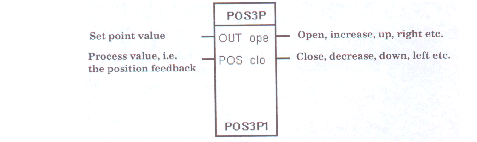
 Exactly as for Inc3P it is possible to govern by means
 of the outputs Open / Close and/or the signals named by
 DoOpen/DoClose. The outputs and the signals may be set
 at a frequency determined by the PlcPgm object. But
 only the signals may be reset by the timer control. The
 duration of the pulses of the outputs, Open and Close,
 becomes an integer multiple of the cycle time of the
 PLC program.
 The object has a built-in timer control which can offer
 a better resolution since the timer control always
 execute each tick.

 If an output signal is to be set or not depends on the
 size of the control error OutVal - Pos and the separate
 dead zones specified by ErrSo and ErrSta. The dead zone
 prevents cycles from repeating to rapidly and becoming
 destructive to the equipment.
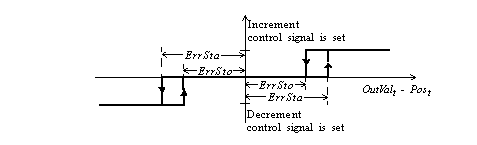
 The duration of the DoOpen/DoClose signals, the pulse
 length, is equal to

                  Gain * | OutVal - Pos |

 If the pulse length is less than the scanning interval
 the signals are cleared by the timer control before the
 next scanning starts.

 It is possible to use the outputs Open / Close and the
 signals named by DoOpen/DoClose at the same time.
Timer Control of Outputs
 Suppose a flow control with an electrically-activated valve
 with increment/decrement control. The flow signal (here kalle2)
 and the valve position (Ai1) exist. One solution is shown in
 figure below. Note that positional output of the Pid object is
 used. The presence of a Curve object can be motivated by a strong
 non-linear valve characteristic.
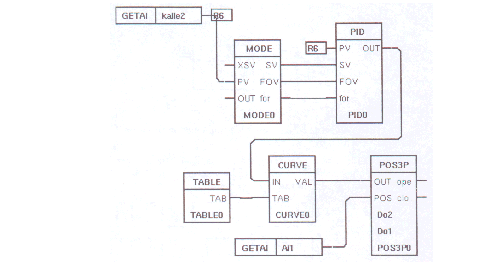
Three Step Control with Position Feedback.
| RtBody attributes pwr_sClass_pos3p | |||
|---|---|---|---|
| Float32 | OutVal | OUT | Set point value. Often connected to the OutVal of a Pid object. |
| Float32 | Pos | POS | Position feedback, the process value. |
| Boolean | Open | ope | Specifies order to open or not. FALSE means no action; TRUE means open ( up, increment, right or what else may be relevant to this output). |
| Boolean | Close | clo | Specifies order to close or not. FALSE means no action; TRUE means close ( down, decrement, left or what else may be relevant to this output). |
| Float32 | Gain | Gain | Gain, in seconds, per control signal unit. The control signal is often in the range 0 - 100 %. Suppose it is possible to measure the running time, e.g. the time to drive a valve from completely open to completely closed. Then select Gain as running time divided by the range; ( here 100 - 0). Gain is only used in conjunction with timer control of the outputs. |
| Float32 | ErrSta | ErrSta | Specifies the dead zone value which the control error has to exceed before an open- or close-signal will be set or started. The demand on the dead zone is 0 £ ErrSto £ ErrSta Open or Close is set when the absolute value of (OutVal(t) - Pos(t) ) is greater than ErrSta. |
| Float32 | ErrSto | ErrSto | Specifies the dead zone value which the control error have to be below before an open- or close-signal will be reset or stopped. Open or Close is interrupted when the absolute value of (OutVal(t) - Post(t)) is less than ErrSto. The demand on the dead zone is 0 <= ErrSto <= ErrSta |
| Pointer to Boolean | OpenP | ||
| Pointer to Boolean | CloseP | ||
| Boolean | TimerFlag | Indicates an active timer. | |
| Pointer to Boolean | TimerNext | Points to the next element in the timer queue. TimerCount |
|
| UInt32 | TimerCount | Number of remaining ticks. | |
| Pointer to Boolean | TimerDO | Points to a Do or Dv object or, if these are not used, to TimerDoDum. After a time of TimerTime the signal specified by TimerDo is cleared. |
|
| Float32 | TimerTime | Delay, in seconds, is set in run time. Specifies when the outputs have to be reset. |
|
| Boolean | TimerDODum | Dummy. If TimerDoDum does not point to a Do or Dv object it points to this attribute. |
|
| Objid | TimerObjDId | Identity of this object is set at load file creation. Used by the run time system. |
|
| DevBody attributes | |||
|---|---|---|---|
| AttrRef | DoOpen | Name of an external opening signal e.g. Do or Dv object ( corresponding to Open) at timer control. Also if DoOpen specifies a signal Open is handled by the object. |
|
| AttrRef | DoClose | Name of an external closing signal, e.g. Do or Dv object ( corresponding to Close) at timer control. Also if DoClose specifies a signal Close is handled by the object. |
|
| PlcNode | PlcNode | ||
| GraphPlcNode | |
|---|---|
| object_type | 152 |
| parameters[0] | 2 |
| parameters[1] | 0 |
| parameters[2] | 2 |
| parameters[3] | 0 |
| subwindows | 0 |
| graphmethod | 2 (standard, two textfield) |
| graphindex | 0 |
| default_mask[0] | 3 |
| default_mask[1] | 3 |
| segname_annotation | 3 |
| devbody_annotation | 1 |
| compmethod | 23 |
| compindex | 0 |
| connectmethod | 0 |
| executeordermethod | 2 |
| objname | Pos3P |
| graphname | Pos3P |
| debugpar | |
| Template Object | |
|---|---|
| Gain | 1.0 |
| OutVal Input | ||
|---|---|---|
| Class | Input | |
| Type | Float32 | |
| Flags | REDUTRANSFER | |
| GraphName | OUT | |
| Body | RtBody | |
 Set point value. Often connected to the OutVal of a Pid
 object.
| Pos Input | ||
|---|---|---|
| Class | Input | |
| Type | Float32 | |
| Flags | STATE | NOEDIT | REDUTRANSFER | |
| GraphName | POS | |
| Body | RtBody | |
Position feedback, the process value.
| Open Output | ||
|---|---|---|
| Class | Output | |
| Type | Boolean | |
| Flags | STATE | NOEDIT | REDUTRANSFER | |
| GraphName | ope | |
| Body | RtBody | |
 Specifies order to open or not. FALSE means no action;
 TRUE means open ( up, increment, right or what else may
 be relevant to this output).
| Close Output | ||
|---|---|---|
| Class | Output | |
| Type | Boolean | |
| Flags | STATE | NOEDIT | REDUTRANSFER | |
| GraphName | clo | |
| Body | RtBody | |
 Specifies order to close or not. FALSE means no action;
 TRUE means close ( down, decrement, left or what else
 may be relevant to this output).
| Gain Intern | ||
|---|---|---|
| Class | Intern | |
| Type | Float32 | |
| Flags | REDUTRANSFER | |
| GraphName | Gain | |
| Body | RtBody | |
 Gain, in seconds, per control signal unit. The control
 signal is often in the range 0 - 100 %. Suppose it is
 possible to measure the running time, e.g. the time to
 drive a valve from completely open to completely
 closed. Then select Gain as running time divided by the
 range; ( here 100 - 0).

 Gain is only used in conjunction with timer control of
 the outputs.
| ErrSta Intern | ||
|---|---|---|
| Class | Intern | |
| Type | Float32 | |
| Flags | REDUTRANSFER | |
| GraphName | ErrSta | |
| Body | RtBody | |
 Specifies the dead zone value which the control error
 has to exceed before an open- or close-signal will be
 set or started.

 The demand on the dead zone is 0 £ ErrSto £ ErrSta
 Open or Close is set when the absolute value of (OutVal(t)
 - Pos(t) ) is greater than ErrSta.
| ErrSto Intern | ||
|---|---|---|
| Class | Intern | |
| Type | Float32 | |
| Flags | REDUTRANSFER | |
| GraphName | ErrSto | |
| Body | RtBody | |
 Specifies the dead zone value which the control error
 have to be below before an open- or close-signal will
 be reset or stopped.
 Open or Close is interrupted when the absolute value of
 (OutVal(t)  - Post(t)) is less than ErrSto.
 The demand on the dead zone is 0 <= ErrSto <= ErrSta
| OpenP Intern | ||
|---|---|---|
| Class | Intern | |
| Type | Pointer to Boolean | |
| Flags | POINTER | PRIVATE | STATE | NOEDIT | |
| Body | RtBody | |
| CloseP Intern | ||
|---|---|---|
| Class | Intern | |
| Type | Pointer to Boolean | |
| Flags | POINTER | PRIVATE | STATE | NOEDIT | |
| Body | RtBody | |
| TimerFlag Intern | ||
|---|---|---|
| Class | Intern | |
| Type | Boolean | |
| Flags | STATE | INVISIBLE | |
| Body | RtBody | |
Indicates an active timer.
| TimerNext Intern | ||
|---|---|---|
| Class | Intern | |
| Type | Pointer to Boolean | |
| Flags | POINTER | STATE | INVISIBLE | PRIVATE | |
| Body | RtBody | |
 Points to the next element in the timer queue.
 TimerCount
| TimerCount Intern | ||
|---|---|---|
| Class | Intern | |
| Type | UInt32 | |
| Flags | STATE | INVISIBLE | |
| Body | RtBody | |
Number of remaining ticks.
| TimerDO Intern | ||
|---|---|---|
| Class | Intern | |
| Type | Pointer to Boolean | |
| Flags | POINTER | STATE | INVISIBLE | PRIVATE | |
| Body | RtBody | |
 Points to a Do or Dv object or, if these are not used,
 to TimerDoDum. After a time of TimerTime the signal
 specified by TimerDo is cleared.
| TimerTime Intern | ||
|---|---|---|
| Class | Intern | |
| Type | Float32 | |
| Flags | ||
| Body | RtBody | |
 Delay, in seconds, is set in run time. Specifies when
 the outputs have to be reset.
| TimerDODum Intern | ||
|---|---|---|
| Class | Intern | |
| Type | Boolean | |
| Flags | STATE | INVISIBLE | |
| Body | RtBody | |
 Dummy. If TimerDoDum does not point to a Do or Dv
 object it points to this attribute.
| TimerObjDId Intern | ||
|---|---|---|
| Class | Intern | |
| Type | Objid | |
| Flags | INVISIBLE | |
| Body | RtBody | |
 Identity of this object is set at load file creation.
 Used by the run time system.
| DoOpen Intern | ||
|---|---|---|
| Class | Intern | |
| Type | AttrRef | |
| Flags | ||
| Body | DevBody | |
 Name of an external opening signal e.g. Do or Dv object
 ( corresponding to Open) at timer control. Also if
 DoOpen specifies a signal Open is handled by the
 object.
| DoClose Intern | ||
|---|---|---|
| Class | Intern | |
| Type | AttrRef | |
| Flags | ||
| Body | DevBody | |
 Name of an external closing signal, e.g. Do or Dv
 object ( corresponding to Close) at timer control. Also
 if DoClose specifies a signal Close is handled by the
 object.
| PlcNode Buffer | ||
|---|---|---|
| Class | Buffer | |
| Type | PlcNode | |
| Flags | INVISIBLE | |
| Body | DevBody | |