
| Volume pwrb | |
| Attributes: Runtime | Development | System | Template | Detail C Binding: Struct | Class | Code ClassTree | INDEX NO INDEX |
|
Class SubStep
|
||
|---|---|---|
| Version | 1.0 | |
| Modified | 08-MAR-2026 11:05:32.00 | |
| Code | rt_plc_macro_grafcet.h | |
 Grafcet step representing an underlying sequential
 chain, a sub-sequential chain.
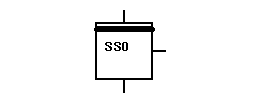
 From a functional point of view, we can look upon the
 object as a sub-sequential chain that has been
 substituted by the SubStep object.

 The sub-sequential chain is edited in an underlying
 sub-window. The objects in the window get a
 WindowSubStep object as parent object.
 Such a sub-window,
  - starts with a SsBegin object, which becomes active
    when the SubStep object becomes active.
  - ends with a SsEnd object, which tells when the
    SubStep object is finished.

 To the right output one or more Order objects can be
 connected at the same time as well as one or more Stoxx,
 Setxx or Resxx objects. The output can also be left
 open or be used as an ordinary binary signal.

 An active status cannot be transferred from a SubStep
 object until the SsEnd object in the sub-sequential
 chain has signalled ready and the condition following
 the SubStep object is satisfied. When so, active status
 is transferred from the SubStep object to the next step
 in the chain.

 Note! If the visual differences in the SubStep symbol are
 small, when there is a subwindow and when there is not,
 the consequences are important. A SubStep object
 without an underlying sub-window implies that the
 execution is caught in the SubStep object.
 A condition of structured configuring is the
 possibilities to configure in levels. A SubStep can in
 its sub-sequential chain contain SubStep objects. Such
 a SubStep object can then in its sub-sequential chain
 contain further SubStep objects and so on.
| RtBody attributes pwr_sClass_substep | |||
|---|---|---|---|
| Boolean | Status | sts1 | |
| Boolean | Status2 | sts2 | |
| Array of Boolean | Order | Order | Specifies the status of the step. FALSE means an inactive step, and TRUE means an active step. The value may be picked up in another program by means of a GetDp object. Note! In the structure of the object or referenced this attribute is named Status[0]. Order[1] specifies the status of the underlying sub-window. FALSE means that the execution of the sub-window is not finished and TRUE means that it is. Note! In the structure of the object or referenced this attribute is named Status[1]. |
| DevBody attributes | |||
|---|---|---|---|
| PlcNode | PlcNode | ||
| GraphPlcNode | |
|---|---|
| object_type | 32 |
| parameters[0] | 0 |
| parameters[1] | 0 |
| parameters[2] | 3 |
| parameters[3] | 0 |
| subwindows | 1 |
| subwindow_class[0] | pwrb:Class-WindowSubstep |
| graphmethod | 4 (special) |
| graphindex | 4 |
| default_mask[0] | 0 |
| default_mask[1] | 7 |
| segname_annotation | 1 |
| compmethod | 24 |
| compindex | 1 |
| tracemethod | 7 |
| traceindex | 1 |
| executeordermethod | 4 |
| objname | SS |
| graphname | SS |
| debugpar | Order[0] |
| Status Output | ||
|---|---|---|
| Class | Output | |
| Type | Boolean | |
| Flags | STATE | RTVIRTUAL | INVISIBLE | |
| GraphName | sts1 | |
| Body | RtBody | |
| Status2 Output | ||
|---|---|---|
| Class | Output | |
| Type | Boolean | |
| Flags | STATE | RTVIRTUAL | INVISIBLE | |
| GraphName | sts2 | |
| Body | RtBody | |
| Order Output | ||
|---|---|---|
| Class | Output | |
| Type | Array of Boolean | |
| Flags | ARRAY | STATE | NOEDIT | NOREMOVE | REDUTRANSFER | |
| Elements | 2 | |
| GraphName | Order | |
| Body | RtBody | |
 Specifies the status of the step. FALSE means an
 inactive step, and TRUE means an active step. The value
 may be picked up in another program by means of a GetDp
 object.

 Note! In the structure of the object or referenced this
 attribute is named Status[0].

 Order[1] specifies the status of the underlying sub-window.
 FALSE means that the execution of the sub-window is not
 finished and TRUE means that it is.

 Note! In the structure of the object or referenced this
 attribute is named Status[1].
| PlcNode Buffer | ||
|---|---|---|
| Class | Buffer | |
| Type | PlcNode | |
| Flags | INVISIBLE | |
| Body | DevBody | |