
| Volume pwrb | |
| Attributes: Runtime | Development | System | Template | Detail C Binding: Struct | Class | Code ClassTree | INDEX NO INDEX |
|
Class Drive
|
||
|---|---|---|
| Version | 1.0 | |
| Modified | 08-MAR-2026 11:05:32.00 | |
| Code | rt_plc_drive.c | |
 START/ STOP motor control with supervision of contactor
 response and motion guard.
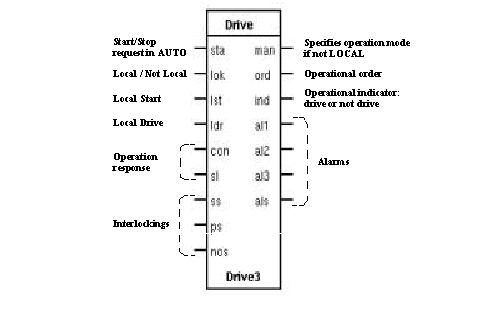
 Three different types of interlockings:

  - safety interlocking SafeStop
  - production interlocking ProdStop
  - 'prevent to start' interlocking, NoStart

 SafeStop and ProdStop disable, each separately, the
 internal alarms (Alarm1, ..., Alarm3), i.e. when
 SafeStop or ProdStop is set the alarms are prevented
 from getting TRUE.
 A forward-back operation may be implemented by two
 Drive objects with mutual interlocking by SafeStop.

 One of three operating modes, LOCAL / MANUAL / AUTO, is
 selected by means of the input signal Local and the
 output signal ManMode in the following way:
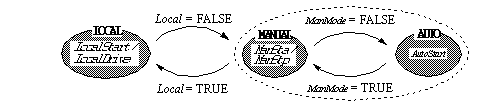
LOCAL
        - Used at operation from for example an outer
          operator's console, switching equipment etc.
        - Only safety interlocking SafeStop is taken
          into account.
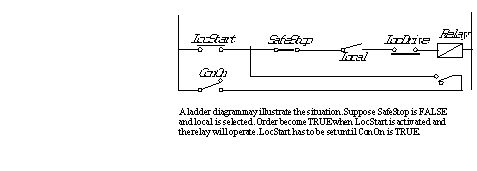
        - LocStart has a spring back push button
          function with a closing start function. The
          signal has to be set until ConOn is TRUE;
          see below.
        - LocDrive has a spring back push button
          function with an opening stop function. STOP
          is also done when Local is reset.
MANUAL/AUTO
        - Both production and safety interlockings are
          concerned.
        - In MANUAL mode START/STOP request is handled
          by the operator by means of the attributes
          ManSta respectively ManSto.
        - In AUTO mode START request is done on a
          leading edge on AutoStart; STOP request when
          AutoStart is FALSE, i.e. not at any edge but
          on the level.
        - The changes,
          -- AUTO -> MANUAL, do not influence the
             operational order, Order.
          -- MANUAL -> AUTO. If the operational order

 Supervision. If contactor response respectively motion
 guard are not used the corresponding input is left
 open. Internally the output signal Order is used
 instead of the missed input signal; i.e. it is not the
 value of ProdTim or SpeedTim itself that determines if
 these are concerned or not.
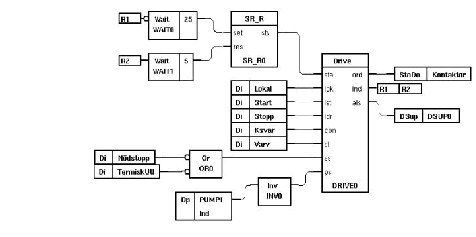
Worm Conveyer with Motion Guard
 Assumptions:

 - Switching equipment to local drive at the motor etc.
 - Signals from emergency stop ( nödstopp in Swedish) and thermal
   tripping (termisk utlösning in Swedish) exists.
 - The worm conveyer may not be driven if PUMP1 is off. This pump
   is represented and driven by another Drive object. The PUMP1
   restriction is not valid at driving from the switching equipment.
 - The worm conveyer drives in operational mode AUTO with rotation
   in 5 minutes every half hour or on operator request; WAIT0 has
   TimerTime =25 · 60 seconds and WAIT1 TimerTime = 5 · 60 seconds.
 - Message will be sent at alarms.
Periodical Control of a ContactorForward/Backward operation
 Driving only in the operational mode AUTO. Forward/backward operation
 is controlled by Dv-signals. Response from the contactor exists, but
 no tachometric relay. The both single drives interlock each other, and
 changes between forward/backward are separated in time by TIMER0
 respectively TIMER1.
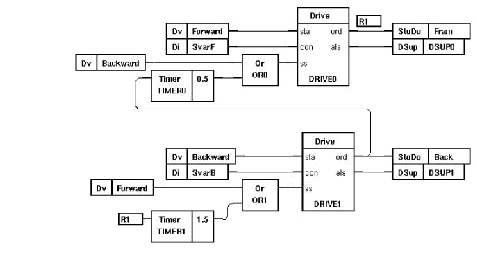
Configuration of a Forward/Backward OperationTwo Conveyers
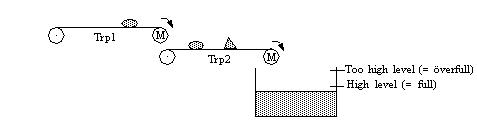
 The conveyer Trp1 may start only if the conveyer Trp2 is already running
 (=production interlocking). The conveyers use the same thermal tripping
 signal.
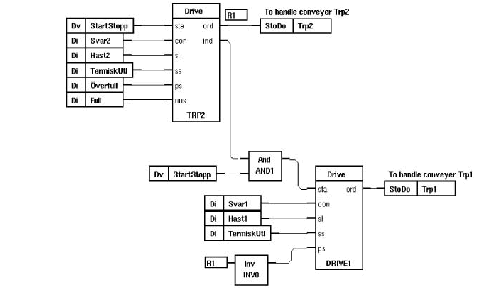
 Shows the Operational Indicator Used to Control the Order of Starting

 The AND-gate to start TRP1 is used to create a leading edge on the start
 signal when TRP2 is running.

 Also in the operational mode MANUAL TRP1 is interlocked by TRP2 and TRP2
 by level guards in the container. If a switching equipment to local drive
 was set up thermal tripping is the only interlocking in the operational
 mode LOCAL.
| RtBody attributes pwr_sClass_drive | |||
|---|---|---|---|
| Boolean | AutoStart | sta | Specifies START request at operational mode AUTO. The transition FALSE -> TRUE means START request. If AutoNoStop is not used, FALSE means STOP request. |
| Boolean | AutoNoStop | nst | Specifies STOP request at operational mode AUTO. FALSE means STOP request. If not connnected, AutoStart is used to stop. |
| Boolean | Local | loc | Selection of operational mode. The signal may proceed from for example a rotary switch. FALSE means that operational mode 'NOT LOCAL' is selected and ManMode whether it is MANUAL or AUTO. TRUE means that operational mode LOCAL has been selected. |
| Boolean | LocStart | lst | Specifies START request at operational mode LOCAL. FALSE means no action; TRUE implies that the operational order, Order, has been set. |
| Boolean | LocDrive | ldr | Specifies STOP request in operational mode LOCAL. FALSE implies that the operational order, Order, is reset; note closing function. TRUE means no action, but is necessary too allow next START request by LocStart. |
| Boolean | ConOn | con | Contactor response. If the con-input is left open the ord-output will be used as an internal input signal and the value will be stored in ConOn. FALSE means that the contactor has not been closed and TRUE that it has been closed. |
| Boolean | Speed | sl | Tachometric relay or motion guard. If the sl-input is left open the ind-output will be used as an internal input signal and the value will be stored in Speed. FALSE means no motion and TRUE indicates motion. |
| Boolean | SafeStop | ss | Specifies the state of the safety interlocking. FALSE means that the safety interlocking is not activated. TRUE means that unconditional STOP, i.e. the operational order, Order, is set to STOP independent of operational mode. |
| Boolean | ProdStop | ps | Specifies the state of the production interlocking and is not valid in the operational mode LOCAL. FALSE means that the production interlocking is not activated. TRUE means that the operational order, Order, is set to STOP; valid only for the operational modes AUTO and MANUAL. |
| Boolean | NoStart | nos | Specifies the state of 'prevent to start' interlocking and is not valid in the operational mode LOCAL. FALSE means that the 'prevent to start' interlocking is not activated. TRUE means that some 'prevent to start' interlocking exist. If NoStart makes the transition FALSE -> TRUE when the operational order, Order, has already been set TRUE, there will be no effect on the operational order. |
| Boolean | ManMode | man | Specifies required operational mode ( MANUAL or AUTO) when LOCAL is FALSE. Used as an ordinary parameter e.g. it may be written into from display programs. The advantage of placing this attribute as an output is that it will be easier to use it in the graphic configuration. If Local is FALSE it means that -- FALSE required operational mode is AUTO -- TRUE - " - MANUAL |
| Boolean | Order | ord | The operational order specifies either START or STOP. FALSE means STOP and TRUE means START. |
| Boolean | Ind | ind | Operational indicator with respect to drive or not drive. The attribute is a confirmation of the current operational state. It is used for example to interlock operational mode or alarms only relevant to run time. FALSE means no drive; TRUE means operational order with response from contactor and motion guard, i.e. drive and Order = ConOn = Speed is TRUE and operational mode is 'NOT LOCAL'. |
| Boolean | Alarm1 | al1 | Specifies if the contactor response arrived within the time limit value ProdTim or not. FALSE means no alarm; TRUE means that the contactor response did not arrive within the time limit value ProdTim. The operational order, Order, is set to STOP and the alarm remains until the next START requirement (AutoStart makes the transition FALSE -> TRUE or ManSta becomes TRUE) is accomplished. Connects a DSup object to the output if message shall be sent and specifies DetectText in the DSup object, e.g. 'The motor xxx did not start' |
| Boolean | Alarm2 | al2 | Specifies if the contactor response arrived within the time limit value ProdTim and still remains or not. FALSE means no alarm; TRUE means the contactor response arrived within the time limit value ProdTim but disappeared later. The operational order, Order, is set to STOP and the alarm remains until the next START requirement is accomplished. Connects a DSup object to the output if message shall be sent and specifies DetectText in the DSup object, e.g. 'The contactor response is lost on xxxx'. |
| Boolean | Alarm3 | al3 | FALSE means no alarm. TRUE means that the contactor response has arrived, but Speed did not arrived within the time limit value SpeedTim or disappeared later. The operational order, Order, is set to STOP and the alarm remains until the next START requirement is accomplished. Connects a DSup object to the output if message shall be sent and specifies DetectText in the DSup object, e.g. 'No motion on ....', 'No operational pressure in ...' |
| Boolean | SumAlarm | als | Sum of alarms. Specifies if any alarms exist or not. FALSE means no active alarms at all in this object; TRUE means that at least one of Alarm1, Alarm2 or Alarm3 is on. Connects a DSup object to the output if message shall be sent and specifies DetectText in the DSup object. |
| Boolean | ManSta | ManSta | Specifies START request in the operational mode MANUAL. FALSE means no request; TRUE means START request. The request is reset by the PROVIEW/R system when it has been noticed. |
| Boolean | ManStp | ManStp | Specifies STOP request in the operational mode MANUAL. FALSE means no request; TRUE means STOP request. The request is reset by the PROVIEW/R system when it has been noticed. |
| Float32 | ProdTim | ProdTim | Specifies, in seconds, the time limit value ( >= 0 ) of contactor response. If the response exceeds this value Alarm1 is set. The time is counted from the moment when Order becomes TRUE. |
| Float32 | SpeedTim | SpeedTim | Specifies, in seconds, the time limit value ( ³ 0 ) of motion response. If the response exceeds this value Alarm3 is set. The time is counted from the moment when ConOn becomes TRUE. |
| Boolean | TimerFlag | Indicates an active timer. | |
| Pointer to Boolean | TimerNext | Points to the next element in the timer queue. | |
| UInt32 | TimerCount | Number of remaining ticks. | |
| Pointer to Boolean | TimerDO | Points to a Do or Dv object or, if these are not used, to TimerDoDum. After a time of TimerTime the signal specified by TimerDo is cleared. |
|
| Float32 | TimerTime | The value of the timer in seconds. It is set in run time to ProdTime or SpeedTime. |
|
| Boolean | TimerDODum | Dummy. If TimerDoDum does not point to a Do or Dv object it points to this attribute. |
|
| Objid | TimerObjDId | Identity of this object is set at load file creation. Used by the run time system. |
|
| Int32 | ManAcc | ManAcc | The operator's authorities to change between the operational modes MANUAL / AUTO can be restricted. 0 -- Changes not allowed. !=0 -- Changes allowed. |
| Int32 | Status | Status | The possible values are as follows: -- 0 Stopped; Order = Ind = FALSE -- 1 Stopping; Order = FALSE and Ind = TRUE -- 2 Waits for the contactor response to arrive -- 3 Waits for the motion guard to indicate motion -- 4 Drive |
| DevBody attributes | |||
|---|---|---|---|
| PlcNode | PlcNode | ||
| GraphPlcNode | |
|---|---|
| object_type | 180 |
| parameters[0] | 10 |
| parameters[1] | 0 |
| parameters[2] | 7 |
| parameters[3] | 0 |
| subwindows | 0 |
| graphmethod | 0 (standard, individual attributes) |
| graphindex | 0 |
| default_mask[0] | 161 |
| default_mask[1] | 70 |
| segname_annotation | 1 |
| compmethod | 30 |
| compindex | 0 |
| executeordermethod | 2 |
| objname | Drive |
| graphname | Drive |
| debugpar | |
| Template Object | |
|---|---|
| LocDrive | 1 |
| ProdTim | 1.0 |
| SpeedTim | 2.0 |
| ManAcc | 15 |
| AutoStart Input | ||
|---|---|---|
| Class | Input | |
| Type | Boolean | |
| Flags | STATE | NOEDIT | NOINVERT | REDUTRANSFER | |
| GraphName | sta | |
| Body | RtBody | |
 Specifies START request at operational mode AUTO.
 The transition FALSE -> TRUE means START request.
 If AutoNoStop is not used, FALSE means STOP request.
| AutoNoStop Input | ||
|---|---|---|
| Class | Input | |
| Type | Boolean | |
| Flags | STATE | NOEDIT | NOINVERT | REDUTRANSFER | |
| GraphName | nst | |
| Body | RtBody | |
 Specifies STOP request at operational mode AUTO.
 FALSE means STOP request.
 If not connnected, AutoStart is used to stop.
| Local Input | ||
|---|---|---|
| Class | Input | |
| Type | Boolean | |
| Flags | NOINVERT | REDUTRANSFER | |
| GraphName | loc | |
| Body | RtBody | |
 Selection of operational mode. The signal may proceed
 from for example a rotary switch. FALSE means that
 operational mode 'NOT LOCAL' is selected and ManMode
 whether it is MANUAL or AUTO. TRUE means that
 operational mode LOCAL has been selected.
| LocStart Input | ||
|---|---|---|
| Class | Input | |
| Type | Boolean | |
| Flags | STATE | NOEDIT | NOINVERT | REDUTRANSFER | |
| GraphName | lst | |
| Body | RtBody | |
 Specifies START request at operational mode LOCAL.
 FALSE means no action; TRUE implies that the
 operational order, Order, has been set.
| LocDrive Input | ||
|---|---|---|
| Class | Input | |
| Type | Boolean | |
| Flags | STATE | NOEDIT | NOINVERT | REDUTRANSFER | |
| GraphName | ldr | |
| Body | RtBody | |
 Specifies STOP request in operational mode LOCAL. FALSE
 implies that the operational order, Order, is reset;
 note closing function. TRUE means no action, but is
 necessary too allow next START request by LocStart.
| ConOn Input | ||
|---|---|---|
| Class | Input | |
| Type | Boolean | |
| Flags | STATE | NOEDIT | NOINVERT | REDUTRANSFER | |
| GraphName | con | |
| Body | RtBody | |
 Contactor response.
 If the con-input is left open the ord-output will be
 used as an internal input signal and the value will be
 stored in ConOn. FALSE means that the contactor has not
 been closed and TRUE that it has been closed.
| Speed Input | ||
|---|---|---|
| Class | Input | |
| Type | Boolean | |
| Flags | STATE | NOEDIT | NOINVERT | |
| GraphName | sl | |
| Body | RtBody | |
 Tachometric relay or motion guard.

 If the sl-input is left open the ind-output will be
 used as an internal input signal and the value will be
 stored in Speed. FALSE means no motion and TRUE
 indicates motion.
| SafeStop Input | ||
|---|---|---|
| Class | Input | |
| Type | Boolean | |
| Flags | STATE | NOEDIT | NOINVERT | REDUTRANSFER | |
| GraphName | ss | |
| Body | RtBody | |
 Specifies the state of the safety interlocking. FALSE
 means that the safety interlocking is not activated.
 TRUE means that unconditional STOP, i.e. the
 operational order, Order, is set to STOP independent of
 operational mode.
| ProdStop Input | ||
|---|---|---|
| Class | Input | |
| Type | Boolean | |
| Flags | STATE | NOEDIT | NOINVERT | REDUTRANSFER | |
| GraphName | ps | |
| Body | RtBody | |
 Specifies the state of the production interlocking and
 is not valid in the operational mode LOCAL. FALSE means
 that the production interlocking is not activated. TRUE
 means that the operational order, Order, is set to
 STOP; valid only for the operational modes AUTO and
 MANUAL.
| NoStart Input | ||
|---|---|---|
| Class | Input | |
| Type | Boolean | |
| Flags | STATE | NOEDIT | NOINVERT | REDUTRANSFER | |
| GraphName | nos | |
| Body | RtBody | |
 Specifies the state of 'prevent to start' interlocking
 and is not valid in the operational mode LOCAL. FALSE
 means that the 'prevent to start' interlocking is not
 activated. TRUE means that some 'prevent to start'
 interlocking exist. If NoStart makes the transition
 FALSE -> TRUE when the operational order, Order, has
 already been set TRUE, there will be no effect on the
 operational order.
| ManMode Output | ||
|---|---|---|
| Class | Output | |
| Type | Boolean | |
| Flags | REDUTRANSFER | |
| GraphName | man | |
| Body | RtBody | |
 Specifies required operational mode ( MANUAL or AUTO)
 when LOCAL is FALSE. Used as an ordinary parameter e.g.
 it may be written into from display programs. The
 advantage of placing this attribute as an output is
 that it will be easier to use it in the graphic
 configuration. If Local is FALSE it means that
     --  FALSE  required operational mode is AUTO
     --  TRUE            -  "  -              MANUAL
| Order Output | ||
|---|---|---|
| Class | Output | |
| Type | Boolean | |
| Flags | STATE | NOEDIT | REDUTRANSFER | |
| GraphName | ord | |
| Body | RtBody | |
 The operational order specifies either START or STOP.
 FALSE means STOP and TRUE means START.
| Ind Output | ||
|---|---|---|
| Class | Output | |
| Type | Boolean | |
| Flags | STATE | NOEDIT | REDUTRANSFER | |
| GraphName | ind | |
| Body | RtBody | |
 Operational indicator with respect to drive or not
 drive. The attribute is a confirmation of the current
 operational state. It is used for example to interlock
 operational mode or alarms only relevant to run time.
 FALSE means no drive; TRUE means operational order with
 response from contactor and motion guard, i.e. drive
 and Order = ConOn = Speed is TRUE and operational mode
 is 'NOT LOCAL'.
| Alarm1 Output | ||
|---|---|---|
| Class | Output | |
| Type | Boolean | |
| Flags | STATE | NOEDIT | REDUTRANSFER | |
| GraphName | al1 | |
| Body | RtBody | |
 Specifies if the contactor response arrived within the
 time limit value ProdTim or not. FALSE means no alarm;
 TRUE means that the contactor response did not arrive
 within the time limit value ProdTim. The operational
 order, Order, is set to STOP and the alarm remains
 until the next START requirement (AutoStart makes the
 transition FALSE -> TRUE or ManSta becomes TRUE) is
 accomplished.

 Connects a DSup object to the output if message shall
 be sent and specifies DetectText in the DSup object,
 e.g. 'The motor xxx did not start'
| Alarm2 Output | ||
|---|---|---|
| Class | Output | |
| Type | Boolean | |
| Flags | STATE | NOEDIT | REDUTRANSFER | |
| GraphName | al2 | |
| Body | RtBody | |
 Specifies if the contactor response arrived within the
 time limit value ProdTim and still remains or not.
 FALSE means no alarm; TRUE means the contactor response
 arrived within the time limit value ProdTim but
 disappeared later. The operational order, Order, is set
 to STOP and the alarm remains until the next START
 requirement is accomplished.

 Connects a DSup object to the output if message shall
 be sent and specifies DetectText in the DSup object,
 e.g. 'The contactor response is lost on xxxx'.
| Alarm3 Output | ||
|---|---|---|
| Class | Output | |
| Type | Boolean | |
| Flags | STATE | NOEDIT | REDUTRANSFER | |
| GraphName | al3 | |
| Body | RtBody | |
 FALSE means no alarm.
 TRUE means that the contactor response has arrived, but
 Speed did not arrived within the time limit value
 SpeedTim or disappeared later. The operational order,
 Order, is set to STOP and the alarm remains until the
 next START requirement is accomplished.

 Connects a DSup object to the output if message shall
 be sent and specifies DetectText in the DSup object,
 e.g. 'No motion on ....', 'No operational pressure in ...'
| SumAlarm Output | ||
|---|---|---|
| Class | Output | |
| Type | Boolean | |
| Flags | STATE | NOEDIT | REDUTRANSFER | |
| GraphName | als | |
| Body | RtBody | |
 Sum of alarms. Specifies if any alarms exist or not.
 FALSE means no active alarms at all in this object;
 TRUE means that at least one of Alarm1, Alarm2 or Alarm3
 is on.

 Connects a DSup object to the output if message shall
 be sent and specifies DetectText in the DSup object.
| ManSta Intern | ||
|---|---|---|
| Class | Intern | |
| Type | Boolean | |
| Flags | STATE | NOEDIT | REDUTRANSFER | |
| GraphName | ManSta | |
| Body | RtBody | |
 Specifies START request in the operational mode MANUAL.
 FALSE means no request; TRUE means START request. The
 request is reset by the PROVIEW/R system when it has
 been noticed.
| ManStp Intern | ||
|---|---|---|
| Class | Intern | |
| Type | Boolean | |
| Flags | STATE | NOEDIT | REDUTRANSFER | |
| GraphName | ManStp | |
| Body | RtBody | |
 Specifies STOP request in the operational mode MANUAL.
 FALSE means no request; TRUE means STOP request. The
 request is reset by the PROVIEW/R system when it has
 been noticed.
| ProdTim Intern | ||
|---|---|---|
| Class | Intern | |
| Type | Float32 | |
| Flags | REDUTRANSFER | |
| GraphName | ProdTim | |
| Body | RtBody | |
 Specifies, in seconds, the time limit value ( >= 0 ) of
 contactor response. If the response exceeds this value
 Alarm1 is set. The time is counted from the moment when
 Order becomes TRUE.
| SpeedTim Intern | ||
|---|---|---|
| Class | Intern | |
| Type | Float32 | |
| Flags | REDUTRANSFER | |
| GraphName | SpeedTim | |
| Body | RtBody | |
 Specifies, in seconds, the time limit value ( ³ 0 ) of
 motion response. If the response exceeds this value
 Alarm3 is set. The time is counted from the moment when
 ConOn becomes TRUE.
| TimerFlag Intern | ||
|---|---|---|
| Class | Intern | |
| Type | Boolean | |
| Flags | STATE | INVISIBLE | REDUTRANSFER | |
| Body | RtBody | |
Indicates an active timer.
| TimerNext Intern | ||
|---|---|---|
| Class | Intern | |
| Type | Pointer to Boolean | |
| Flags | POINTER | STATE | INVISIBLE | PRIVATE | |
| Body | RtBody | |
Points to the next element in the timer queue.
| TimerCount Intern | ||
|---|---|---|
| Class | Intern | |
| Type | UInt32 | |
| Flags | STATE | INVISIBLE | REDUTRANSFER | |
| Body | RtBody | |
Number of remaining ticks.
| TimerDO Intern | ||
|---|---|---|
| Class | Intern | |
| Type | Pointer to Boolean | |
| Flags | POINTER | STATE | INVISIBLE | PRIVATE | |
| Body | RtBody | |
 Points to a Do or Dv object or, if these are not used,
 to TimerDoDum. After a time of TimerTime the signal
 specified by TimerDo is cleared.
| TimerTime Intern | ||
|---|---|---|
| Class | Intern | |
| Type | Float32 | |
| Flags | STATE | INVISIBLE | REDUTRANSFER | |
| Body | RtBody | |
 The value of the timer in seconds. It is set in run
 time to ProdTime or SpeedTime.
| TimerDODum Intern | ||
|---|---|---|
| Class | Intern | |
| Type | Boolean | |
| Flags | STATE | INVISIBLE | |
| Body | RtBody | |
 Dummy. If TimerDoDum does not point to a Do or Dv
 object it points to this attribute.
| TimerObjDId Intern | ||
|---|---|---|
| Class | Intern | |
| Type | Objid | |
| Flags | INVISIBLE | |
| Body | RtBody | |
 Identity of this object is set at load file creation.
 Used by the run time system.
| ManAcc Intern | ||
|---|---|---|
| Class | Intern | |
| Type | Int32 | |
| Flags | ||
| GraphName | ManAcc | |
| Body | RtBody | |
 The operator's authorities to change between the
 operational modes MANUAL / AUTO can be restricted.
    0   -- Changes not allowed.
   !=0 -- Changes allowed.
| Status Intern | ||
|---|---|---|
| Class | Intern | |
| Type | Int32 | |
| Flags | STATE | NOEDIT | REDUTRANSFER | |
| GraphName | Status | |
| Body | RtBody | |
 The possible values are as follows:

  -- 0    Stopped; Order = Ind = FALSE
  -- 1    Stopping; Order = FALSE and Ind = TRUE
  -- 2    Waits for the contactor response to arrive
  -- 3    Waits for the motion guard to indicate motion
  -- 4    Drive
| PlcNode Buffer | ||
|---|---|---|
| Class | Buffer | |
| Type | PlcNode | |
| Flags | INVISIBLE | |
| Body | DevBody | |