An ordinary sequential Grafcet step.
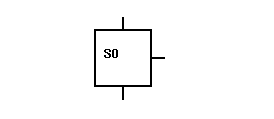
 To the right output one or more Order objects can be
 connected at the same time as well as one or more Stoxx,
 Setxx or Resxx objects. The output can also be left
 open or be used as an ordinary binary signal.

 The vertical connections are connected to Trans
 objects.
 Each step in a sequential chain will be cleared by a
 common reset signal; for more information see the
 InitStep object.
Examples
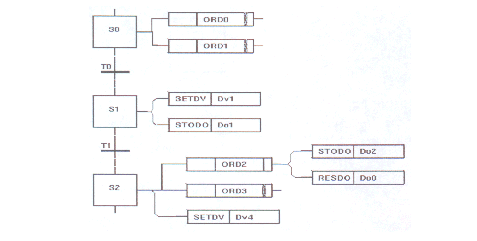
 Connections to the Step Objects in a Straight Sequence

 It is important to know the difference between a connection direct to a Step
 and a connection to an Order; see figure Connections to the Step Objects in
 a Straight Sequence. Assume e.g. a StoDv object. If it is connected direct to
 a Step it will execute each time when the PLC program executes. In figure
 Connections to the Step Objects in a Straight Sequence this means that:

 - Dv1 is set as long as the step S1 is active, since a Set xx object executes
   only as long as the input is set, i.e. Dv1 remains set also when S1 becomes
   inactive.
 - Do1 gets the value TRUE as long as S1 is active and the value FALSE when S1
   becomes inactive. If Do1 is set from any other object since S1 became inactive
   it will be cleared at once.

 On the other hand, if the object is connected to an Order it will execute at
 every scanning when the Order is active plus one further time, i.e. exactly
 as if it was located in an activity window . Remainder logic ( see e.g. figure
 Example of the Use of Step- and Order Status as an Ordinary Binary Signal
 which use the status of an Order object are executing each time when the PLC
 program executes. In figure Connections to the Step Objects in a Straight Sequence
 this means that:

 - Do2 is set as long as ORD2 is active and reset when ORD2 is inactive, i.e. Do2
   creates a pulse. If Do2 is set from any other object since ORD2 became inactive
   it will not be cleared, because the order list of ORD2 does not execute.
 - Do0 is set as long as ORD2 is active plus one further time.
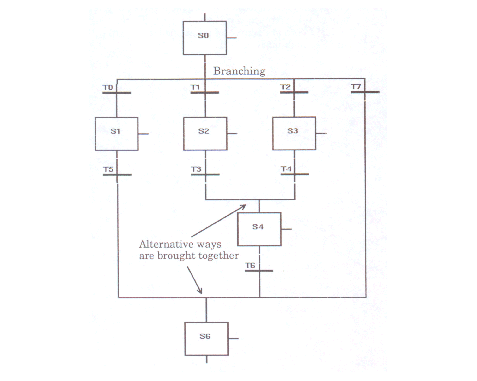
 Alternative Sequences

 At alternative sequences the transition conditions have to be different in
 some way. In figure See Alternative Sequences at most one of the conditions
 T0, T1, T2 or T7 will be satisfied at every moment. If more than one condition
 is satisfied at the same time the result of the execution is not easy to predict.

 The special types of connection lines used at alternative sequences (branching
 and when the lines are brought together) are created in the following way:
 Choose, before the connection is done, in the View menu Connections --> Palette
 and then select StepConv or StepDiv in the lower palette under ConGrafcet.
 The fact that alternative sequences starts with a branch from one step and
 are brought together at one step come back in the name of the corresponding
 line objects.

 Parallel sequences are used when the execution will continue in parallel branches.
 Figure Parallel Sequences shows an example with two parallel branches. When S13 is
 active and the transition condition T1 becomes satisfied the transition will take
 place, i.e. S14 and S15 both are put active and S13 inactive. Then the parallel
 branches will execute independent of each other.

 Because the order when respective branch has finished its execution may vary it is
 suitable to finish each step by a 'waiting step' (i.e. a step without any activities)
 and Cond put to TRUE in the following transition condition (T4 in the example). The
 branches are brought together to the main branch when all the branches have reached
 its 'waiting step'. This means in figure 3-54 that if S16 and S17 both are active,
 T4 is satisfied, then S18 will become active and S16 and S17 both inactive.

 Parallel Sequences

 The special types of connection lines used at parallel sequences (branching and
 when the lines are brought together) are created in a way similar to that of
 alternative sequences. Choose, Connections --> Palette and then select TransConv
 or TransDiv in the lower palette under ConGrafcet. The fact that parallel
 sequences starts with a branch from one Trans object and are brought together
 at one Trans object come back in the name of the corresponding line objects.
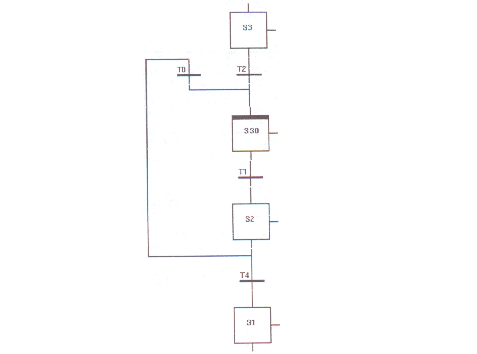
 A Sequential Chain with Repetition of a Step

 Figure A Sequential Chain with Repetition of a Step shows that the order of
 execution in a sequential chain can also go backwards.
 Specifies the status of the step. FALSE means an
 inactive step, and TRUE means an active step. The value
 may be picked up in another program by means of a GetDp
 object; see figure 3-22 on page 3-184. In the structure
 of the object or referenced this attribute is named
 Status[0].

 Order[1] is a copy of Order[0]. The Trans object looks
 on Order[0] and Order[1].
