 Base component for a controlvalve with an analog order output, position feedback
 and/or two switches (switch open and/or switch closed).

 From the object graph, auto or manual mode can be selected, and in manual mode
 the order output can be set.

 All the signals and code for this object is found in the actuator object
 BaseActuatorA.

 Local mode control is not handled within the object, but local mode
 can be displayed in the object graph and symbol, and with a warning alarm.
Graphical Symbol
The graphical symbol for this object is BaseComponent/CValve.

 Default dynamics:
 - the valve symbol is filled with the original color when the valve is
   not closed.
 - colored white when the valve is closed.
 - colored flashing red when an error occurs.
 - colored yellow when a warning occurs.
 - indicating the current mode:
   M:  Manual mode.
   L: Local mode, mode is set to auto when local is left.
   LM: Local mode, mode is set to manual when local is left.
   No indication: auto mode.

 Default action:
 - the methods menu is opened with MB3.
Object Graph
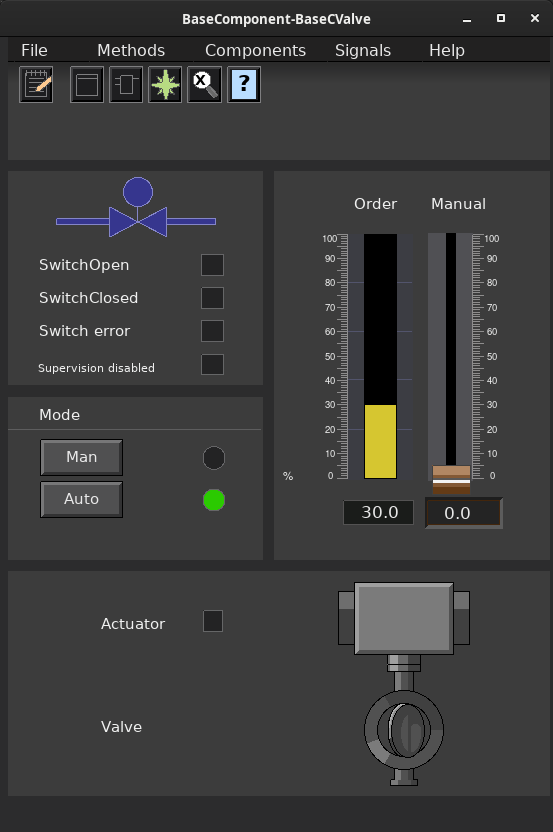
 The scale of the Order, Position and Manual bars, are determined by
 the Actuator.Order.PresMaxLimit and Actuator.Order.PresMinLimit attributes.
Mode and supervision
 Mode and supervision is handled by the actuator object. See class
 BaseActuatorA for more information.
Configuration
Component Configuration
 There are eight configuration alternatives, that specifies whether the actuator
 has limit switches and/or positional feedback.

 - TwoSwitches            Switch open and switch closed. No positional feedback.
 - SwitchOpen             Switch open and no positional feedback.
 - SwitchClosed           Switch closed and no positional feedback.
 - NoSwitches             No switches and no positional feedback.
 - PositionTwoSwitches    Positional feedback, switch open and switch closed.
 - PositionSwitchOpen     Positional feedback and switch open.
 - PositionSwitchClosed   Positional feedback and switch closed.
 - PositionNoSwitches     Positional feedback and no switches.
Signals
 Signals that should be connected to channel objects:

 - Actuator.Order        Ao
 - Actuator.Position     Ai (optional)
 - Actuator.SwitchOpen   Di (optional)
 - Actuator.SwitchClosed Di (optional)
Plc coding
For plc coding the function object BaseCValveFo is used.
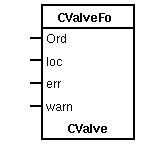
 Create a function object in the plc editor and connect it to the current
 object with the connect function.
Simulate
For simulation of the sensor value, use the plc object BaseCValveSim.
See also
| Template Object |
| Actuator.GraphConfiguration |
4 |
| Actuator.Order.Unit |
% |
| Actuator.Order.PresMaxLimit |
1.000000e+02 |
| Actuator.Position.PresMaxLimit |
1.000000e+02 |
| Actuator.Mode.OpNoLocal |
1 |
| Actuator.Mode.OpMaxRefMan |
1.000000e+02 |
| Actuator.Mode.AlarmLocalMode.DetectOn |
1 |
| Actuator.Mode.AlarmLocalMode.DetectText |
Local mode is activated |
| Actuator.Mode.AlarmLocalMode.EventType |
64 |
| Actuator.Mode.AlarmLocalMode.EventPriority |
67 |
| Actuator.Mode.AlarmLocalMode.EventFlags |
7 |
| Actuator.Mode.AlarmLocalMode.MoreText |
|
| Actuator.Mode.AlarmLocalMode.Attribute |
BaseComponent:Class-BaseCValve-Template |
| Actuator.Mode.AlarmLocalMode.CtrlPosition |
1 |
| Actuator.Mode.AlarmLocalMode.LockAttribute |
1 |
| Actuator.MaxPosDiff |
5.000000e+00 |
| Actuator.DiffAlarmDelay |
1.000000e+01 |
| Actuator.DiffAlarm.DetectOn |
1 |
| Actuator.DiffAlarm.DetectText |
Position error |
| Actuator.DiffAlarm.EventType |
64 |
| Actuator.DiffAlarm.EventPriority |
67 |
| Actuator.DiffAlarm.EventFlags |
7 |
| Actuator.DiffAlarm.MoreText |
|
| Actuator.DiffAlarm.Attribute |
BaseComponent:Class-BaseCValve-Template |
| Actuator.DiffAlarm.CtrlPosition |
1 |
| Actuator.DiffAlarm.LockAttribute |
1 |
| Actuator.SwitchAlarmDelay |
1.000000e+01 |
| Actuator.SwitchAlarm.DetectOn |
1 |
| Actuator.SwitchAlarm.DetectText |
Switch error |
| Actuator.SwitchAlarm.EventType |
64 |
| Actuator.SwitchAlarm.EventPriority |
67 |
| Actuator.SwitchAlarm.EventFlags |
7 |
| Actuator.SwitchAlarm.MoreText |
|
| Actuator.SwitchAlarm.Attribute |
BaseComponent:Class-BaseCValve-Template |
| Actuator.SwitchAlarm.CtrlPosition |
1 |
| Actuator.SwitchAlarm.LockAttribute |
1 |
| Actuator.PosSwitchOpen |
9.500000e+01 |
| Actuator.PosSwitchClosed |
5.000000e+00 |
| Valve.Specification |
Valve |
