
| Volume BaseComponent | |
| Attributes: Runtime | Development | System | Template | Detail C Binding: Struct | Class ClassTree | INDEX NO INDEX |
|
Class CompModeD2M
|
||
|---|---|---|
| Version | 1.0 | |
| Modified | 04-OCT-2005 14:02:56.85 | |
 Simple mode object for digital components with two order outputs.
 The object graph contains Auto/Man buttons to switch between auto and manual
 mode. There are also increment, decrement and stop buttons to control the unit
 in manual mode.

 The manual Incr/Decr buttons in the object graph can be configured to view
 Up/Down, Forw/Back and Open/Close.
Object Graph
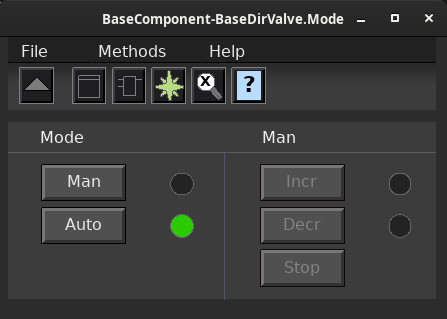
 The Auto/Man buttons changes mode and the Incr/Decr/Stop buttons are used
 to manually control the unit.

 - The Incr/Decr buttons have toggle function.

 - The Auto/Man buttons switches mode.

 - The Incr/Decr/Stop buttons are dimmed in auto mode.

 - The Incr/Decr indicators shows the status of the manual orders. They
   don't show the orders in auto mode.
 The mode object CompModeD2M handles two digital order outputs and contains
 the functions

 - Increment and decrement orders, that can be renamed to up/down, forw/back or
   open/close.
 - Buttons in the object graph are dimmed to avoid incorrect actions.
Component Configuration
 -IncrDecr      Text of Incr/Decr buttons in object graph is Incr/Decr.
 -UpDown        Text of Incr/Decr buttons is On/Off.
 -ForwBack      Text of Incr/Decr buttons is Forw/Back.
 -OpenClose     Text of Incr/Decr buttons is Open/Close.
Mode control from object graph
 The figure displays the default configuration. The operator selects manual
 or auto mode with the Auto/Man buttons. In auto mode, the order outputs
 are controlled by the OrderAutoIncr and OrderAutoDecr inputs of the function
 object.
Auto only
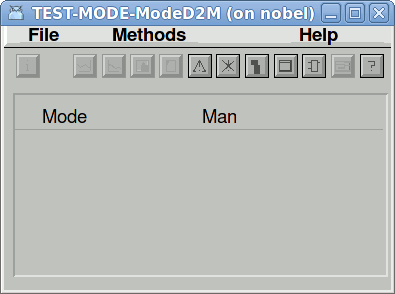
 The figure displays a configuration where the manual mode is disabled, i.e. the
 order output is controlled by the OrderAutoIncr and OrderAutoDecr inputs of the
 function object. This is achived by setting the attribute OpOnlyAuto to 1.
Error handling
 If Ready is not set, the order output is interlocked in all modes.
 Note that if Ready is lost, the mode is not forced to manual, as in some other
 mode objects.
Plc coding
For plc coding the function object CompModeD2MFo is used.
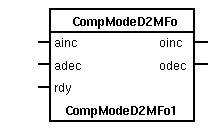
 Create a function object in the plc editor and connect it to the current
 object with the connect function.
See also
| RtBody attributes pwr_sClass_CompModeD2M | |||
|---|---|---|---|
| CompModeD2GCEnum | GraphConfiguration | Enumeration for object graph configuration. Handled by the ConfigureComponent method. |
|
| Boolean | OpAuto | Switch to Auto mode. OpAuto is normally set from the Auto button in the object graph, and automatically reset by the program. |
|
| Boolean | OpMan | Switch to Manual mode. OpMan is normally set from the Auto button in the object graph, and automatically reset by the program. |
|
| Boolean | ManMode | Manual mode is active. | |
| Boolean | OpAutoOnly | Configuration attribute to disable manual mode. No buttons are present in the object graph. |
|
| Boolean | OpOrderManIncr | Manual increment order set by the Incr button in the object graph. |
|
| Boolean | OpOrderManDecr | Manual decrement order set by the Decr button in the object graph. |
|
| Boolean | OpOrderManStop | Manual stop order. OpManStop is normally set from the Stop button in the object graph, and automatically reset by the program. |
|
| Boolean | OpNoStopButton | The function of the Incr and Decr buttons for manual control can be configured to set the corresponding output as long as the button is pressed, or to set the output when the Incr/Decr button is clicked, and to reset when the Stop button is clicked, or when the Incr/Decr button is clicked again. This is configured with OpNoStopButton. |
|
| String8 | IndMode | Text string to show the current mode in the object symbol. Contains "M" in manual mode and is empty in auto mode. |
|
| AttrRef | PlcConnect | The plc function object connected to this object. | |
| Template Object |
|---|
| GraphConfiguration Attribute | ||
|---|---|---|
| Class | Attribute | |
| Type | CompModeD2GCEnum | |
| Flags | ||
| Body | RtBody | |
 Enumeration for object graph configuration.
 Handled by the ConfigureComponent method.
| OpAuto Attribute | ||
|---|---|---|
| Class | Attribute | |
| Type | Boolean | |
| Flags | ReduTransfer|State|Noedit | |
| Body | RtBody | |
 Switch to Auto mode.
 OpAuto is normally set from the Auto button in the object graph,
 and automatically reset by the program.
| OpMan Attribute | ||
|---|---|---|
| Class | Attribute | |
| Type | Boolean | |
| Flags | ReduTransfer|State|Noedit | |
| Body | RtBody | |
 Switch to Manual mode.
 OpMan is normally set from the Auto button in the object graph,
 and automatically reset by the program.
| ManMode Attribute | ||
|---|---|---|
| Class | Attribute | |
| Type | Boolean | |
| Flags | ReduTransfer|State|Noedit | |
| Body | RtBody | |
Manual mode is active.
| OpAutoOnly Attribute | ||
|---|---|---|
| Class | Attribute | |
| Type | Boolean | |
| Flags | ReduTransfer | |
| Body | RtBody | |
 Configuration attribute to disable manual mode.
 No buttons are present in the object graph.
| OpOrderManIncr Attribute | ||
|---|---|---|
| Class | Attribute | |
| Type | Boolean | |
| Flags | ReduTransfer | |
| Body | RtBody | |
 Manual increment order set by the Incr button in the object
 graph.
| OpOrderManDecr Attribute | ||
|---|---|---|
| Class | Attribute | |
| Type | Boolean | |
| Flags | ReduTransfer | |
| Body | RtBody | |
 Manual decrement order set by the Decr button in the object
 graph.
| OpOrderManStop Attribute | ||
|---|---|---|
| Class | Attribute | |
| Type | Boolean | |
| Flags | ReduTransfer | |
| Body | RtBody | |
 Manual stop order.
 OpManStop is normally set from the Stop button in the object graph,
 and automatically reset by the program.
| OpNoStopButton Attribute | ||
|---|---|---|
| Class | Attribute | |
| Type | Boolean | |
| Flags | ReduTransfer | |
| Body | RtBody | |
 The function of the Incr and Decr buttons for manual control can be configured
 to set the corresponding output as long as the button is pressed, or to set
 the output when the Incr/Decr button is clicked, and to reset when the Stop button
 is clicked, or when the Incr/Decr button is clicked again. This is configured with
 OpNoStopButton.
| IndMode Attribute | ||
|---|---|---|
| Class | Attribute | |
| Type | String8 | |
| Flags | Noedit | |
| Body | RtBody | |
 Text string to show the current mode in the object symbol.
 Contains "M" in manual mode and is empty in auto mode.
| PlcConnect Attribute | ||
|---|---|---|
| Class | Attribute | |
| Type | AttrRef | |
| Flags | ||
| Body | RtBody | |
 The plc function object connected to this object.
 This attribute is set when the function object is connected from
 the plc editor by the connect function.