

Show actual user name in XttGraph


2 months 9 hours ago #381
by Foxman
Show actual user name in XttGraph was created by Foxman
Hi all,
does anyone know a way to show the actual user in a XttGraph?
/Martin
does anyone know a way to show the actual user in a XttGraph?
/Martin
Please Log in or Create an account to join the conversation.


1 month 4 weeks ago #383
by claes
Replied by claes on topic Show actual user name in XttGraph
Hi Martin,
It’s possible with the script function GetUser() and by using an extern declared variable.
Use a value field and add dynamics DigScript. Insert this text into DigScript.Script
extern string current_user;
current_user = GetUser();
To continuously execute the script create a Dv that is always true and connect DigScript.Attribute to this Dv. Also set DigScript.Level to 1.
Connect the Value dynamics to the extern variable by setting Value.Attribute to $ccm.current_user##String80.
/Claes
It’s possible with the script function GetUser() and by using an extern declared variable.
Use a value field and add dynamics DigScript. Insert this text into DigScript.Script
extern string current_user;
current_user = GetUser();
To continuously execute the script create a Dv that is always true and connect DigScript.Attribute to this Dv. Also set DigScript.Level to 1.
Connect the Value dynamics to the extern variable by setting Value.Attribute to $ccm.current_user##String80.
/Claes
Please Log in or Create an account to join the conversation.
1 month 4 weeks ago #385
by Foxman
Replied by Foxman on topic Show actual user name in XttGraph
Hi Claes,
thanks for your advice. It's $ccm that does the magic.
But I have a strange behavior:
Everything looks fine, as long as I call the operator environment from the runtime monitor on the engineering station (attachement 1). But when I run rt_xtt -q <OpPlace> on the engineering station (Ubuntu 22.04, ProviewR 5.9.0-2) or on the production system (Debian 11, ProviewR 5.9.0-2), the username stays empty (attachement 2). When I then open the header as a standalone window, it works as expected.
The header.pwg is normally embedded in an XttMultiView.
Any suggestions?
/Martin
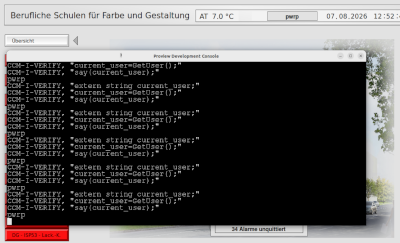
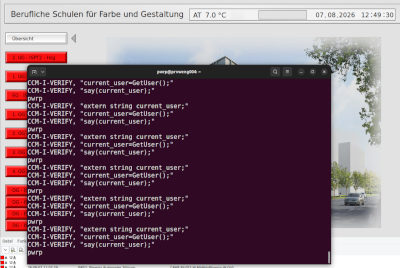
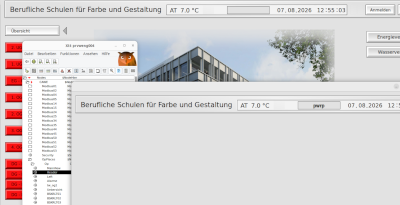
thanks for your advice. It's $ccm that does the magic.
But I have a strange behavior:
Everything looks fine, as long as I call the operator environment from the runtime monitor on the engineering station (attachement 1). But when I run rt_xtt -q <OpPlace> on the engineering station (Ubuntu 22.04, ProviewR 5.9.0-2) or on the production system (Debian 11, ProviewR 5.9.0-2), the username stays empty (attachement 2). When I then open the header as a standalone window, it works as expected.
The header.pwg is normally embedded in an XttMultiView.
Any suggestions?
/Martin
Please Log in or Create an account to join the conversation.
1 month 4 weeks ago #386
by claes
Replied by claes on topic Show actual user name in XttGraph
Hi Martin,
I’m afraid I’ve found two issues with this. The first is that there is a bug in the script execution for multiviews so the script is not executed. The other is that the extern variable is created when the script is executed the first time while the value dynamics tries to connect to the variable before this event. Thus the first time the graph is opened, in a multivew or standalone, the connection will fail and the user is not viewed. Both issues will be fixed in the next release.
If you can accept to only show the initial user you can put the script as the xtt initialization script $HOME/xtt_setup.rtt_com and declare and set the current_user variable there, and skip the DigScript dynamic in the value field. The initial user will be displayed but any login from the login dialog or with the login command will not be detected.
/Claes
I’m afraid I’ve found two issues with this. The first is that there is a bug in the script execution for multiviews so the script is not executed. The other is that the extern variable is created when the script is executed the first time while the value dynamics tries to connect to the variable before this event. Thus the first time the graph is opened, in a multivew or standalone, the connection will fail and the user is not viewed. Both issues will be fixed in the next release.
If you can accept to only show the initial user you can put the script as the xtt initialization script $HOME/xtt_setup.rtt_com and declare and set the current_user variable there, and skip the DigScript dynamic in the value field. The initial user will be displayed but any login from the login dialog or with the login command will not be detected.
/Claes
Please Log in or Create an account to join the conversation.
1 month 3 weeks ago #387
by Foxman
Replied by Foxman on topic Show actual user name in XttGraph
Hi Claes,
thanks for your quick reply. It explains a phenomenon that I've never been able to figure out: I was never successful to make scripts run in my windows. Of course they are all embedded in the MainView (XttMultiView). Now I understand.
The good news is, that "external" scripts run via DigCommand are executed even in multiviews. Therefor I used "external" scripts in all of these cases. It takes a little more effort, but if you organize it well, it's also a bit more transparent what's happening. As you can see from the previous attachments, it works in this case as well.
Because I have to show the actual user I did some more investigations. At the end - with your explanations - I found an acceptable workaround:
I made the header (header.pwg) exchangeable and use setsubwindow in the updateuser-script (that I run from DigCommand) to set the header again when the script is called the fist time. With this the header works like the standalone header window attached to my last post.
Thanks to your help, I now have the solution I need. Thank you very much!
/Martin
thanks for your quick reply. It explains a phenomenon that I've never been able to figure out: I was never successful to make scripts run in my windows. Of course they are all embedded in the MainView (XttMultiView). Now I understand.
The good news is, that "external" scripts run via DigCommand are executed even in multiviews. Therefor I used "external" scripts in all of these cases. It takes a little more effort, but if you organize it well, it's also a bit more transparent what's happening. As you can see from the previous attachments, it works in this case as well.
Because I have to show the actual user I did some more investigations. At the end - with your explanations - I found an acceptable workaround:
I made the header (header.pwg) exchangeable and use setsubwindow in the updateuser-script (that I run from DigCommand) to set the header again when the script is called the fist time. With this the header works like the standalone header window attached to my last post.
Thanks to your help, I now have the solution I need. Thank you very much!
/Martin
Please Log in or Create an account to join the conversation.
Time to create page: 0.595 seconds